
I remember the first time my dual-screen laptop hinge gave out on me right before an important presentation. That lightbulb moment hit hard—my carelessness had silently been sabotaging my device. It was a mistake I wouldn’t repeat, or so I thought. But as I dived deeper into the world of laptop maintenance, I realized many users, perhaps including you, might be unknowingly making similar errors that lead to costly repairs or total hardware failure.
Why Your Insidious Mistakes Are Killing Your Laptop’s Flexibility
Want to keep your dual-screen laptop functioning flawlessly in 2026? Then understanding and avoiding common pitfalls is essential. Today, I’ll share the five most common mistakes that can damage your hinge and how to prevent them from derailing your tech plans. I’ll also reveal effective strategies based on my own experience and trusted sources—like data recovery experts—to keep your device in optimum shape. But first, let me ask—have you noticed your hinge becoming loose or stiff? Such signs are often precursors to bigger problems.
Is Forgetting to Maintain Your Hinge Actually Worth the Risk?
Early on, I ignored basic maintenance steps, assuming hinges are built to last forever. That was a costly oversight. A small oversight, like neglecting to clean debris or ignoring misaligned movement, can accelerate wear and tear. Trust me, a slight delay in addressing these small issues could mean battling with a replacement or the inconvenience of repair shops. So, if you’re curious about how simple preventive measures can save you big bucks, stick around—there’s plenty more to come. Ready to discover the secrets to preserving your dual-screen experience? Let’s dive into the mistakes you must avoid.
Check and Clean Regularly
My first hands-on step was to develop a habit of inspecting my laptop’s hinges weekly. I used a soft brush and compressed air to remove dust and debris that could cause misalignment or stiffness. During one session, I found accumulated grit in the hinge area, which, if ignored, could have accelerated wear. After cleaning, I tested the movement, ensuring it was smooth and responsive. This simple routine can prevent dirt from acting as an abrasive and extend your hinge’s lifespan.
Handle with Care During Opening and Closing
Think of your hinge like a door hinge—you wouldn’t pry it open or slam it shut repeatedly. When opening or closing your laptop, do so gently, supporting the base with one hand and the lid with the other. I recall a time when I tried to quickly open my dual-screen laptop without supporting the chassis, leading to a slight misalignment. By consciously supporting the device, I avoided putting unnecessary strain on the hinges, preserving their integrity over time.
Avoid Overextending or Forcing the Hinge
The temptation to stretch the hinge beyond its designed angle can be tempting, especially if the screen feels stiff. Instead, pay attention to resistance. If you encounter difficulty, consult a professional rather than forcing it—a mistake I made once when I attempted to force open a stubborn hinge, risking damage to the components. Remember, hinges are engineered for specific movement ranges; exceeding these can cause cracks or tears that are costly to repair. To prevent this, always operate within manufacturer guidelines, and seek expert advice if your hinge shows abnormal resistance.
Maintain Proper Environment and Usage Habits
Environmental factors matter. Avoid exposing your device to extreme temperatures, humidity, or direct sunlight, which can compromise hinge materials. I once stored my laptop in a humid garage, resulting in corrosion over months. Additionally, avoid placing heavy objects on your device that can exert pressure on the hinges. Incorporating these habits can safeguard your hardware against both environmental and mechanical stress.
Seek Professional Repairs Before Minor Issues Turn Major
If you notice any signs of deterioration—such as looseness, stiffness, or unusual noises—consult a professional early. Waiting can turn small misalignments into costly replacements. When I detected a slight wobble in my hinge, I visited a repair specialist promptly, which saved me from a full hinge replacement. Regular professional check-ups can identify problems before they escalate, ensuring your dual-screen experience remains uninterrupted for years to come.
Protect Your Screen and Hinge from External Damage
Using protective covers and case accessories might seem trivial, but they significantly reduce the risk of accidental drops and impacts that can damage hinges. I added a sturdy sleeve to my laptop, which absorbed a fall that could have otherwise busted the hinge or cracked the screen. Think of these accessories as armor—preventing mishaps from turning into repairs.
Stay Informed and Updated on Maintenance Practices
Finally, always keep abreast of the latest tips and manufacturer guidelines. Many issues stem from outdated practices or ignorance of design limitations. Subscribing to tech repair blogs or forums—like the content found here—can provide valuable insights. Your proactive approach is your best defense against hardware breakdowns, saving time and money over the device’s lifespan.
Many assume that data recovery is solely about pressing the right button or using the latest software, but in my experience, this is a dangerous oversimplification. The nuance lies in understanding the specific causes of data loss, such as physical damage versus logical corruption, and applying tailored solutions. For instance, after a failed SSD, blindly running generic recovery tools can worsen the situation, especially if the drive has physical issues. Instead, consulting experts who understand the underlying hardware intricacies—like those highlighted in studies on NAND flash degradation—can make all the difference. Relying solely on popular forums or DIY fixes often leads to further damage, stalling recovery efforts and increasing costs.
Similarly, with computer repair, many people overlook the importance of environmental factors and subtle hardware behaviors. For example, a faint whine or unusual heat can indicate failing components that, if caught early, prevent catastrophic failure. Professional diagnostic tools reveal these hidden issues, and regular maintenance can streamline repairs. Professionals also emphasize the danger of misdiagnosis; applying software solutions without understanding the hardware context can result in data overwriting or hardware damage.
When it comes to managing IT, there’s a common myth that cloud solutions are foolproof security measures. However, without a comprehensive strategy—including proper access controls, regular backups, and employee training—these solutions can give a false sense of security. A recent report by cybersecurity experts underscores that breaches often happen due to overlooked vulnerabilities, not the absence of cloud adoption. Implementing managed IT services requires a nuanced approach: aligning technology with business needs, not just following trends. For example, over-customization in configurations can inadvertently introduce vulnerabilities, making regular audits crucial.
And don’t forget about laptop screens—many believe replacing a broken screen is straightforward, but the real challenge lies in the details. For example, improper calibration after replacement can cause ghosting in OLED screens or color inconsistencies, which are often neglected by amateurs. The advanced nuance involves understanding the hardware compatibility and calibration procedures that ensure full display functionality. Attempting to fix these without specialized knowledge can result in worse performance and void warranties.
In essence, the biggest misunderstanding across all these areas is thinking there are one-size-fits-all solutions. An expert’s insight considers the complex interplay between hardware and software, tailored to each situation. Failing to recognize these nuances can lead to costly mistakes and prolonged downtimes. By approaching data recovery, repair, and IT management with a strategic mindset, you safeguard your critical assets effectively.
If you’ve ever fallen into this trap of oversimplification, I’d love to hear your story. Let me know in the comments! For more detailed guidance, check out our article on [data recovery secrets](https://computerrepairmasters.com/data-recovery-secrets-every-business-should-know-today). Remember, a proactive, nuanced approach keeps your systems resilient and reliable.
Choose the Right Equipment for Lasting Performance
Investing in quality tools and components forms the foundation of effective maintenance. I personally rely on precision screwdrivers with magnetic tips from companies like iFixit, which allow me to disassemble and reassemble laptops without risking damage. For data recovery, I swear by Recuva—a free tool that, when combined with a bootable Linux recovery environment like Ubuntu Live CD, can help recover files from physically damaged drives before they become unrecoverable. Additionally, a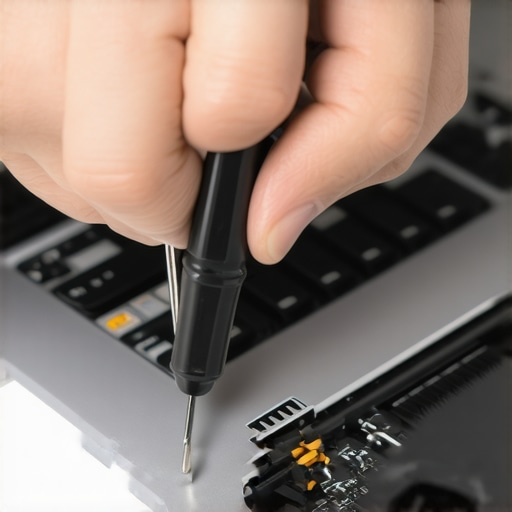
sturdy anti-static mat and wrist strap are non-negotiable for preventing electrostatic discharge during sensitive repairs, prolonging component lifespan.
Implement Proven Maintenance Procedures
Regular inspections and cleaning with compressed air and soft brushes are essential. I schedule quarterly checks, especially for laptops that travel frequently. Applying thermal paste upgrades—using trusted products like Arctic MX-4—can significantly improve thermal management for overused or aging systems, preventing thermal throttling and hardware stress. These practices keep your system stable over years without costly replacements.
Leverage Professional Software for Diagnostics and Monitoring
Tools like CrystalDiskInfo give a clear snapshot of your drive’s health, highlighting impending failures so you can act proactively. For routine backups, I favor comprehensive data recovery strategies that ensure business continuity. Implement scheduled scans with software like Malwarebytes or Advanced SystemCare to detect corruption early, avoiding extended downtime or data loss.
Streamline Long-Term Care with Automation and Documentation
Automation tools like PowerShell scripts can automate mundane maintenance tasks, while diligent documentation of hardware configurations ensures quick troubleshooting and efficient scaling. I keep an updated digital repair log, referencing manufacturer specifications and past issues to guide future interventions. This habit accelerates repairs and reduces errors, especially in managed IT environments.
Future-Proof Your Setup and Practices
Looking ahead, the trend leans toward AI-powered diagnostic tools that can predict hardware failures before they happen—much like the predictive analytics discussed in managed IT trend reports. To stay ahead, integrating such solutions into your maintenance routine is advisable. For example, studying machine learning models that analyze SMART data from SSDs can alert you to imminent drive failure, giving you time for data migration or replacement.
How do I maintain data integrity and hardware performance over the long haul?
One actionable tip I recommend is scheduling weekly drive health checks with tools that interpret manufacturer-specific SMART data—like those discussed here—and combining it with scheduled backups to cloud or external drives. Practice proactive replacement of aging components before failure occurs, saving you from costly repairs andDowntime. To learn more about advanced recovery methods and ensuring your setup remains reliable, review our comprehensive guides at here. Remember, consistent maintenance and the right tools make all the difference in keeping your systems working smoothly for years to come.
Lessons That Changed My Approach to Laptop Care
One surprising realization was that even small, seemingly insignificant habits—like regularly inspecting hinges—can dramatically extend the life of a dual-screen laptop. I learned that neglecting these details often leads to unexpected breakdowns, forcing costly repairs. Another lightbulb moment was understanding that environmental factors—like humidity or heavy pressure—can silently damage hardware, emphasizing the importance of proper storage and handling. Lastly, I discovered that seeking professional help early, rather than waiting for symptoms to worsen, saves both time and money and preserves the device’s integrity long-term.
Tools and Resources That Elevate Your Maintenance Routine
My trusted toolkit begins with a set of precision screwdrivers from iFixit, which makes disassembly safe and efficient. For real-time health monitoring, I rely on CrystalDiskInfo to catch early signs of drive deterioration. When it comes to professional data recovery, this resource offers invaluable strategies. Combining quality hardware tools with diagnostic software has transformed my approach to tech upkeep—it’s about proactive care, not reactive fixes.
Your Next Move Toward Durability
Taking control of your laptop’s health isn’t just about saving money—it’s about peace of mind. Start incorporating regular inspections, gentle handling, and proper environmental practices today. Remember, the key is consistency and awareness; small steps now can prevent big headaches later. If you’re curious about more advanced techniques or have personal experiences to share, I invite you to comment below. Together, we can build a community that values longevity and smart maintenance—because your laptop’s lifespan depends on what you do today.