

I remember the time I giddily grabbed that tiny can of compressed air, ready to clean out my motherboard after a long gaming session. I shook it vigorously, aimed the nozzle at the dusty corners, and gave it a few blasts. Suddenly, my system froze. Panic set in. That lightbulb moment hit hard: maybe that canned air wasn’t such a harmless solution after all.
The Hidden Perils of Canned Air for Your Motherboard
Many PC enthusiasts and even professionals swear by canned air to keep their systems spotless. But what if I told you that this seemingly innocent routine could be doing more harm than good? In fact, improper use of compressed air has been linked to damaging delicate motherboard components, causing static buildup, and even pushing dust further into tight spaces instead of removing it.
Today, we’re going to explore why your quick fix might be risking your hardware’s health, and how to approach cleaning your motherboard safely and effectively. Whether you’re troubleshooting a sluggish system or just want to prevent future malfunctions, understanding the risks and alternatives can save you time, money, and frustration.
Is Canned Air Worth the Hype?
Initially, I thought I was doing the right thing—after all, a quick blast seemed simple and effective. But I overlooked the fact that moisture from propellants and the force of compressed air can dislodge components or generate static electricity. Early on, I made the mistake of holding the can upright and aiming directly at sensitive parts, which is a common error that can cause liquid propellant to escape and damage your motherboard.
According to experts, static damage accounts for a significant number of motherboard failures, and improper cleaning techniques only increase that risk. So, before you reach for that can again, ask yourself: is this really the safest method?
If you’ve faced similar issues or are curious about safer cleaning methods, stick around. We’ll delve into practical steps to ensure your system stays clean without unnecessary risks, making sure your PC runs smoothly for years to come. For related tips on maintaining your hardware, you might find our guide on [DIY Laptop Screen Repair](https://computerrepairmasters.com/laptop-screen-repair-how-to-fix-common-issues-at-home) helpful as well.
Prepare Your Workspace and Gather Tools
Before starting, turn off your PC and unplug it from the power source. Place it on an anti-static mat or a clean, non-conductive surface. Use a plastic or wooden tool to open the case to avoid static electricity damage. Collect necessary tools: a soft brush, microfiber cloth, isopropyl alcohol (90% or higher), and compressed air in a safe, upright position, avoiding direct spray onto delicate parts.
Disassemble and Inspect the Motherboard
Carefully remove the motherboard from the case if necessary. Examine it for obvious dust buildup, corrosion, or damaged components. Take note of connectors and cables to ensure correct reassembly. Handle the motherboard by its edges, avoiding contact with circuitry.
Remove Loose Dust with Soft Brush and Compressed Air
Gently brush dust off using a soft, anti-static brush, working in small circles to dislodge debris from slots and chips. Follow with short bursts of compressed air, holding the can upright to prevent liquid propellant from escaping. Maintain a safe distance—about 6 inches—and keep the can moving to avoid any damage. 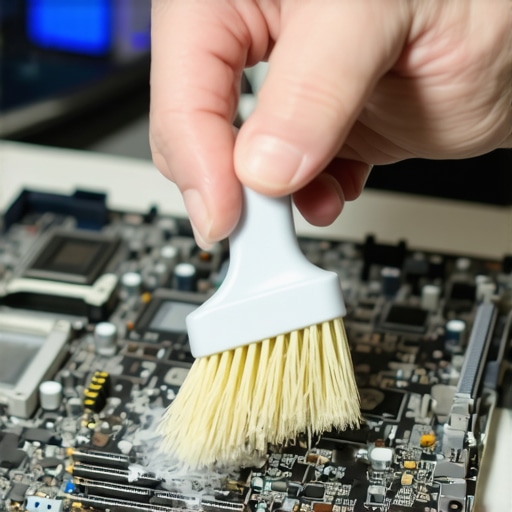 Proper technique prevents static buildup and further dust intrusion. An incident I recall involved accidentally holding the can sideways, which caused a sputter of propellant, leading me to clean the area again and replace the motherboard in a cleaner environment.
Be Cautious of Static and Moisture Risks
Static electricity is a silent killer—wear an anti-static wrist strap connected to your case or work surface. Avoid carpets or static-prone gloves. Never spray compressed air upside down; this forces liquid propellant out, risking short circuits. Use the air in quick, controlled bursts, and always aim away from delicate components.
Clean with Isopropyl Alcohol for Stubborn Residues
If there are greasy or stubborn dirt patches, dampen a microfiber cloth with isopropyl alcohol and gently wipe affected areas. Be sparing—liquid should not pool or drip into connectors or chips. Allow the motherboard to dry completely before reassembling. This carefully executed step prevents residue buildup that could cause future faults.
Reassemble and Test
Once the motherboard is thoroughly dry, reattach it to the case, reconnect all cables and components. Power on and run diagnostic tests or stress tests to verify stability. Regular cleaning extends your motherboard’s lifespan and maintains optimal performance. When in doubt, consulting guides like DIY laptop screen repair tips can offer additional insights into hardware care.
Many individuals believe that following generic advice or relying on superficial fixes guarantees long-term system health, but this often falls short in real-world scenarios. A prevalent myth is that hardware problems are purely mechanical—yet, in reality, software intricacies, firmware configurations, and environment factors play significant roles in system stability. For instance, an overlooked aspect in data recovery is understanding the significance of proper drive handling to prevent further data loss. Rushing into repairs without considering subsystem interactions can lead to repetitive failures, emphasizing the need for a nuanced approach. Have you ever fallen into this trap? Let me know in the comments.
Why Your Assumptions on Managed IT Might Be Keeping You Vulnerable
One of the most common pitfalls is assuming managed IT solutions are a set-it-and-forget-it fix. However, effective IT management requires continuous monitoring, tailored strategies, and proactive adjustments. Many businesses make the mistake of adopting a standard package without customizing security protocols, which can leave gaps exposed to evolving threats. Experts advocate for regular assessments, such as vulnerability scans and staff training, to reinforce defenses. For example, neglecting to update firmware and security patches can leave known vulnerabilities open, undermining the entire system. To stay ahead, consult specialists to develop a comprehensive plan, like the ones outlined in managed IT strategies for 2025. When it comes to data recovery, many assume that recovery software can rescue all formats—yet, understanding file system nuances is crucial for success, as detailed in our data recovery techniques. A wise approach combines technology with expertise, ensuring minimal data loss and faster turnaround. Don’t forget, regular backups and strategic planning are your best defenses against unexpected failures. If you’re curious about streamlining your operations or elevating your cybersecurity posture, reach out via our contact page.
Stay Ahead with the Right Tools for Maintenance
Achieving long-term reliability in your IT setup hinges on using precise, high-quality tools. I personally swear by a static-safe electronic parts brush and a precision compressed air can designed for delicate electronics. These allow for dust removal without the risk of static discharge or moisture accumulation, which are common pitfalls when using generic products. For stubborn residues, I rely on industry-grade data recovery tools—not just for data restoration, but also for diagnosing hardware health during maintenance cycles. These tools help me identify emerging issues before they become critical, saving time and money.
Implementing Routine Checks to Extend Hardware Lifespan
Consistent maintenance is more than a quick cleaning; it involves scheduled diagnostics. I recommend running managed IT solutions that include routine hardware assessments. These assessments include testing drive integrity with SMART monitoring tools, evaluating cooling efficiency with infrared thermometers, and checking for firmware updates. Automating these checks with monitoring software like Hardware Monitor Pro allows for proactive actions, reducing downtime and preventing catastrophic failures.
Future-Proof Your Maintenance Strategy
Looking ahead, the trend is moving toward AI-driven predictive maintenance. Tools that analyze data patterns to forecast hardware failures are becoming more accessible to small businesses. Integrating such solutions now can drastically increase your system’s dependability and cost savings. For example, adopting machine learning models that analyze temperature fluctuations and operational logs can alert you to potential motherboard abnormalities long before symptoms manifest visibly. Embrace these emerging technologies early, and you’ll build a resilient infrastructure that adapts over time.
How do I maintain my system over time for maximum reliability?
Establish a regular maintenance schedule that combines physical cleaning with software diagnostics. Use specialized tools like professional-grade data recovery and diagnostic software to monitor hardware health. Keep firmware and drivers updated routinely, and consider deploying AI-powered predictive tools to forecast failures before they happen. Ultimately, investing in the right tools and a proactive mindset will keep your systems running smoothly long-term. Try implementing scheduled SMART drive checks combined with ambient temperature monitoring, which offers tangible benefits in preventing unexpected breakdowns.
What I Wish I Knew Before Using Canned Air
One of my earliest mistakes was assuming that canned air was entirely safe for motherboard cleaning. I learned that holding the can sideways or aiming directly at delicate chips could cause static buildup or accidental spraying of moisture, leading to hardware damage. Now, I understand the importance of proper technique and the hidden risks involved.
Another insight is that superficial cleaning isn’t enough—regular, in-depth maintenance combined with the right tools can save you from costly repairs down the line. Rushing through a quick blast might seem efficient, but taking the time to disassemble and clean meticulously truly makes a difference.
Lastly, I realized that relying solely on canned air without understanding static risks and moisture issues can be a costly mistake. Investing in anti-static brushes and high-quality compressed air, along with proper protocols, protects your motherboard and ensures your PC’s longevity.
My Go-To Arsenal for Safe Motherboard Care
- Anti-Static Brushes: They gently remove dust without generating static, essential for sensitive components.
- High-Quality Compressed Air: Using cans designed for electronics, held upright, in short bursts, ensures safe dust removal.
- Isopropyl Alcohol (90%+) and Microfiber Cloths: Perfect for stubborn grime, this combo ensures a thorough, residue-free clean.
- Anti-Static Wrist Straps: They prevent static build-up, keeping your hardware safe during disassembly.
Selecting the right tools and understanding their proper use has transformed my maintenance routine. For more expert insights, check out industry-grade diagnostic tools.
Step Into Confident Maintenance
Taking control of your motherboard care isn’t just about tools—it’s about developing a maintenance mindset. Regular inspections, combined with gentle cleaning and proper static precautions, can drastically extend your hardware’s lifespan. Embrace these practices, and you’ll see fewer failures and better performance. If you want to streamline your IT maintenance, consider exploring managed IT strategies for 2025.