

It was 11:30 PM on a Tuesday. I was scrolling through family photos when the display on my phone just… vanished. Not a flicker, not a dimming—just total, soul-crushing darkness. I tapped the glass. Nothing. I plugged it in, and the notification light blinked, mocking me with its steady pulse. I knew the phone was technically alive, but it felt like a brick because every single photo from my daughter’s first birthday was trapped behind that black glass. My heart sank. If you’ve ever stared at a dead screen knowing your digital life is held hostage, you know exactly how that cold sweat feels. I spent the next four hours frantically googling and praying I wouldn’t have to pay a fortune for professional help.
My Phone Screen Went Black and I Almost Lost Everything
I’ll be honest with you: I’ve made some pretty dumb moves in the past. Years ago, I actually tried to pry open a casing with a butter knife because I was too impatient to wait for the right tools. Spoiler alert: I ended up with a scarred thumb and a shattered digitizer. But that failure taught me something vital about computer repair for beginners—patience and the right adapter are your best friends. Today, I’m going to show you exactly how to bypass that broken display and pull your files onto a safe device. We aren’t just talking about cloud backups that might not have synced; we’re talking about getting raw access to your internal storage when the ‘lights are out.’ Whether you are dealing with a standard hardware glitch or a more complex laptop screen repair-style hardware failure, the logic remains the same. Have you ever looked at a black phone screen and felt that specific sinking feeling? I’d love to hear your horror stories in the comments—mostly so I don’t feel so alone in my clumsiness!
Does this DIY stuff actually work for non-techies?
It’s natural to be skeptical. You might think that without a touch interface, the phone is a vault with no key. However, your phone is essentially just a tiny computer. According to a report by Gartner, hardware failure accounts for a staggering portion of data loss, yet the storage chips themselves usually survive the trauma that kills the screen. By using simple peripherals like OTG (On-The-Go) adapters or specific data recovery secrets used by the pros, you can ‘see’ what your phone is doing through an external monitor or control it with a mouse. It sounds like sci-fi, but it’s actually a standard procedure in any ultimate guide to data recovery. We are going to walk through the exact steps to bridge that gap between your dead screen and your precious memories, ensuring you never have to say goodbye to your files just because of a bad ribbon cable or a dropped handset.
Tactical Steps to Recover Your Files from a Black Screen
The first thing you have to do is determine if the ‘brain’ of the device is still functioning. Think of your phone like a car with a smashed dashboard; the engine might be humming, but you simply cannot see the gauges. To test this, try calling the device from another phone or using the ‘Find My Device’ sound alert. If it rings or vibrates, you are in luck. Before you panic and assume you need professional data recovery secrets, try a forced restart. On most modern handsets, this involves holding the Power and Volume Down buttons for about 15 seconds. I once spent twenty minutes sweating over a client’s ‘dead’ Google Pixel, convinced the motherboard was fried, only to realize it was just a deep system freeze that a hard reboot solved in seconds.
Check for Life Before You Panic
If the forced restart doesn’t bring the display back, you need to verify if the touch layer is still responsive even if the image is gone. Swipe across the black glass where you usually answer calls. If you hear the haptic buzz of a notification or the ‘unlock’ sound, your data is safe; you just need a window to see it. This is a classic example of how to spot a hardware failure masquerading as a software bug. When the backlight dies but the processor is running, the phone is essentially a blind computer waiting for instructions.
Plug in a Mouse to Regain Control
If the screen is black and the touch digitizer is also broken, you are essentially locked out of a house with no door handle. This is where an OTG (On-The-Go) adapter becomes your best friend. This tiny dongle converts your USB-C or Lightning port into a standard USB-A slot. You can literally plug a standard computer mouse into your phone. A cursor will appear on the screen—well, it would if the screen worked. This is the first half of the bridge you need to build. 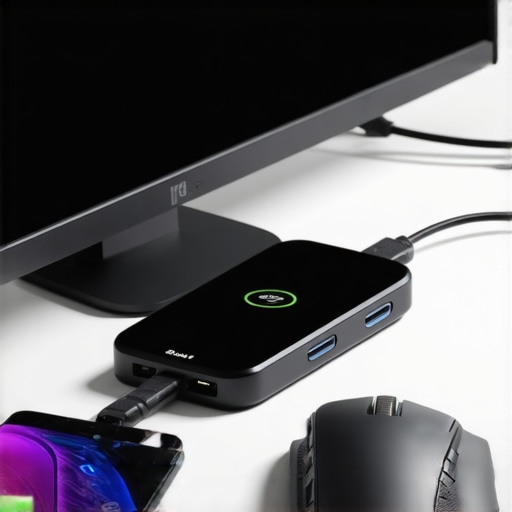
Cast Your Phone to a Monitor
The real magic happens when you use a multi-port USB-C hub. These are the same tools used for laptop screen repair diagnostics. Plug the hub into your phone, connect an HDMI cable to your TV, and suddenly, your phone’s desktop appears on the big screen. It is a massive ‘Eureka’ moment. Last summer, I helped a neighbor who had dropped his phone while hiking. The screen was a psychedelic mess of purple lines, very similar to why your screen looks purple or green after you bumped your laptop. By hooking it to his living room TV and using a wired mouse, we navigated to his gallery and moved his photos to a cloud drive faster than he could find his wallet to pay for a repair.
Dealing with Total Internal Failure
Sometimes the issue is deeper than the screen; it is the internal memory failing to communicate with the operating system. If your phone is stuck in a boot loop or refuses to power on at all, you are dealing with a more serious internal component issue. This is where the power of data recovery tools comes into play. You might need to use specialized software on a PC that can ‘see’ the file system of a bricked device. It is like using a telescope to look into a dark room—you aren’t fixing the lightbulb, but you are still seeing what is inside. For business owners, this is why managed IT strategies to keep your business secure in 2025 always emphasize redundant backups. You do not want to be the person learning how to bypass a dead screen at 2 AM when a critical deadline is looming.Let’s dig deeper into why these tactical fixes don’t always work for everyone and where most users inadvertently seal the fate of their files. The most dangerous mistake I see is the ‘reboot-till-it-works’ loop. When a device suffers from a black screen, the instinct is to keep hammering the power button, but if the issue is a short-circuit on the logic board, every power cycle risks sending a surge through the NAND flash memory chip where your photos live. This is a classic example of how to spot a hardware failure masquerading as a software bug. While a software freeze is fixed by a reboot, a physical failure is exacerbated by it. If your device feels unusually hot while the screen is black, stop immediately; you are likely cooking the very data you want to save.
Stop Blaming Software for Every Glitch
A common contrarian view I hold is that ‘free recovery software’ is often a trap. Everyone says to download a tool and scan the drive, but in my experience, running a heavy scan on a failing storage controller is the fastest way to kill it. According to a study by Ontrack, a global leader in data recovery, nearly 40% of critical data loss incidents involve some form of user-inflicted damage during the initial ‘triage’ phase. If the screen is black because of a drop, the storage chip might be physically loose. Stressing it with a 4-hour software scan is like asking someone with a broken leg to run a marathon to see if they are still healthy. Instead, you should focus on hardware-level stabilization before you ever launch a piece of software. This is one of those data recovery secrets that professionals use to maintain a high success rate: we clone the drive’s physical state first.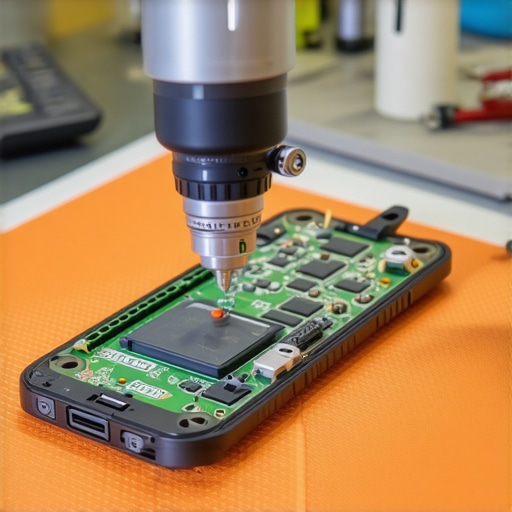
Can You Bypass an Encrypted Controller on a Dead Board?
This is where things get sophisticated. Modern smartphones and laptops use File-Based Encryption (FBE), meaning the ‘key’ to your data is tied to the hardware’s security enclave. If you simply pull the storage chip and try to read it on another machine, you’ll just see gibberish. This is why the ‘Freezer Trick’—an old-school myth about reviving hard drives—is so dangerous today. Putting an encrypted device in a freezer causes internal condensation that can blow the security chip, making recovery impossible even for the pros. If you hear a physical clicking or scratching sound, you must accept that the DIY phase is over. You should why you should never open a clicking hard drive in a normal room because a single speck of dust can destroy the platters forever.
Why Your Cloud Storage Might Be Lying to You
I have seen many people lose hope because they realize their ‘backup’ wasn’t actually a backup. There is a nuance here that most people miss: sync is not the same as backup. If you have Google Photos or iCloud synced and you delete a ‘corrupted’ file or an app glitches out, it deletes it everywhere. This is the mistake that makes your backups completely useless. For business owners, this risk is amplified a hundredfold. A single black screen on a CEO’s laptop shouldn’t result in a week of downtime. This is precisely why managed IT is a game changer for growing companies; they implement true redundant versioning, where the data exists independently of the hardware’s current mood. Have you ever fallen into this trap where you thought you were backed up, only to find the folder empty? Let me know in the comments—I’ve been there too, and it’s a lesson you only want to learn once.If you are serious about never losing data again, you have to move beyond the consumer-grade junk. I’ve seen so many people try to fix a $2,000 MacBook with a $5 screwdriver set and a prayer. It is painful to watch. When I am working on a device where the data is worth more than the hardware, I reach for tools that offer absolute precision. For example, a thermal imaging camera is a total game-changer. It lets you see exactly which capacitor is shorting out without having to guess and potentially fry the board further. This is a level of detail you won’t find in most computer repair for beginners guides, but it is what separates the pros from the hobbyists. If you can identify the heat signature of a failing chip before it fully dies, you can save the board and the files. It is the same logic I use when I provide managed it solutions streamlining operations for small businesses—we look for the ‘hot spots’ in a network before they catch fire. 
How do I keep my hardware running for a decade?
Longevity isn’t an accident; it is a result of thermal management and knowing the specific limits of your components. One of the most overlooked aspects of maintenance is checking the ‘odometer’ on your storage. I use tools like CrystalDiskInfo or DriveDx to monitor the S.M.A.R.T. data religiously. Specifically, you need to watch the ‘Percentage Used’ on NVMe drives. As I mention in my guide on the sign your ssd is reaching its write limit and about to die, once that number starts climbing, your risk of a sudden ‘black screen’ event skyrockets. Beyond software, physical cleanliness is king. I’ve found that how to extend the life of your office pcs by three years often comes down to simply cleaning out the dust that traps heat against the processor. Heat is the number one killer of silicon. According to the Backblaze 2023 Drive Stats report, hard drive failure rates jump significantly after the 48-month mark, so if your gear is hitting its fourth birthday, you are officially on borrowed time. Looking ahead, I see the repair world moving toward AI-assisted diagnostics. Imagine a tool that doesn’t just tell you a part is broken, but predicts it three months in advance based on tiny voltage fluctuations. We are already seeing shadows of this in managed it strategies to keep your business secure in 2025. In the meantime, don’t wait for your screen to go dark before you act. My challenge to you today is to download a drive health monitor right now and check your primary SSD. If it’s over 90% wear, start your migration today. If you are running a business and the thought of auditing your hardware makes you sweat, it might be time to look into why managed it is a game changer for growing companies. Prevention is always cheaper than a midnight panic.
Lessons from the Digital Trenches
After years of tinkering with dead displays and frantic hardware swaps, I’ve realized that data isn’t just ones and zeros—it’s your history. Here are the lightbulb moments that changed how I approach technology:
- Redundancy is your only real insurance. If your data exists in only one place, it doesn’t really exist. I learned this the hard way after a cloud sync error wiped a folder I thought was safe. This is often the mistake that makes your backups completely useless.
- Stop while you are ahead. If you hear a physical clicking or the device is getting hot, put the screwdriver down. Pushing a failing component is the fastest way to turn a recoverable situation into a permanent loss. Knowing data recovery secrets involves knowing when to call a professional.
- Hardware fails; it’s a matter of when, not if. Every SSD and screen has an expiration date. Being proactive about identifying the sign your ssd is reaching its write limit and about to die saves you from the 2 AM panic I described earlier.
#IMAGE_PLACE_HOLDER_E#
The Gear That Saves My Sanity
I don’t recommend products lightly. These are the specific tools I keep in my bag for every black screen emergency:
Anker 7-in-1 USB-C Hub: This is the gold standard for connecting a phone to an external monitor and mouse simultaneously. It is built like a tank and handles power delivery perfectly, which is vital when you are trying to bridge a dead display.
CrystalDiskInfo: I use this tool religiously to monitor the health of every drive in my house. It’s free, lightweight, and gives you a clear Health Status percentage so you aren’t caught off guard by a sudden failure.
Vysor: If you can get your phone into ADB mode, this software lets you mirror and control your screen on your PC. It has saved many unresponsive handsets where the digitizer was the only casualty.
Stop Waiting for the Next Failure
Don’t let a black screen be the reason you lose sleep tonight. We live in an era where data recovery is more accessible than ever, but prevention is still the most powerful tool in your arsenal. Whether you are managing your personal photos or looking for managed IT strategies to keep your business secure in 2025, the best time to build your safety net was yesterday. The second best time is right now. Check your drives, verify your sync settings, and stay ahead of the hardware curve. Have you ever been locked out of your device because of a broken screen? What was the one file you were most desperate to save? Let’s swap stories in the comments!