

The sound of my favorite ceramic mug clinking against the edge of my MacBook is a noise that still haunts my dreams. It wasn’t just a splash; it was a full-on, double-shot-latte tidal wave that disappeared into the gaps of my keyboard faster than I could scream. My first instinct was to shake it—worst idea ever. My second was to grab a hairdryer—even worse. I once spent an entire afternoon frantically blowing into a USB port, thinking my breath would somehow evaporate the liquid. Spoiler alert: it didn’t, and I probably just added more moisture to the situation. I sat there watching the screen flicker and die, feeling that pit in my stomach that only a $2,000 mistake can cause. But here is the thing: a spill doesn’t have to be a death sentence if you act in the next sixty seconds. Most people freeze. They stare at the brown puddle seeping under the ‘Enter’ key and hope it didn’t go deep. It did. Gravity is efficient, and coffee is invasive.
Stop Everything and Cut the Power Immediately
[image_placeholder_1] The very first thing I did back then—and the thing I regret most—was trying to ‘save’ the document I was working on. Forget the document. Every second those circuits are live while soaked in caffeine, you are courting a permanent short circuit. You need to perform the move that saves your laptop after a coffee spill by holding down that power button until the lights go out. Don’t use the ‘Shut Down’ menu. Do not wait for a ‘Save’ prompt. Just kill it. This is about survival, not file integrity right now. I remember thinking I could just dry it off and keep going. I was a novice, and I made the classic computer repair for beginners blunder of assuming ‘dry on the outside’ meant ‘safe on the inside.’ In reality, the coffee starts a chemical reaction called electrolysis the moment it hits a powered-on circuit. According to data from independent repair experts at iFixit, the minerals and sugars in beverages like coffee are far more damaging than plain water because they leave behind conductive residues that corrode copper traces in hours, not days. If your laptop has a removable battery, pop it out immediately. If it doesn’t, just get that charger unplugged and keep the lid open in a ‘tent’ position.
Can You Really Save a Soaked Motherboard?
You might be sitting there thinking your logic board is toast and you should just head to the store for a replacement. I get it. The skepticism is real, especially when you see those scary red ‘X’ marks on the internal moisture sensors. But I have salvaged machines that were literally dripping with sugary espresso. The secret isn’t rice—please, for the love of tech, stop using rice or canned air in ways that push liquid deeper into the chips. Rice is for sushi, not for absorbing internal laptop moisture; it actually introduces dust and starch into the components, making the ‘coffee mud’ even worse. We are going to focus on stabilization first. If you have ever felt that sheer panic of seeing your life’s work submerged in a beverage, you aren’t alone. Have you ever had a ‘heart-stop’ moment where a drink landed right on your tech and you just stood there paralyzed? It’s a gut-punch. But before you go hunting for data recovery secrets to get your files back from a dead drive, let’s see if we can keep the drive from dying in the first place. Sometimes, you just need to know how to test if your motherboard is dead or just in a temporary coma. Corrosion is a patient enemy. Even if the laptop seems fine after it dries, those tiny leftover coffee particles are slowly eating away at the delicate soldering. We will also dive into the truth about recovering data from a water-damaged SSD because the rules are different for solid-state storage. Let’s get into the nitty-gritty of the teardown and cleaning process that actually works.
Open the Case and Expose the Damage
Once the power is dead, you have bought yourself some time, but the clock is still ticking. You need to get that bottom panel off immediately. I remember a frantic Sunday night with an old Lenovo where I thought I had removed every screw, only to nearly crack the chassis because a tiny, spiteful Phillips #00 was hiding under a rubber foot. It is a game of patience. If you are a beginner, this is where most people panic, but you have to realize that computer repair for beginners is really just about organization and the right tools. Grab a set of precision drivers and a spudger. Once you are inside, you will see the extent of the invasion. Coffee often pools around the battery connector and the RAM slots. If you see sticky brown residue, do not just wipe it with a paper towel. Paper towels leave behind lint that can snag on the sharp solder joints and create a whole new set of problems.
Bathing Your Motherboard in Pure Alcohol
This is the part that feels wrong but is exactly right: you need 99% isopropyl alcohol. Do not use the 70% stuff from the grocery store; the extra 30% is mostly water, which is exactly what we are trying to remove. Think of the alcohol as a specialized solvent that ‘chases’ the water out and then evaporates without a trace. 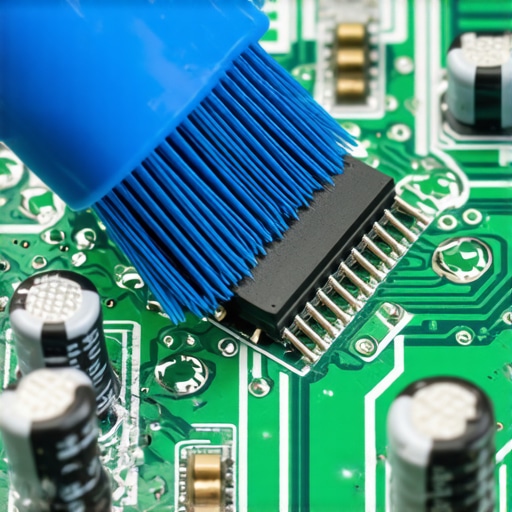 I once helped a friend who spilled a sugary margarita into his gaming rig. We thought we cleaned it all, but missed one tiny spot under the RAM slot. Three weeks later, the machine wouldn’t post. We had to learn how to test if your motherboard is dead or just sleeping because a single caramelized sugar crystal had bridged two pins. Use a soft-bristled toothbrush dipped in the alcohol to gently scrub any area where the coffee landed. Focus on the ‘legs’ of the chips where liquid likes to hide.
How to Save Your Drive from Sudden Death
If the spill reached your storage, you need to act even faster. Most modern laptops use NVMe drives that are essentially just exposed circuit boards. If coffee gets under the controller chip, it can fry the drive the next time you apply power. While you are cleaning, you should understand the truth about recovering data from a water-damaged SSD: the drive itself might be replaceable, but your photos and documents are not. Remove the drive, clean the gold contacts with alcohol, and set it aside.
Look Closely for Hidden Corrosion
While the board is out, check the cooling system. I have seen coffee get sucked into the fan housing, creating a sticky sludge that prevents the blades from spinning. It’s worth checking how to tell if your laptop fan is actually broken or just dusty or, in this case, gummed up by caffeine. Finally, if the liquid reached the display assembly, you are in for a challenge. Screen layers are like a sponge for liquid. If you see dark splotches or uneven lighting, you might need to look into laptop screen repair diy tips for clearer displays to see if the panel is salvageable or if the backlight sheets are permanently stained. Direct execution here saves thousands in replacement costs.
Even if you managed to scrub the board clean and the device powers on, you aren’t out of the woods. A common mistake I see even intermediate technicians make is assuming that if the machine boots, the job is done. This is where the ‘hidden’ corrosion comes into play. Most people believe that once the liquid is dry, the danger has passed. However, professional data from electronics reliability studies suggests that ionic contamination—the microscopic salts left behind by coffee—can absorb humidity from the air weeks later, restarting the corrosion process. You have to be thorough or you’re just waiting for a delayed failure.
Stop Defaulting to a Factory Reset
When a laptop starts acting up after a spill, the knee-gerek reaction is often to ‘wipe it and start over.’ This is a massive trap. In my years of experience, I’ve seen users overwrite precious data trying to fix a hardware-level short circuit with a software solution. You must learn how to spot a hardware failure masquerading as a software bug. If your screen is glitching or the keyboard is ghosting, a Windows reinstall won’t do anything but waste four hours of your life and potentially toast your SSD further by keeping the power running during the process.
Is Your Motherboard Actually Dead or Is It Just the CMOS?
Sometimes the laptop won’t turn on at all after a spill, even if the board looks pristine. Before you declare it a paperweight, check the small stuff. I once spent two days diagnosing a ‘dead’ MacBook only to realize the liquid had shorted the tiny coin-cell battery on the board. Learning how to identify a failing CMOS battery before your BIOS resets can save you from a $500 motherboard replacement when a $5 battery was the culprit. 
The Huge Difference Between Syncing and Backing Up
For business owners dealing with a spilled drink on a work machine, the panic usually centers on ‘The Cloud.’ There is a dangerous misconception that because you use OneDrive or Dropbox, your data is safe. It’s not. If your laptop starts malfunctioning and begins corrupted file syncs, it can overwrite the healthy versions in the cloud. This is why why your business backup plan is actually just a sync plan is a critical distinction to understand. Real data recovery requires versioned, offline backups that don’t mirror the ‘suicide’ of a dying hard drive. According to a 2023 report by Backblaze, SSDs fail at a rate that is surprisingly comparable to HDDs once they hit the five-year mark, yet users treat them as if they are invincible. If your drive was submerged, don’t trust it. Pull the data and replace the hardware. Have you ever fallen into this trap of trusting a ‘dry’ laptop only to have it die a month later? Let me know in the comments. We also need to consider the security of your remote team; if a spill happens at home, you should refer to the checklist for securing employee home offices without invading privacy to ensure the recovery process doesn’t leak sensitive company data.
Your Screen Might Not Be Broken
Finally, don’t rush to buy a new panel. If your display is flickering after a spill, it might just be the connection. Before you spend hundreds, check how to tell if your screen flicker is software or a dying ribbon cable. Often, coffee wicks into the LVDS connector, and a simple alcohol cleaning of the pins restores the image perfectly. If you hear a clicking sound while doing this, stop immediately; why you should never open a clicking hard drive in a normal room applies to more than just HDDs—it’s a reminder that internal components are sensitive to the dust in your living room.
Stop Stripping Screws with Cheap Hardware Store Drivers
I’ve learned the hard way that a ten-dollar set of screwdrivers from a big-box store is the fastest way to turn a simple repair into a nightmare. You need a set of high-quality precision bits—I personally swear by the iFixit Pro Tech Toolkit—because the tolerances on those internal MacBook or Dell screws are microscopic. If you are just starting, please read up on computer repair for beginners so you do not strip a head and end up drilling out a motherboard mount. Beyond the physical tools, you need to master the power of data recovery tools like R-Studio or DMDE. These are not just ‘click-and-fix’ apps; they require you to understand how file systems are structured. I use them to clone drives sector-by-sector before I even try to boot the OS, ensuring I have a ‘safety net’ if the hardware fails during the process.
Keep Your Salvaged Tech Alive for the Long Haul
For those of you running a business, a single spill is not just a personal tragedy; it is a liability that can halt operations for days. This is where effective managed IT solutions for growing companies come into play. Instead of one person with a screwdriver, you have a centralized system that monitors hardware health and handles the heavy lifting of security. According to research from the IPC (Institute for Printed Circuits), ‘no-clean’ flux residues often found in modern electronics can actually trap moisture under BGA chips, leading to latent failures weeks after the initial incident. This is why professional-grade cleaning is non-negotiable. I predict that in the next few years, we will see motherboards equipped with built-in electrochemical sensors that can alert a technician to corrosion before the user even notices a glitch. Until then, you need to be proactive about how to extend the life of your office PCs by three years through regular thermal paste replacement and dust management.
How do I maintain my laptop’s health after a major spill?
The secret is continuous monitoring rather than ‘setting and forgetting.’ You should be checking your SMART data at least once a month. I have seen salvaged drives work perfectly for a few weeks and then suddenly hit the sign your SSD is reaching its write limit and about to die because the controller was stressed by the electrical short. If you want to be truly safe, try this advanced tip: use an ultrasonic cleaner with a specialized electronics detergent on the board. It is the only way to reliably remove sugar from under the CPU. If you are serious about saving your machine and your career-critical data, go grab a bottle of 99% isopropyl alcohol and a high-powered magnifying glass right now—the faster you identify the green tint of corrosion, the better your chances.
What the Pros Keep Quiet About Liquid Damage
Over the years, I have realized that the real danger of a coffee spill isn’t the initial splash—it is the false sense of security that follows. If your machine boots up after an hour of drying, you might think you’ve won, but corrosion is a patient enemy. One thing many technicians won’t tell you is that sugary lattes are significantly more destructive than black coffee; the sugar caramelizes and creates a semi-conductive bridge that attracts moisture from the air long after the spill has dried. You have to be aggressive with your cleaning. If you aren’t sure if the damage is permanent, you should definitely check how to test if your motherboard is dead or just sleeping before you give up. Another lightbulb moment for me was realizing that the battery is the ‘fuel’ for the corrosion fire. Even if the laptop is off, as long as that battery is plugged into the board, a chemical reaction is happening. This is why I always tell people that computer repair for beginners starts and ends with disconnecting the power source immediately.
The Gear That Actually Saves Drowned Devices
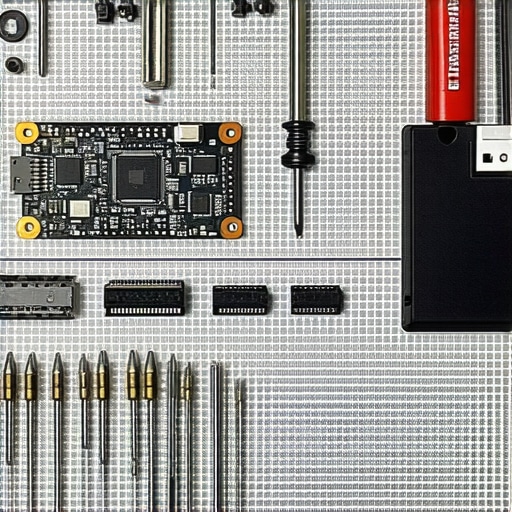
You cannot fix a modern laptop with a kitchen knife and a hairdryer. To do this right, you need a specific set of tools that treat the hardware with the respect it deserves. [image_placeholder_1] First, I always recommend the iFixit Pro Tech Toolkit; it has the specialized bits for those proprietary screws that manufacturers use to keep you out. Second, you must have 99% isopropyl alcohol—accept no substitutes. Third, once the hardware is stable, you need to master the power of data recovery tools to ensure your files didn’t suffer any silent corruption during the short circuit. For business owners, having a disaster like this occur underscores the need for effective managed IT solutions for growing companies that prioritize off-site backups so a spilled drink doesn’t equal a bankrupt business. If you are working from home, please refer to the checklist for securing employee home offices without invading privacy to ensure your recovery process stays within company security protocols.
Don’t Let One Spill Define Your Productivity
It is easy to feel defeated when your expensive tech is dripping with caffeine, but remember that most hardware is remarkably resilient if handled with precision and speed. The panic you feel is just the motivation you need to act quickly. By following these steps—cutting the power, performing a deep alcohol scrub, and verifying your data integrity—you are doing more than just fixing a laptop; you are gaining a level of technical self-sufficiency that most users will never have. Don’t be afraid to get your hands a little dirty to save your digital life. What was the most stressful thing you’ve ever spilled on your keyboard, and did your machine manage to survive the incident? Let me know in the comments below.