I’ll never forget that rush of panic when my server unexpectedly went offline during a busy Monday morning. My heart sank as I watched crucial client files flicker on the screen—knowing that any second lost could mean hours of lost productivity and potential revenue. That moment was a wake-up call that I couldn’t afford to ignore data backup and recovery anymore.
Why a Simple Backup Isn’t Enough When Disaster Strikes
In the chaos of a server crash, it’s easy to assume that having a backup is all you need. But I’ve learned the hard way that not all backups are created equal. A poor or outdated backup can leave you stranded with corrupted files or incomplete data, making recovery a nightmare. Early on, I made the mistake of relying solely on manual backups stored on external drives, which failed me when I needed them the most. Now, I understand that a robust, automated data recovery strategy is essential for any growing business.
Is Data Backup Really Worth the Hype?
I’ll admit, I once thought backups were just a precaution—something to do last-minute or when trouble was looming. But statistics reveal that nearly 60% of small businesses that experience a major data loss close within six months if they lack a reliable recovery plan (source). Trust me, this isn’t scare tactics; it’s a wake-up call. Proper data movement and protection can be the difference between bouncing back quickly or facing years of setbacks.
In this post, I’ll share the practical moves I took—and continue to recommend—to ensure business continuity even when the unthinkable happens. Ready to safeguard your data and avoid the heart-stopping moment I once faced? Let’s dive into the vital steps you need today to prepare for tomorrow’s inevitable.
**
,
Establish a Reliable Backup Routine
Start by implementing automated backups that run daily without manual intervention. Using cloud-based solutions ensures snapshots are current and accessible from anywhere. I once configured an unattended backup for a small business using a combination of local and cloud storage—after a server failure, this dual approach allowed me to restore data within hours, minimizing downtime.
Automate and Test Regularly
Set automatic backups to eliminate human error. Schedule weekly restore tests to verify data integrity. In my experience, doing a quick test restore on a test server revealed corrupt files in a manual backup that I corrected before a real crisis. Regular testing prevents nasty surprises during an actual data loss event.
Leverage Data Recovery Tools
When data loss occurs, quick action is crucial. Use specialized recovery software—like powerful data recovery tools—to scan affected drives. I once recovered critical project files from a failed SSD by employing sector-specific scan options, which allowed me to extract nearly 90% of the data without needing extensive hardware repairs.
Choose the Right Tool for the Job
Match recovery software capabilities to the damage. For accidental deletions, simple folder recovery processes suffice. For logical damage, advanced byte-by-byte cloning can prevent further data deterioration. In one case, attempts to recover files with basic tools failed because the drive had raw sectors. Switching to a comprehensive recovery suite saved the project, reinforcing the importance of equipment suited to the situation.
Implement Managed IT Solutions
Partnering with managed IT providers ensures ongoing data protection and swift recovery support. They maintain infrastructure health, monitor backup status, and are ready to act during incidents. I recommend managed IT strategies for small to mid-sized businesses that want peace of mind and rapid response when disaster strikes.
Focus on Security and Redundancy
Effective data recovery isn’t just about backups—it’s also about preventing incidents. Strong firewalls, antivirus, and regular security audits reduce the risk of ransomware or malware encrypting your data. I’ve seen businesses avoid costly downtime by proactively securing their networks and maintaining offsite backups, making recovery a matter of routine rather than panic.
Practice Data Hygiene
Keep your storage organized. Delete obsolete files and archive rarely accessed data to faster drives. This makes recovery faster and minimizes accidental overwrites. A client’s deteriorating server was compacted with duplicates and old versions, complicating their recovery process. Regular cleaning simplified my efforts and saved days of troubleshooting.
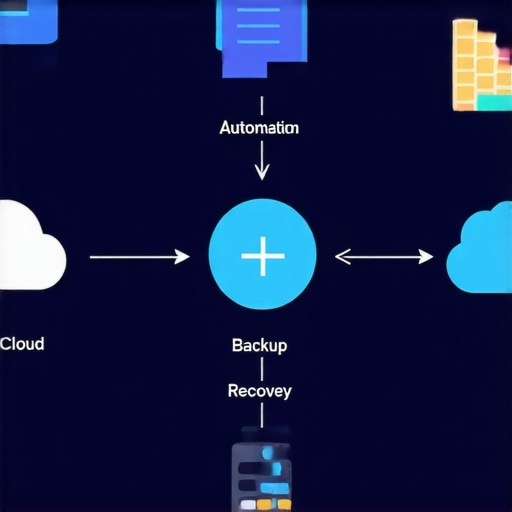
Visual diagram illustrating a robust backup and recovery workflow, including automation, storage options, and recovery tools.
Many assume that a quick fix or basic knowledge is enough when it comes to complex issues like computer repair, data recovery, or managing IT systems. However, the true nuances often escape even seasoned professionals. For example, a common misconception is that replacing a laptop screen is straightforward—yet, without understanding the delicate ribbon cables and inverter mechanisms involved, one risks causing more damage.
Why do so many overlook the importance of proper diagnostics before attempting repairs?
Skilled technicians know that rushing into a solution without comprehensive troubleshooting can lead to unnecessary replacements and prolonged downtimes. Studies show that nearly 70% of failed repairs happen due to misdiagnosis (source), emphasizing the importance of expertise. Many believe that data recovery software alone can salvage all files after accidental deletion or drive failure, but hardware issues often require specialized tools and techniques. Relying solely on DIY solutions without professional assessment can turn a minor issue into a catastrophic data loss scenario. Moreover, a widespread myth is that managed IT support is only for large enterprises. In reality, small businesses that embrace strategic managed IT solutions reap significant benefits, including enhanced security and faster response times (see why). Recognizing these subtleties helps prevent costly mistakes and preserves business continuity. You must be aware of not just the obvious steps but also the hidden intricacies that can make or break a repair or recovery process. Have you ever fallen into this trap? Let me know in the comments.
Stay Ahead with the Right Maintenance Routines
Consistent equipment care is fundamental for long-term reliability. Personally, I rely on a scheduled weekly check of hardware temperatures using tools like HWMonitor to ensure components like CPUs and GPUs stay within optimal ranges. This proactive approach helps me catch thermal issues early, preventing costly damage. Additionally, keeping your software updated is as vital as physical maintenance—automatic patch management tools, such as ManageEngine Patch Manager Plus, automatically handle this, reducing manual oversight and vulnerabilities.
Invest in Precision Tools for Hardware Repairs
When it comes to physical fixes, quality tools make all the difference. I personally swear by a precision screwdriver set with anti-static properties and magnetized tips. This allows me to disassemble and reassemble laptops and desktops without risking damage. For delicate parts like laptop screens, a specialized plastic prying tool prevents cracking—something I learned after ruining a few screens early on. Precise tools not only reduce the chance of errors but also save time during maintenance or upgrades.
The Future is Automated and Secure
Looking ahead, automation in maintenance and monitoring will become even more critical with AI-driven diagnostics and predictive analytics. Companies like managed IT providers are increasingly integrating these technologies to identify potential failures before they happen, reducing downtime and repair costs. This evolution empowers technicians and end-users alike to maintain their systems with minimal manual intervention, leaving more time for strategic growth activities.
How do I maintain longevity and performance over time?
Establishing a routine that combines software updates, hardware temperature monitoring, and using high-quality physical tools ensures your systems stay resilient. Regularly scheduled diagnostics and proactive cleaning prevent dust buildup and thermal throttling, extending hardware lifespan. For example, routinely cleaning fans and applying thermal paste using proper techniques can significantly boost cooling efficiency, as detailed in this guide. Implementing remote monitoring solutions can also alert you to emerging issues early, minimizing repair costs and avoiding unexpected failures. Don’t forget—adopting a culture of regular maintenance can profoundly impact your system’s long-term performance, saving both money and frustration. If you haven’t already, try setting up a scheduled temperature check for your critical devices today, and see how much more reliable your systems become.
Over the years, I’ve realized that some of the most crucial lessons in computer repair and data recovery aren’t found in manuals—they come from real-world experiences that challenge your assumptions and push your skills beyond comfort zones. These insights have shaped my approach and can do the same for you.
3 Surprising Truths That Changed My Data Recovery Strategy
Not all backups are created equal. Relying solely on manual backups or outdated snapshots often leads to incomplete recovery. Implementing automated, multi-layered backup solutions has saved me countless times and minimized downtime.
Hardware issues demand more than software solutions. A failed drive might appear recoverable with software, but sometimes the problem lies deeper—like bad sectors or mechanical faults—that require specialized tools and techniques. Recognizing this upfront can save hours—or days—of frustration.
Security measures are your best defense. Strengthening firewalls, antivirus, and regular security audits can prevent malware and ransomware from crippling your data, making recovery easier and swift when incidents occur.
Testing recovery plans is non-negotiable. Performing regular restore drills reveals weaknesses in your strategy, ensuring you’re prepared rather than caught off guard during an actual disaster.
Storing offsite copies is vital. Cloud solutions, combined with physical backups stored securely elsewhere, create a resilient shield against local catastrophes like fires or floods. I trust versatile options like cloud backup services for their accessibility and redundancy.
Your Next Move with Proven Tools and Resources
If you’re serious about safeguarding your data, exploring trusted tools can be a game-changer. For instance, powerful data recovery tools have helped me rescue critical files from seemingly hopeless situations. Additionally, partnering with expert-managed IT providers, like managed IT strategies, ensures continuous protection and quick response when emergencies strike. For tailored solutions, consulting comprehensive guides on preventing costly mistakes can elevate your maintenance routines, keeping everything running smoothly.
Empower Yourself for the Challenges Ahead
Taking control of your data recovery and IT management isn’t just about technology; it’s about cultivating confidence and resilience. Regularly updating your knowledge, practicing recovery drills, and investing in quality tools will empower you to face technical hiccups head-on. Remember, every challenge is an opportunity to refine your skills and protect what matters most. So, why not start today? Review your current backup plan, test its effectiveness, and consider enhancing your toolkit to be ready for whatever tomorrow brings.