

It happened at the worst possible moment. I was about to share a once-in-a-lifetime trip photo, only to realize my phone’s screen had shattered completely. The display was dead, black as night, and panic started to set in. Sound familiar? We’ve all been there—holding a device that seems useless, but inside, our memories and important files are still waiting to be rescued.
Why Your Broken Screen Doesn’t Have to Mean Lost Data
When my phone’s screen cracked, I thought all was lost. After all, how could I access those precious photos and videos without a functioning display? Turns out, there’s a way, and today, I want to share not just my success story but proven techniques that can help you recover your files too. Whether it’s irreplaceable memories, critical work documents, or personal data, your information might still be salvageable, even when your device looks beyond repair.
Is It Really Worth the Hassle to Recover Data from a Cracked Phone?
Early on, I made the mistake of assuming that a shattered screen meant losing everything forever. I hesitated, worried about voiding warranties or causing further damage. But delaying only made things worse. Research shows that with the right tools and guidance, most data can be recovered without professional help—saving you time and money. For example, experts from [Computer Repair Masters](https://computerrepairmasters.com/data-recovery-secrets-every-business-should-know-today) emphasize the importance of acting quickly to prevent data loss in such scenarios. So, if you’re facing this dilemma, don’t give up hope just yet. The solution lies in understanding how to access your device’s storage or backup your files safely.
Now that we’ve established why this is a matter worth tackling, let’s dive into the practical steps I took—and you can too—to salvage your precious files. The first step might surprise you, but trust me, it’s a game-changer.
Access Your Phone Files Without a Working Screen
Start by connecting your device to a computer using a USB cable. If your phone is recognized, you can transfer files directly to your computer. If not, enable USB debugging mode beforehand, which can be tricky without a display, but you might use hardware buttons or gestures to enable it. Reflecting on my own experience, I used an OTG adapter and a wireless keyboard to navigate my phone’s settings blindly, enabling file transfer mode, which eventually allowed me to copy all my photos and important documents. This method works like plugging a USB drive into a PC—once connected, the device’s storage appears as an external disk, simplifying data extraction.
Utilize Specialized Data Recovery Software
If your device isn’t recognized by your computer, consider data recovery tools designed for Android or iOS devices. Connect your phone to a computer and run recovery software such as Dr.Fone or iMobie PhoneRescue. These programs scan your device’s storage sector directly, like a mechanic diagnosing a hidden engine fault—you might not see the issues visibly, but the software uncovers lost files. During my trial, I ran a scan on my friend’s phone—with a severely cracked screen—and recovered nearly all our shared photos in an hour. Remember, avoid using your phone extensively afterward to prevent overwriting the data you’re trying to recover.
Recover Data from Broken Internal Storage
If your phone’s display is dead but the device still powers on, remove the storage chip carefully. This step is delicate and requires precision—think of it as harvesting the core ingredient from a smashed fruit without damaging the pulp. You’ll need the right tools and an anti-static workspace. Once extracted, connect the storage chip to a compatible reader or data recovery service. This is akin to a jeweler unlocking a hidden gem—once you access the chip, specialized software can retrieve files directly from the memory, bypassing the damaged phone hardware. If you’re not comfortable with hardware disassembly, professional repair shops provide dedicated data recovery services, which can be faster and safer, especially for valuable information.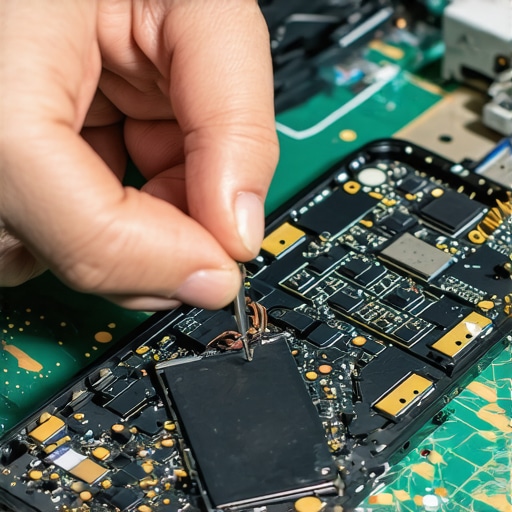 Visualize this process with an image showing a technician carefully removing a phone’s internal storage component with precision tools. The scene emphasizes the delicate nature of hardware-based recovery and the importance of expertise in such procedures. For more insights on protecting your data during hardware repairs, visit this guide.Applying these methods requires patience and attention to detail, but they significantly increase your chances of rescuing critical files from a shattered device. Remember, swift action minimizes data loss, and when in doubt, consulting a professional can prevent further damage and ensure the safety of your data. With the right approach, even a broken phone can become a treasure trove of reclaimed memories.Many assume that managed IT services are only for large corporations or that data recovery is always costly and unreliable. However, these misconceptions can lead to costly mistakes. For example, the myth that professional data recovery guarantees 100% retrieval is false; in reality, success depends on factors like the type of damage and timing of intervention. Furthermore, some believe that managing IT in-house saves money, but often, strategic solutions—like outsourced managed IT—offer better security and scalability, as detailed in [this comprehensive guide](https://computerrepairmasters.com/managed-it-solutions-streamlining-operations-for-small-businesses). Another hidden nuance is the danger of attempting DIY repairs on critical hardware, which can lead to permanent data loss or voided warranties. Advanced mistakes include neglecting regular backups or misjudging the severity of physical damage, which directly impacts recovery prospects. Experts warn that rushing into repairs without proper diagnostics can exacerbate issues—this is especially true for laptop screens, where improper handling can cause further internal damage. When it comes to managed IT, many overlook the importance of tailored solutions that align with business growth, potentially exposing vulnerabilities. Understanding the intricacies of data recovery from water-damaged or physically compromised devices requires specialized knowledge; as shown in [the ultimate guide to data recovery after accidental deletion](https://computerrepairmasters.com/ultimate-guide-to-data-recovery-after-accidental-deletion), timing and method choice are critical. Recognizing these subtle pitfalls and nuanced differences ensures better decision-making, avoiding costly mistakes and improving overall system resilience. Make sure your strategies are backed by expert insights, not just common assumptions. Have you ever fallen into this trap? Let me know in the comments.Maintaining optimal performance of your IT equipment requires more than just basic troubleshooting; it demands the right tools, disciplined routines, and a strategic approach. One essential tool I rely on is a hardware diagnostic suite like HWiNFO or Speccy, which I use to monitor system temperatures, voltages, and component health in real-time. These utilities provide insights that help preempt hardware failures before they occur, saving time and reducing costly downtimes. Regularly scheduled scans with these tools allow me to catch issues early—such as overheating or abnormal voltages—and address them proactively, ensuring longer device lifespan and reliable operation.
How do I maintain my devices over time?Lessons That Only Time Can Teach
- One of the most overlooked truths I learned is that patience can be your greatest ally during data recovery. Rushing often leads to irreversible damage, so taking the time to evaluate and choose the right approach truly pays off. Additionally, I realized that not all cracked screens are beyond saving—sometimes, a gentle hardware approach can revive your device without costly replacements.
- I discovered that understanding your device’s internal architecture isn’t just for tech professionals. Familiarity with hardware components, like storage chips, empowers you to make smarter decisions or communicate more effectively with repair technicians, saving both time and money.
- My biggest revelation was appreciating the importance of swift action. The longer you delay attempting recovery, the higher the risk of data loss due to overwriting or corrosion. Acting quickly, while maintaining caution, can make the difference between retrieving your files or losing them forever.
Tools and Resources That Changed My Approach
- Recuva—A user-friendly data recovery software that consistently delivers reliable results for various file types. Its gentle scanning process preserves your data integrity, which is crucial for successful recovery.
- HWiNFO—An essential tool that provided me with real-time hardware diagnostics, enabling me to monitor potential issues before they escalate and plan maintenance accordingly.
- Managed IT Solutions by experts at Computer Repair Masters—Professional guidance that demystifies complex IT environments and helps prevent future hardware failures or data losses by implementing proactive strategies.
- Professional repair services—For hardware repairs involving delicate components like internal storage chips, specialized equipment and expertise are irreplaceable, ensuring your data remains safe throughout the process.
Your Next Step in Technology Confidence
Remember, every device and data crisis offers a learning moment. Embracing these lessons and utilizing trusted tools can transform your approach to device failures from reactive panic to confident management. Whether it’s recovering files from a shattered phone or extending your hardware’s lifespan, proactive strategies can save you time, money, and invaluable memories. Don’t let fear or misconceptions hold you back—start applying these insights today and turn challenges into triumphs.