

I’ll never forget the cold sweat I felt while staring at a $1,400 invoice from a local tech contractor three years ago. It was a Tuesday, the server had been down for exactly ninety minutes, and the ‘fix’ involved little more than a reboot and a cable swap. I felt like I’d been mugged by a guy in a polo shirt. That was my lightbulb moment. I realized I wasn’t paying for expertise; I was paying a ‘panic tax’ because I didn’t have a plan. Most business owners are in the same boat, watching their bank accounts drain into a black hole of reactive repairs and emergency call-out fees. Today, I’m going to pull back the curtain on why your technology is eating your profits and show you how to flip the script. We aren’t just talking about saving a few bucks on a laptop screen; we are talking about stopping the systematic overspending that happens when you don’t know what’s happening under the hood of your business.
Stop Writing Blank Checks to Your IT Guy
The biggest mistake I made early in my career was believing that ‘if it ain’t broke, don’t fix it’ was a valid financial strategy. It’s actually the most expensive way to run a company. When you wait for a crash, you lose twice: once in the repair bill and once in the lost productivity of your team. You might think you’re saving money by avoiding a monthly contract, but choosing the cheapest managed IT plan often leads to catastrophic downtime that dwarfs any monthly fee. I’ve seen businesses lose thousands because they didn’t realize their backup plan was actually just a sync plan, leaving them helpless when a drive finally gave up the ghost. According to a report by Gartner, the average cost of IT downtime is roughly $5,600 per minute, yet many small businesses still treat IT support like a plumber they call only when the basement is flooding. Have you ever looked at a tech bill and felt like you were being charged for ‘magic’ rather than actual labor?
Is Managed IT Just a Fancy Way to Charge Monthly?
I get the skepticism. It sounds like a subscription trap. But the reality is that the ‘break-fix’ model creates a conflict of interest; your IT guy only makes money when you are suffering. By moving toward streamlined managed IT solutions, you align your goals with theirs—everyone wins when the computers actually work. Often, the reason for those high costs is that your business is overpaying for basic software licenses or hardware you simply don’t need. I once spent six months paying for forty premium seats of a software we only used for five people. It was a clerical error that cost me nearly three grand. This is exactly the kind of leak we are going to plug. [image_placeholder] We will dive into the specifics of auditing your own tech stack so you can stop the bleeding and start investing that capital back into your growth.
Take Control of Your Tech Stack Before It Controls You
The first step to stopping the financial hemorrhage is to realize that most of your IT costs are predictable, not accidental. Think of your business computers like a fleet of delivery vans; if you never change the oil, you shouldn’t be surprised when the engine seizes on the highway. You need a systematic way to audit your business IT spending without hiring an expert. Start by listing every single device and when it was purchased. Most office hardware has a four-to-five-year shelf life before the maintenance costs exceed the value of the machine. I remember a law firm I helped last summer that was about to scrap twelve perfectly good workstations because of a ‘boot error’ that plagued their morning routine. It turned out to be a simple BIOS timing issue. By following a few steps to identify a failing CMOS battery, we saved them from a $15,000 capital expenditure they didn’t actually need.
Stop Guessing Which Office PC Will Die Next
Instead of waiting for a blue screen of death, look for the early warning signs. If a workstation is slowing down, it’s rarely a ‘virus’—it’s usually a bottleneck. Often, the hardware swap that gives old office PCs five more years of life is as simple as moving from a spinning hard drive to an SSD. It’s the difference between walking through mud and sprinting on a track. I’ve seen this one move single-handedly eliminate the need for ’emergency’ hardware refreshes. 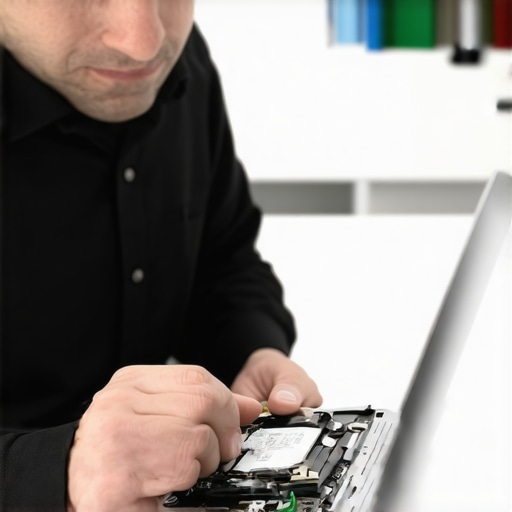
Kill the Ghost Subscriptions Draining Your Account
Software is the silent killer of the small business budget. Every time you sign up for a ‘pro’ tool, that monthly fee becomes a permanent line item. This is why your managed IT service should be tracking your software licenses with obsessive detail. Are you paying for Adobe Creative Cloud for an accountant who only needs to view PDFs? Are you paying for premium Slack features for a team of three? These ‘micro-leaks’ can easily add up to $500 a month. Audit your ‘Users’ list in every SaaS platform you own and delete anyone who hasn’t logged in for thirty days. You’ll be shocked at how much ‘dead weight’ you’re subsidizing.
Secure Your Network Without Buying More Boxes
You don’t always need a $2,000 firewall to keep your data safe. Sometimes, the most effective security moves are free settings changes. For example, why your business needs a separate VLAN for guest Wi-Fi immediately isn’t about buying new gear; it’s about clicking a checkbox in your router settings so a customer’s phone doesn’t have a direct path to your server. It’s like putting a deadbolt on the office door while leaving the front gate open.
Fix the Small Stuff Yourself to Save the Big Stuff
Finally, empower your team to handle minor issues. Not every cracked screen requires a week at a repair shop. Learning laptop screen repair basics can save you hundreds in labor fees. More importantly, teach them the ‘nuclear’ safety rules of data. If a drive starts making a clicking sound, stop everything. Using the move that recovers files from a raw drive without software can be the difference between a five-minute fix and a $3,000 data recovery bill. Control the small variables, and the big disasters tend to take care of themselves.
I’ve realized over the years that the ‘expert’ advice most people follow is actually outdated by a decade. For instance, there’s a common belief that SSDs are practically invincible because they have no moving parts. This is a dangerous oversimplification. When a traditional hard drive fails, it usually gives you a ‘grace period’ of clicks or grinds. When an SSD fails, it is often catastrophic and silent. You must recognize the sign your SSD is reaching its write limit and about to die before the controller locks the NAND flash into a read-only state—or worse. The biggest ‘oops’ factor I encounter is the tendency to run DIY recovery software on a drive that is physically struggling. This is a death sentence for your data. If you suspect hardware failure, the move that protects your data when a hard drive head crashes is to disconnect the power instantly. Scanning a dying drive only accelerates its demise.
The Dangerous Myth of the Indestructible SSD
Many business owners assume that moving to all-flash storage eliminates the need for aggressive backup schedules. In reality, SSDs have a finite lifespan dictated by their ‘Program/Erase’ cycles. According to the 2023 Backblaze Drive Stats report, SSDs show a distinct increase in failure rates as they age, much like their mechanical ancestors. This means your high-speed server might be a ticking time bomb regardless of having no moving parts.
Why did my expensive NVMe drive die while the cheap SATA survived?
It comes down to heat and density. High-end NVMe drives generate significantly more heat and often use Triple-Level Cell (TLC) or Quad-Level Cell (QLC) technology to cram more data into the same space. This increased density often leads to a shorter lifespan compared to older, ‘slower’ enterprise SATA drives.  This is why hardware-level monitoring is non-negotiable for any growing business. You need a partner who understands these nuances before a drive failure halts your entire operation.
Don’t Let Automation Mask a Failing IT Partnership
In the world of support, automation is a double-edged sword. While it helps with scale, it can often hide deteriorating infrastructure until it’s too late. You need to be aware of the red flags that your managed IT provider is using automated responses only to satisfy their Service Level Agreements (SLAs). If you aren’t seeing actual strategic improvements, you aren’t being managed; you’re being babysat. Your focus should be on managed IT strategies to keep your business secure in 2025, which requires human oversight to catch the subtle anomalies that AI might ignore. Even when it comes to the hardware in your hands, the details matter. For example, choosing between an IPS and an OLED laptop screen replacement isn’t just about color; it’s about power consumption and longevity for your remote team. Have you ever fallen into this ‘SSD invincibility’ trap or ignored a flicker thinking it was just a glitch? Let me know in the comments.
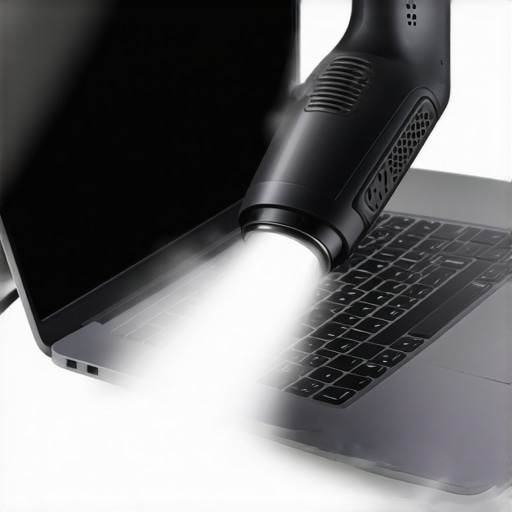
If you are serious about maintaining your fleet, the first thing you need to throw away is that can of air. I have seen too many well-intentioned office managers accidentally spray freezing liquid propellant onto a warm motherboard, causing a thermal shock that cracks traces. Instead, I personally use a dedicated high-velocity electric duster. When you are learning how to fix an overheating laptop with a simple can of compressed air, remember that the ‘how’ matters as much as the ‘what’. For software-side diagnostics, I swear by Hiren’s BootCD PE, a specialized rescue environment that every business owner should have on a bootable thumb drive. It allows you to troubleshoot common computer repair issues effectively before you even think about calling for an expensive emergency technician. It is my go-to for checking memory stability and drive health without booting into a potentially corrupted OS.
How do I maintain my business hardware for maximum longevity?
Maintenance is not just about cleaning; it is about a rolling replacement strategy. You should never find yourself replacing fifty laptops at once because you waited for the screens to start flickering. A much more sustainable approach is the 20% rotation. By identifying the best way to phase out old workstations without losing data, you retire the oldest fifth of your hardware every year. This keeps your capital expenditure flat and ensures your team is never working on ‘antique’ tech that hampers productivity. This is where managed IT strategies to keep your business secure in 2025 really shine. They turn your IT from a reactive mess into a predictable utility, allowing you to focus on growth rather than hardware rot.
Phase Out Your Dying Gear Without the Weekend Overtime
Scaling requires you to move beyond basic repairs and into the realm of systems. If you are still doing one-off fixes, you are losing money. I recommend implementing effective managed IT solutions for growing companies that focus on remote monitoring. This means a dashboard tells you when an employee’s laptop fan is failing before the CPU throttles. I have found that why managed IT is a game changer for growing companies often comes down to this proactivity. Even for simple physical fixes like laptop screen repair diy tips for clearer displays, having a standardized part list ready can save days of downtime. If you are looking for computer repair for beginners avoid costly mistakes, start by documenting your fixes. Every time you solve a problem, add it to an internal ‘Knowledge Base’ so your team can self-serve.
Visibility is the Real Secret to Long-Term Reliability
Finally, focus on tools that provide deep visibility into your storage health. Understanding the power of data recovery tools what you need to know is not just for when a drive dies—it is about preemptive strikes. I predict that in the next few years, AI-driven predictive failure analysis will be standard, but for now, you have to do the legwork. My advanced tip for you: Install a S.M.A.R.T. monitoring utility on every critical workstation today. If a drive shows more than a handful of reallocated sectors, it is not a ‘maybe’—it is a ‘when.’ Pull that data immediately. If you are already seeing the signs of a crash, do not hesitate to contact us to secure your files before the hardware gives up the ghost entirely. Control your variables, and you control your costs.
The Most Expensive IT Mistakes I Stopped Making
Reflecting on years of managing office technology, the biggest ‘lightbulb’ moment wasn’t about a specific piece of software, but a shift in mindset. I realized that the $1,400 invoice I mentioned earlier was a symptom of a reactive culture. One of the hardest lessons I learned is that ‘cheap’ often ends up costing quadruple in the long run. If you are still relying on a local guy who only shows up when things are broken, you are essentially gambling with your uptime. I also discovered that transparency is your best defense; knowing exactly what you are paying for stops the tech ‘magic’ from draining your budget. Finally, I had to accept that data is fragile. Understanding data recovery secrets every business should know today taught me that a sync folder is not a safety net—it’s just a mirror for a disaster.
My Essential Arsenal for Business Hardware Health
To stay ahead of the curve, you don’t need a degree in computer science, but you do need the right tools. I personally swear by Hiren’s BootCD PE for diagnosing systems that refuse to start—it has saved me from declaring a motherboard dead more times than I can count. For everyday monitoring, I recommend any utility that provides S.M.A.R.T. data alerts; if you catch a drive failure early, you can follow an ultimate guide to data recovery after accidental deletion or hardware failure before the sectors become unreadable. Lastly, for small physical repairs like a cracked display, keep a laptop screen replacement step-by-step repair guide bookmarked to empower your team to handle minor setbacks without a week of downtime. These tools turn IT from a mystery into a manageable process.
[image_placeholder]
Take Charge of Your Tech Future Today
You don’t have to be a victim of your own infrastructure. By implementing these audits, rotating your hardware before it fails, and choosing partners who prioritize strategy over ‘firefighting,’ you can flip the script on your business expenses. Technology should be the engine that drives your growth, not the anchor that holds you back. Whether you are looking at how managed IT can elevate your business security in 2025 or simply cleaning out your old workstations, the key is to stay proactive. Reliable computer repair and maintenance isn’t about the one-off fixes; it’s about the systems you build to prevent them. Have you ever been hit with a ‘panic tax’ for an emergency repair that could have been avoided? Let me know your story in the comments below.