

I was sitting at my desk last Tuesday, right in the middle of drafting a report on how managed IT strategies keep businesses afloat, when the air changed. It wasn’t the comforting scent of my morning coffee. It was acrid, sharp, and unmistakably chemical. My heart did a quick double-thump as I looked down at my tower and saw a faint, wispy ghost of smoke drifting out of the exhaust fan. If you are smelling that distinct ‘burning electronics’ odor right now, I need you to listen carefully: unplug the power cord immediately. Don’t finish that email. Don’t save your work. Just kill the power. Today, I am going to walk you through exactly how to triage this terrifying moment so you can determine if your PC is destined for the scrap heap or if it is a simple fix you can handle at home.
Stop Everything Before You Fry Your Motherboard
To be perfectly honest, I have been where you are. Years ago, I ignored a weird ‘hot plastic’ smell because I thought it was just my new graphics card breaking in. I was young, stubborn, and wrong. That smell was actually a poorly seated power connector slowly melting into a puddle of goo. By the time the screen went black, I had turned a $10 cable issue into a $400 motherboard replacement. Since then, I have learned that avoiding costly mistakes starts with respecting your nose. We are going to look for the culprits like dust buildup, failing capacitors, or even a bulging laptop battery if you are on a portable machine. According to safety data from the Consumer Product Safety Commission, electrical malfunctions in consumer electronics often stem from heat-related insulation failure, which is exactly what that ‘burnt plastic’ smell is telling you.
Is it actually worth the panic?
You might be thinking that maybe your fans are just working extra hard or you have some dust burning off. While a little ‘dusty’ smell is common after a long break, a ‘plastic’ smell is a chemical warning. It means something is physically changing state from a solid to a liquid or gas. We need to troubleshoot these issues effectively before a small spark becomes a permanent problem. I want to know—have you ever caught a whiff of something ‘off’ while working late, or are you smelling it for the very first time right now?
Check the Power Supply and GPU First
The most common source of this smell is the Power Supply Unit (PSU). It handles the most raw electricity and has the most components that can fail spectacularly. If you can, put your nose near the back of the PC where the power cord plugs in. If the scent is strongest there, your PSU is likely dying. However, don’t overlook your video card. I have seen many people who needed to spot a dying GPU just in time to save their other components. If your screen is also showing weird colors or lines, that is a huge red flag. Once we rule out the big parts, we can test if your motherboard is dead or just reacting to a localized short. Stay calm, keep that power cord unplugged, and let’s open the case to see what’s really going on inside.Now that you have yanked the plug, we need to perform a digital autopsy. Think of your computer case like a crime scene; you are looking for physical evidence of a thermal event. Open the side panel and grab a bright flashlight. We are looking for ‘the magic smoke’ or, more accurately, the residue it leaves behind. A short circuit is essentially a high-speed collision on a tiny copper highway, and it almost always leaves a mark.
Crack the Side Panel and Look for Scorch Marks
Before you touch anything, look for discolored spots on the motherboard. I once spent three hours tearing down a high-end workstation for a client, thinking the CPU had melted, only to find a tiny, charred moth wedged behind a fan hub. That one bug turned a $2,000 repair into a $15 cleaning fee. Use your light to check the areas around the silver cylinders—the capacitors. If any of them look like they have a ‘muffin top’ or are leaking a crusty brown fluid, you need to test if your motherboard is dead or salvageable. 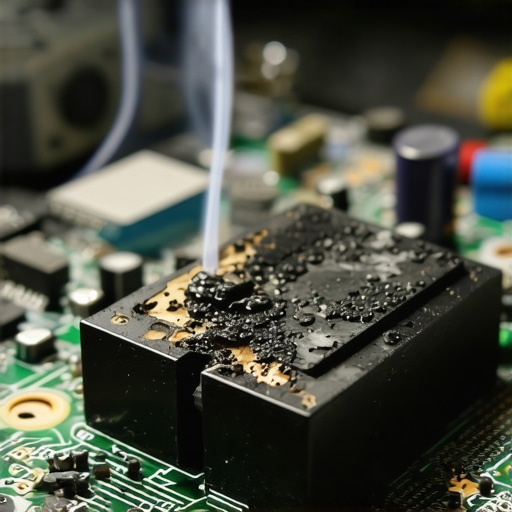
Identify the Scent to Find the Source
Not all burning smells are created equal. If it smells like ozone—that sharp, electric tang after a lightning storm—you are likely looking at a failing motor in a fan or a catastrophic failure in the power supply. If it smells like sweet, acrid chemicals, that is usually a capacitor giving up the ghost. If you are on a portable machine and the smell is accompanied by a keyboard that feels unusually warm or warped, you must safely remove a bulging laptop battery before you do anything else. Heat and lithium are a volatile combination that can lead to actual flames, not just smoke.
Isolate the Power Supply Without Risking Your Data
If the smell is localized to that big metal box where the power cord plugs in, do not attempt to open that box yourself. Power supplies contain large capacitors that can hold a lethal charge even when unplugged. Instead, we want to rule out the components that actually hold your life’s work. If you are worried about your files, learning data recovery secrets starts with keeping the drive away from the heat source. I always recommend pulling the SSD or hard drive out of a ‘stinky’ PC and testing it in a different machine or an external enclosure.
Clean Out the Dust Before You Blame the Hardware
Sometimes, the smell is just ‘toasted’ dust. When dust settles on high-voltage components, it acts as an insulator, trapping heat until the dust itself begins to carbonize. However, be extremely careful with how you clean it. You should stop using canned air on your motherboard if you are spraying it too close or at an angle that freezes the components, as the moisture can cause the very shorts you are trying to avoid. Instead, use short, controlled bursts from a distance to see if the smell dissipates. While you are at it, tell if your laptop fan is actually broken by checking for physical obstructions that might be causing the motor to overheat and off-gas that distinctive ‘burning motor’ scent. By methodically checking the PSU, the GPU, and then the motherboard, you can troubleshoot these issues effectively without throwing away a perfectly good computer.Once you have physically inspected the hardware, we hit the most stressful part: the data. Most ‘experts’ will tell you that as long as your files are in the cloud, you are safe, but that is a dangerous half-truth. I have seen countless users assume their OneDrive or Dropbox was a safety net, only to realize that when their hardware shorted, it sent a corruption command that synced across all their devices.
Stop treating your cloud folder like a bulletproof backup
In my experience, a ‘sync’ plan is the most common point of failure for small businesses. According to the 2024 State of Backup report by Backblaze, over half of users who suffer data loss realize too late that why your business backup plan is actually just a sync plan is the reason they can’t revert to a clean version of their files. If your motherboard is smoking, your first priority isn’t just getting the files—it is ensuring you don’t overwrite them during a panicked reboot.
Can you still pull data from an encrypted drive that won’t mount?
This is the question that separates the pros from the hobbyists. If you are using BitLocker or FileVault, a hardware failure becomes a nightmare. If the controller chip on your SSD is the thing that burned out, the data is still there, but it is effectively gibberish without the hardware-level decryption key. This is why the truth about recovering data from an encrypted SSD that won’t mount often involves specialized hardware tools that bypass the standard boot process. If you’re in this situation, do not—I repeat, do not—keep trying to ‘power cycle’ the drive to see if it shows up. Every time you apply power to a failing NAND chip, you risk a process called ‘cell depletion’ which can make the data permanently unrecoverable.
The mistake that kills your chance of recovery
The biggest ‘oops’ factor I see is the urge to run ‘scan and fix’ software on a drive that is physically failing. If you hear a faint clicking or the drive keeps disconnecting, it is a hardware issue, not a software one. Running a heavy scanning utility like Chkdsk is like forcing a person with a broken leg to run a marathon to see where it hurts. It will lead to the mistake that makes your backups completely useless by physically grinding the drive heads into the platters.  If your external drive is the culprit, you might notice the reason your external hard drive keeps disconnecting during transfers is actually a failing bridge chip in the enclosure, not the drive itself. In that case, you can often shuck the drive and plug it directly into a SATA port. But if you hear a scratching sound, stop immediately and read up on how to pull critical data from a hard drive that makes a scratching sound before the data is turned into literal dust. Have you ever fallen into this trap of trying ‘one last reboot’ only to have things get worse? Let me know in the comments below, because your story might just save someone else’s career.If you want to move past the ‘pray and reboot’ phase of tech ownership, you need to own the right tools. I don’t just mean a screwdriver set from the bargain bin. I personally swear by a digital multimeter with a continuity tester—it is the only way to know if a circuit is truly broken or just resting. When you’re dealing with a system that literally started smoking, you have to be able to verify voltages before you risk plugging it back in. This isn’t just about hobbyist repair; for my business clients, managed IT solutions streamlining operations often involve this level of physical auditing to ensure a single $50 power supply doesn’t take down a $10,000 server cluster. According to the IPC-A-610 standards, which are the industry gold standard for electronic assembly acceptability, even minor discoloration on a PCB can indicate a localized thermal runaway that compromises structural integrity.
Get a real multimeter before you touch the motherboard
Using a multimeter allows you to test for ‘shorts to ground.’ If you touch one probe to the metal chassis and the other to a power pin on the motherboard and hear a beep, you have a physical bridge where there shouldn’t be one. No amount of software can fix that. I’ve found that how to spot a hardware failure masquerading as a software bug often starts with these raw electrical readings. If the 12V rail is only pushing 11.2V, your system will crash, and your OS will blame a ‘driver error’ when the real culprit is a dying capacitor. 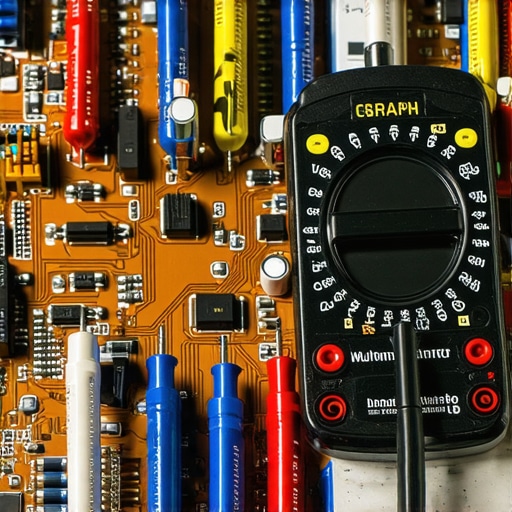
How do I keep my hardware from melting in the first place?
Prevention is significantly cheaper than a digital autopsy. I recommend a bi-annual deep clean that goes beyond a simple dusting. You should be looking for the sign your SSD is reaching its write limit and checking your thermal paste every three years. Over time, that paste turns into a dry, insulating crust that actually traps heat against your processor instead of moving it to the heatsink. Learning how to extend the life of your office PCs by three years is mostly about managing these thermal variables.
Predictive monitoring is the end of the ‘smoking PC’ era
Looking ahead, the trend is moving toward integrated AI sensors within the BIOS that can predict a component failure before the ‘burnt plastic’ smell ever reaches your nose. We are seeing effective managed IT solutions for growing companies adopt telemetry tools that flag abnormal power draws in real-time. Soon, your computer will likely send a notification to your phone saying ‘Power Supply Fan RPM dropped below threshold’ before the motor actually burns out. Until then, you have to be the sensor. My challenge to you: Download a hardware monitor today and look at your ‘VRM Temperatures’ while running a heavy task—if they are hitting over 95°C, you need to improve your case airflow immediately.
Lessons I Learned the Hard Way Under a Smoking Desk
Over the years, I have seen a lot of ‘magic smoke,’ and I have learned that your initial reaction determines whether you lose a $50 part or your entire digital life. First, smoke is always a physical change; you cannot fix a melted circuit trace with a Windows update or a driver reinstall. If you see smoke, something has physically failed. Second, silence is often more dangerous than a loud pop. A fan that stops spinning quietly allows heat to build up in a silent, deadly pocket until a capacitor vents. I have found that learning computer repair for beginners is less about knowing every circuit and more about knowing when to stop before you make a situation worse. Third, always trust your senses over your logic. If it smells like burnt plastic, it is burnt plastic, even if the computer is still ‘working’ for the moment.
Tools That Saved My Data More Than Once
When the air clears and you are ready to investigate, you need more than just hope. I never start a diagnostic without a digital multimeter; it is the only way to verify that a power supply is safe to use again. For software-side monitoring, I rely on HWiNFO to watch VRM temperatures in real-time, which helps me spot a hardware failure masquerading as a software bug before it leads to another thermal event. If the worst happens and the system won’t boot, I keep a SATA-to-USB dock on hand to immediately pull files. This is vital because you must realize why your business backup plan is actually just a sync plan—if the hardware is failing, a sync might just mirror the corruption to the cloud before you can stop it.
Your New Journey into Proactive Hardware Care
Taking the side panel off your PC after a smoke scare is the first step toward becoming a steward of your technology rather than just a user. While the smell of burning electronics is terrifying, it is also a powerful teacher about the importance of airflow and maintenance. By managing your thermals and keeping your components clean, you can easily extend the life of your office PCs by three years or more. Don’t let a single bad capacitor discourage you from performing your own computer repair tasks; every expert you meet started with a similar moment of panic and a screwdriver in their hand. Have you ever seen the ‘magic smoke’ come out of your own machine, or did you catch the scent just in time? Let me know your closest call in the comments below.