

I will never forget the cold sweat I broke into when a client called to tell me their vendor had just received a “corrected” wire transfer request from my client’s actual email address. The domain was right. The signature was perfect. But my client hadn’t sent it. I realized right then that I had made a classic mistake: I assumed that because their managed IT strategies were solid on the surface, their email authentication was handled. It wasn’t. That moment changed how I look at digital identity forever.
Stop Scammers from Stealing Your Good Name
If you have ever felt like your business is an easy target for hackers, you are not being paranoid. Scammers love to impersonate small businesses because we often leave the digital back door wide open. Today, I am going to show you how to shut that door tight. We are going to dive into the world of SPF, DKIM, and DMARC—the three pillars that prove to the world that your emails are the real deal. It is about more than just avoiding the spam folder; it is about protecting your reputation and your bank account. If you have been troubleshooting common computer repair issues or worrying about your network, this is the next logical step in your security journey.
Is all this technical setup actually worth the hassle?
You might be wondering if your five-person team really needs enterprise-level email security. I used to think the same thing until I saw a local shop lose a week’s worth of revenue to a single spoofed invoice. The reality is staggering: the FBI reports that business email compromise (BEC) scams cost organizations billions of dollars every year, with a significant portion of those being small to mid-sized firms. You can read the full breakdown in the 2023 IC3 Internet Crime Report. It is not just a “big guy” problem anymore. Early in my career, I ignored these settings because they felt too “corporate,” and that cost a client their trust with a vendor. Don’t make my mistake. We can fix this together, and it is easier than you think if you have the right effective managed IT solutions in place. Have you ever noticed a suspicious email that looked like it came from a colleague? Let me know in the comments—I’d love to hear your story.
[IMAGE_PLACEHOLDER]
Setting these records up is like giving your mailman a secret handshake that only you and he know. Without it, anyone can put your return address on a fake envelope. By the end of this guide, you will have a clear roadmap to securing your domain so that your messages always land where they belong—and the fakes get tossed in the trash where they deserve to be.
Start with Your SPF Guest List
Think of the Sender Policy Framework (SPF) as a VIP guest list at the door of your domain. If a mail server isn’t on the list, it doesn’t get in. I remember setting this up for a small law firm where we were implementing managed IT solutions streamlining operations for small businesses. They had five different services sending mail on their behalf, from marketing tools to their internal server. My mistake was rushing the process; I missed one IP address, and half their outgoing mail bounced. It was a frantic afternoon of computer repair for beginners avoid costly mistakes level troubleshooting, but it proved the system works. To set this up, you need to access your DNS settings and create a TXT record that lists every authorized IP address or service, like Outlook or Gmail, allowed to send mail as you.
Lock Your Envelopes with a DKIM Wax Seal
DomainKeys Identified Mail (DKIM) adds a layer of encryption that acts like a digital wax seal on your messages. It doesn’t hide the content, but it proves the content wasn’t tampered with during its journey across the web. If someone intercepts the email and tries to change the bank details on your invoice, the seal breaks, and the recipient’s server knows something is wrong. This is why why your managed IT provider should be managing your domain renewals is so critical; if your domain settings aren’t tightly managed, these keys can expire or get misconfigured, leaving you vulnerable. You will generate a public and private key pair through your email provider and add the public key to your DNS. It is a bit like when you how to spot a suspicious process in your task manager—you are looking for that specific signature of legitimacy that tells you everything is running as intended.
Give the Guard Clear Instructions with DMARC
SPF and DKIM are the ID cards, but DMARC is the security guard standing at the gate. It tells the receiving server exactly what to do if the ID cards are missing or fake. You can tell it to do nothing, put the mail in quarantine, or reject it entirely. I always recommend starting with a policy of none to monitor who is using your domain before moving to a reject policy. This prevents you from accidentally blocking your own legitimate mail while you are still troubleshooting common computer repair issues effectively. 
Monitor Your Reports to Catch Hidden Threats
Once DMARC is active, you will start receiving XML reports. They look like gibberish at first, but they are a goldmine of information showing every server in the world trying to send mail as your company. I once caught a phishing campaign targeting a local non-profit before they even realized their name was being used just by glancing at these logs. It is a proactive move, much like how checking why your business is overpaying for basic software licenses can save you money; monitoring these reports saves your reputation. If you see a lot of failures from an IP address you do not recognize, you have just spotted an active spoofing attempt in real time. Staying on top of this ensures your managed IT strategies to keep your business secure in 2025 are actually delivering the protection your brand deserves.
But here is where the conversation usually stops, and where the real trouble begins. Most business owners think that once their email is secured and their backups are running, they can set it and forget it. I am here to tell you that this mindset is the fastest way to lose everything. Everyone tells you that moving your files to the cloud is a “backup,” but in my experience, that is the most dangerous myth in modern business. If you are using OneDrive or Dropbox, you have a mirror, not a safety net. If a virus encrypts your local files, it will happily “sync” those encrypted files to the cloud, leaving you with nothing. This is why your business backup plan is actually just a sync plan. To truly be safe, you need an immutable, off-site backup that doesn’t just copy changes in real time. According to the Backblaze 2023 State of Backup Report, while more people are backing up than ever, a staggering number still lack offsite, versioned copies that protect against ransomware.
Why does your RAID setup actually make data recovery harder?
When I talk to more advanced clients, they often brag about their RAID 5 or RAID 10 server setups. They think redundancy equals data safety. But here is the nuance: RAID protects you from hardware failure, not data corruption or accidental deletion. In fact, pulling data from a failed array is significantly more complex than a single drive. This is the truth about recovering data from an encrypted ssd that wont mount or a failed RAID stripe. If you don’t have the right tools or experience, you can easily overwrite the very blocks you are trying to save. I have seen enthusiasts try to “force online” a drive in a degraded array, only to cause a total parity collapse that makes professional recovery twice as expensive. Always stop the moment you hear a mechanical noise; why you should never open a clicking hard drive in a normal room is a lesson usually learned the hard way by those who think they can DIY a physical disk failure.
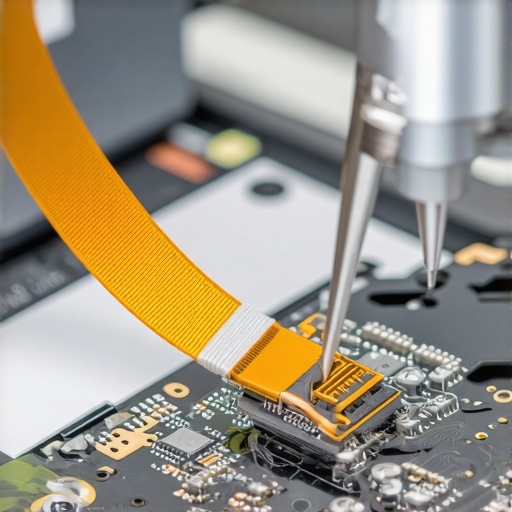
The mistake that turns a screen fix into a motherboard replacement
Hardware is just as fickle as software. I see people all the time trying to save a few bucks by following a guide on laptop screen repair how to fix common issues at home. The “oops” factor usually happens with the internal ribbon cable. If you don’t disconnect the battery first, even if the laptop is “off,” there is still a tiny standby current running through that connector. One slip of the metal screwdriver and you have shorted the backlight circuit on the motherboard. I have had to tell many heartbroken people that their $80 screen fix is now a $500 board replacement. Knowing how to tell if your screen flicker is software or a dying ribbon cable is step one, but knowing when to stop is even more important for your wallet.
Managed services are about the invisible work
Finally, there is a common belief that you only pay an IT guy for when things break. This is why many companies choose the cheapest option, which always leads to more downtime. The real value is in the quarterly audits. If your provider isn’t digging into your logs, checking for lateral movement, or verifying how managed IT can elevate your business security in 2025, they aren’t managing your IT; they are just waiting for you to fail. This proactive approach is why your managed IT service should be providing quarterly security audits. Have you ever fallen into this trap of thinking everything was fine just because nothing was currently broken? Let me know in the comments—I’d love to hear your story.
Continuing the journey of securing your environment means moving from reactive firefighting to a proactive stance. I’ve spent years refining my physical and digital toolkit, and if I’m being honest, most of the miracle software you see in pop-up ads is bloated junk. When I’m in the field, I rely on a specific set of utilities like CrystalDiskInfo to monitor S.M.A.R.T. data—it’s the only reliable way to catch a drive failure before the dreaded click of death begins. If you aren’t checking these stats regularly, you’re flying blind. This is why the power of data recovery tools what you need to know is less about the software you buy after a crash and more about the monitoring you do today. For cloning, I swear by Macrium Reflect; it handles resizing partitions on the fly, making the easiest way to clone a failing hard drive to a new ssd a simple task instead of a data-loss gamble. 
How do I maintain my system health over time?
Maintenance isn’t a one-time event; it’s a rhythm. I’ve found that how managed IT can elevate your business security in 2025 depends entirely on your ability to automate the mundane. You should be running automated patch management and hardware health checks at least weekly. We are rapidly moving toward a future where AI won’t just scan for viruses, but will predict specific component failures—like a dying capacitor or a failing fan—based on subtle voltage fluctuations and thermal patterns. To see the foundation of this, you can look at the technical documentation for SMART Monitoring Tools (smartmontools), which provides the professional-grade backbone for almost every serious disk-health utility used by IT experts today. If you are managing your own hardware, like following a laptop screen replacement step-by-step repair guide, remember that the long-term result depends on the quality of your parts. Don’t buy the cheapest panel you find; you’ll end up with dead pixels or a washed-out display within a month. This commitment to quality is why managed IT is a game changer for growing companies—we have the volume to vet vendors so you don’t have to risk your hardware on subpar components.
Stop the crash before it starts
Looking ahead, I predict we will see a massive shift toward self-healing networks and workstations. Imagine a system that detects a corrupted OS file and automatically pulls a clean version from an immutable cloud backup before you even notice a lag. Until that becomes standard, your best bet is to stay educated and use the right tools. I want you to try one thing today: download a portable hardware monitor and check your SSD’s remaining life percentage. It takes two minutes and could save you weeks of heartache. If you’re feeling overwhelmed by the technical debt of your growing business, effective managed IT solutions can take that weight off your shoulders. Don’t wait for the blue screen to tell you there’s a problem—be the boss who knows it’s coming and stops it in its tracks.
What My Most Expensive Mistakes Taught Me About Digital Defense
Over the years, I have learned that the most dangerous phase of business growth is when you are ‘big enough to be targeted but small enough to be careless.’ If you treat your security settings like a one-time chore, you are leaving the door unlatched. I have seen marketing campaigns fail because an SPF record was out of date, and I have seen companies lose a decade of archives because they thought a sync was a safety net. This is the mistake that makes your backups completely useless—assuming that automation equals invincibility. Real security requires a mindset shift: you aren’t just ‘fixing’ things; you are building a resilient vault.
Another hard truth? Hardware quality matters more than the sticker price. When performing a laptop screen replacement step-by-step repair guide, using a cheap third-party panel might save you forty dollars today, but it could lead to how to fix a laptop screen that is suddenly too dark to read or flickering issues within a month. Always prioritize verified parts and professional standards if you want your gear to last through the next fiscal year.
Tools I Use to Sleep Better at Night
I don’t believe in ‘magic’ software, but I do believe in professional-grade utilities that provide clarity. For DNS and email authentication, I always keep MXToolbox open in a tab; it is the industry standard for verifying that your SPF and DKIM records are actually doing their job. For monitoring the physical health of your workstations, CrystalDiskInfo is my go-to for catching a drive failure before it becomes a catastrophe. These data recovery secrets every business should know today usually boil down to one thing: having the right data before the crash happens. Finally, if you are looking for a way to map out your infrastructure, DMARCian is incredible for making sense of those complex XML reports that the DMARC protocol sends back to you.
Take Control Before the Crisis Hits
You now have the roadmap to move from a reactive state to a proactive one. Whether it is locking down your email domain or finally admitting that your cloud storage isn’t a backup, the power is in your hands. This commitment to detail is why managed IT is a game changer for growing companies—it takes the guesswork out of the equation so you can focus on your actual work. Don’t wait for a suspicious email or a clicking hard drive to motivate you. Take one small step today, even if it is just auditing your DNS records, to ensure your business remains your own.
Have you ever had a moment where you realized your ‘backup’ was actually just a sync plan that didn’t save your files? Let me know in the comments below—I would love to hear how you handled it!