

I still remember sitting on my sun-drenched porch three years ago, trying to hit a deadline while squinting at a screen that had essentially become a high-definition mirror. Every time the sun shifted, I saw more of my neighbor’s oak tree and less of my spreadsheet. It was the moment I realized that my ‘premium’ glossy display was actually my biggest productivity enemy. I’d fallen for the marketing trap: I thought shinier meant better. It didn’t. In fact, it was the exact same mistake I made when I tried laptop screen repair with DIY tips without checking the finish first. I ended up with a gorgeous display that was unusable in 90% of my favorite working spots.
Stop Staring at Your Own Reflection
Most of us don’t think about screen finish until we’re stuck with the wrong one. We focus on resolution, refresh rates, and color accuracy, but the coating—glossy or matte—is what actually dictates where and how you can use your machine. If you’re at the point where you need a laptop screen replacement with a step-by-step repair guide, you have a rare opportunity to fix the manufacturer’s original mistake. We are going to settle the debate today so you don’t end up wasting money on a panel that makes your eyes ache.
Is a matte screen really just a dull version of glossy?
This is the biggest fear my neighbors always bring up when they ask for advice. They worry that by choosing a matte finish to kill the glare, they’ll lose that vibrant ‘pop’ that makes Netflix look so good. It’s a valid concern. Early matte screens were notorious for looking a bit grainy, almost like there was a layer of dust trapped under the glass. But the technology has changed. According to the Vision Council, nearly 60% of Americans experience digital eye strain, and choosing the right screen coating is a primary recommendation for reducing the glare that causes it. I’m going to show you why your ‘washed out’ fear might be outdated and how to spot if your current screen brightness keeps flickering because of hardware or just bad lighting. Have you ever found yourself hiding in a dark corner of the office just so you could see your monitor clearly? You aren’t alone, and you definitely shouldn’t have to live like that. Let’s get into which finish actually wins the battle for your desk.
Audit Your Environment Before You Touch a Tool
Before you spend a dime on new hardware, you need to conduct a lighting audit of your most frequent work spots. I remember a client who called me in a panic because they thought their screen was dying. It looked dim, grainy, and they were convinced they needed a full laptop screen repair to fix common issues at home. When I arrived, I realized they were sitting directly under a high-intensity LED track light that was bouncing off their glossy screen like a mirror. No amount of repair would fix a physics problem. We simply turned the desk 45 degrees, and the ‘broken’ screen was suddenly perfect. Start by identifying the primary light sources in your room. If you have windows behind you or overhead lights you cannot control, a matte finish is your only real defense.
Run the Flashlight Test to See What You Are Actually Fighting
To truly understand the impact of your current finish, turn your laptop off. Take your phone’s flashlight and shine it directly at the black screen from about two feet away. If you see a sharp, distinct bulb reflecting back at you, you have a glossy screen. If the light disperses into a soft, blurry glow, you have a matte finish. This test shows you exactly how much ‘specular reflection’ your eyes are processing. If that sharp bulb makes you wince, you’re likely suffering from the same issues that lead people to search for how to fix a blurry laptop screen after a driver update, when the real culprit is just optical interference.
Swap Your Panel to Change Your Daily Life
If the flashlight test proves your environment is hostile to your current screen, you don’t have to buy a whole new laptop. This is the part where most computer repair for beginners guides miss a huge opportunity. When your screen is cracked or failing, you can usually choose between a matte or glossy replacement panel, provided the connector pins match.
Match Your Spare Part to Your Specific Eyesight Needs
When you are following a laptop screen replacement step-by-step repair guide, look up the part number on the back of your LCD. Search for that part number with the keywords ‘matte’ or ‘glossy.’ Most manufacturers produce both versions for the same laptop model to satisfy different corporate or consumer needs. If you do a lot of color-critical photo editing in a dark room, stick with glossy. If you are a ‘digital nomad’ working in cafes and parks, the matte panel is a non-negotiable upgrade. I once swapped a glossy screen for a matte one on an old Dell for a writer friend, and she claimed it felt like getting a new pair of glasses.
Tweak Your Settings to Save a Washed Out Matte Display
If you already have a matte screen and hate how ‘dull’ it looks, you can often fix this in software. Many people mistakenly think their hardware is failing and look for how to spot a hardware failure masquerading as a software bug. In reality, matte screens just need a bit more contrast. Go into your graphics control panel (Intel, AMD, or NVIDIA) and bump the saturation or ‘digital vibrance’ up by 5-10%. This compensates for the light diffusion of the matte coating. You should also check why your laptop screen looks washed out and how to calibrate it to ensure your gamma levels aren’t making the anti-glare coating look worse than it actually is.
While everyone focuses on the aesthetics of a matte versus glossy finish, many seasoned users fall into a much more dangerous trap: assuming that if the screen looks good, the system is healthy. Let’s dig deeper into the nuances of hardware maintenance that most people overlook. One of the most common myths I see in my shop is the belief that high resolution always equals better productivity. In reality, cramming 4K onto a 13-inch laptop often leads to scaling issues that cause more eye strain than a simple glare ever would. It’s similar to how people obsess over pixel counts but ignore the fact that the fix for a laptop screen that has a ghosting effect usually lies in the response time, not the resolution.
Your cloud sync is not a real backup strategy
Here is a contrarian view that often shocks my clients: Most people who think they have a backup actually have nothing but a mirror. If you use a service that immediately syncs your files to the cloud, you haven’t backed up your data; you’ve just created a second place for your mistakes to live. If you accidentally delete a folder or a virus encrypts your files, that deletion or encryption syncs instantly. This is the mistake that makes your backups completely useless in a real crisis. According to the 2023 Drive Stats report by Backblaze, drive failure rates are rising as capacities increase, making a true, versioned backup more critical than ever. You need a system that keeps historical snapshots, ensuring that why your business backup plan is actually just a sync plan doesn’t become the reason you lose a decade of work.
What happens when your hardware starts lying to your software?
We often trust what the OS tells us, but advanced users know that software is frequently the last to know when hardware is failing. I’ve seen dozens of people spend hours on laptop screen repair how to fix common issues at home by reinstalling drivers, when the actual problem was a failing GPU or a pinched ribbon cable. This is the “Oops” factor: treating the symptom instead of the cause. If your screen is flickering, don’t just update Windows. Check the physical connections first. Attempting to force a software fix on a hardware failure is a classic computer repair for beginners trap that can lead to permanent damage.
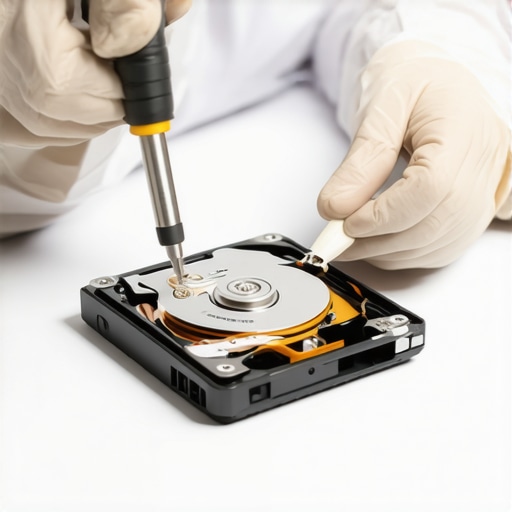
The most dangerous thing you can do is run “recovery software” on a drive that is physically failing. If you hear a mechanical noise, every second the platters spin, you are losing data forever. Learning how to pull critical data from a hard drive that makes a scratching sound requires knowing when to stop touching the device entirely. Professional data recovery secrets expert techniques to save your files fast almost always involve specialized hardware imagers, not a $20 app from the internet. Even in a managed environment, you must ensure how to tell if your office firewall is actually blocking threats before you assume your network is safe. Have you ever fallen into the ‘sync is a backup’ trap or tried to fix a hardware problem with a software update? Let me know in the comments.
You’ve likely seen me mention the importance of making the right hardware choices, but let’s talk about the ‘forever’ part. Maintenance isn’t just a chore; it’s an investment in your sanity. I personally swear by the iFixit Pro Tech Toolkit—not because I’m a professional repairman every day, but because using a precision driver prevents the stripped screws and scratched casings that often lead to a computer repair for beginners disaster. Beyond the physical tools, it’s about the ritual. Every six months, I open my laptop chassis. If you ignore this, the buildup of pet hair and dust will eventually force you to figure out how to tell if your laptop fan is actually broken or just dusty before the heat kills your processor.
How do I maintain my laptop for the long haul?
Consistency beats intensity every single time. I run a S.M.A.R.T. data check every quarter without fail. Using lightweight utilities helps you identify the sign your SSD is reaching its write limit and about to die before the blue screen of death makes the decision for you. According to the JEDEC JESD218 standard, SSD endurance is a measurable science based on workload and heat, and ignoring these metrics is like driving a car without a fuel gauge. If you catch a failing drive early, you can master the easiest way to clone a failing hard drive to a new ssd and skip the total data loss heartbreak.
I also recommend a dedicated electronics-safe microfiber cloth and 99% isopropyl alcohol for the chassis. Avoid generic ‘glass cleaners’ from the grocery store; they contain ammonia that can strip the anti-glare coating off a matte screen or cause why your laptop screen has a faint white glow around the edges. If you have already noticed odd visual artifacts, try troubleshooting common computer repair issues effectively by checking your internal display cable before assuming you need a whole new panel. For my business-owning readers, scaling up means you can’t be the one fixing every laptop individually. This is exactly why managed it is a game changer for growing companies. It’s not just about fixing what’s broken; it’s about having a strategy where effective managed it solutions for growing companies handle the heavy lifting like software licenses and security audits automatically.
The Future of Repairing Your Own Tech
Looking ahead, I predict we are moving toward a world where ‘Right to Repair’ becomes a software standard as much as a hardware one. We are already seeing the rise of modular laptops that allow you to swap ports and motherboards like LEGO sets. This transparency will drastically reduce the need for specialized data recovery secrets expert techniques to save your files fast because the hardware won’t be a locked box anymore. Try this today: Download a S.M.A.R.T. utility and check your ‘Power-On Hours.’ If that number is over 20,000, it is officially time to start planning your next proactive hardware upgrade before your current machine decides it’s retired.
The Most Expensive Lesson I Learned at the Workbench
After years of fixing machines, I’ve realized that the most expensive repairs aren’t the ones involving broken glass or fried motherboards—they are the ones where a user suffers for months with a setup that doesn’t fit their life. I once saw a designer lose a week of work because they couldn’t see subtle color shifts on a matte screen in a perfectly lit studio. On the flip side, I’ve seen office workers quit because of chronic headaches caused by glossy glare. The hardware isn’t the problem; the environment mismatch is.
Always remember that your laptop is a tool, not a museum piece. If a modification like a screen swap or a deep clean makes your day 10% easier, it’s worth the effort. I’ve learned to stop waiting for a total failure before acting. By the time you need to find tips for troubleshooting laptop screen problems seamlessly, you’ve likely already lost hours of focus. Proactivity is the only true fix in the world of high-performance tech.
#IMAGE_PLACEHOLDER_E#
Tools That Actually Live in My Desk Drawer
If you want to move beyond basic user status, you need a specific set of resources that provide clarity when things go sideways. First, I always keep CrystalDiskInfo pinned to my taskbar; it’s the easiest way to learn how to check if your hard drive is about to fail using s m a r t data without any guesswork. Second, the iFixit Pro Tech Toolkit is the gold standard because it handles everything from precision screens to stubborn chassis screws without damaging the plastic.
For those running a business, your tool might not be a screwdriver—it might be a partnership. This is why managed it is a game changer for growing companies. Instead of wrestling with drivers, you get a system that breathes and scales. Finally, I highly recommend the Backblaze Blog for anyone who wants to understand why hardware fails on a global scale. It turned my anxiety about data loss into a structured plan for resilience and effective troubleshooting common computer repair issues effectively.
Your Workspace Deserves a Second Chance
Don’t let a bad screen coating or a dusty fan dictate your productivity. Whether you decide to perform a DIY laptop screen repair how to fix common issues at home or simply move your desk to a better light, the goal is the same: a machine that works for you. You now have the knowledge to audit your environment, choose the right panel, and maintain your system like a professional. Start small today—run that flashlight test or check your drive health—and reclaim your digital space.
Have you ever completed a DIY repair only to realize you should have done it months ago? Let me know about your biggest hardware win in the comments below!