

I remember sitting in my office at 2 AM, the silence of the building only broken by the frantic whirring of a dying server fan. I wasn’t panicked yet; I had a ‘successful’ backup notification from that evening sitting in my inbox. I felt prepared. But when I tried to mount the recovery image, the screen stayed black. The files were gone. The software had been reporting ‘Success’ for months, yet the actual data was a scrambled mess of zeros. That night taught me a brutal lesson: a backup you haven’t tested is just a ghost in the machine.
Your Backup Software is Probably Lying to You
I made the classic mistake of trusting the green checkmark. For years, I told clients that as long as the automated reports were clean, we were golden. I was wrong. Modern data environments are complex, and things like bit rot or configuration drift can turn a perfect-looking backup into a useless pile of digital bricks. This is where effective managed IT solutions really earn their keep. They don’t just look at the report; they actually boot the virtual machine and verify the data integrity. If your provider isn’t doing this, they aren’t managing your risk—they are just watching it grow. I’ve seen businesses fold because they lacked a documented disaster recovery plan that included manual verification.
Is monthly testing really necessary for a small team?
You might think this sounds like overkill if you only have a few employees. But according to a survey by Ontrack, nearly 40% of companies that attempted to restore from a backup during a crisis found that their data recovery efforts failed because the backups were corrupted or incomplete. That is a terrifying statistic when your livelihood is on the line. I once lost three days of work for a client because I didn’t check the SQL database backups manually—I just assumed the file-level backup was enough. It wasn’t. Today, I tell everyone that if you aren’t testing, you aren’t backed up. Have you ever actually tried to restore a single folder just to see if it works, or are you just hoping for the best?
Stop Hoping and Start Verifying Your Data
We often treat IT like a utility, expecting it to just work like the lights or the water. But data is volatile. Whether you are dealing with a ransomware infection on your server or a simple hardware failure, the moment of truth is unforgiving. Monthly testing ensures that when the hardware eventually fails—and it will—you are performing a routine task rather than a miracle. We will dive into the exact checklist your IT team should be following to ensure your peace of mind.
Build a Verification Ritual That Actually Works
To stop living in fear of data loss, you have to move beyond checking logs and start performing fire drills. The most dangerous assumption in IT is that a ‘Successful’ status message equals a recoverable file. I once managed a legal firm where the backup logs showed 500GB of data transferred every night like clockwork. When their primary drive finally failed, I discovered that 490GB of that was actually a recursive loop of temporary log files created by a bug. The actual case files hadn’t been backed up in three weeks. This is why managed IT strategies to keep your business secure in 2025 must include manual data sampling. You need to pick five random files every month and try to open them. If they don’t open, your backup is just a digital paperweight.
Stop Trusting the File Size
A common trap is looking at the size of the backup archive and assuming it’s healthy because the numbers match. Data corruption, often called ‘bit rot,’ can happen without changing the file size at all. It is like having a library full of books where the covers are fine, but the pages inside are blank. You should be using data recovery secrets and expert techniques like checksum verification. This process compares the ‘fingerprint’ of the original file to the backup. If they don’t match, you have a problem that a simple green checkmark won’t catch.
Spin Up a Sandbox Every Single Month
If you are running virtual servers, the only real test is a ‘sandbox boot.’ This means taking your backup image and booting it as a virtual machine on a completely separate network. I’ve seen countless instances where the data was technically ‘there,’ but the operating system had a registry error that prevented it from ever starting up again. This is exactly why managed IT is a game changer for growing companies; they have the infrastructure to run these tests without disrupting your daily work. If you can’t see the login screen on your restored server, you don’t have a backup.
Fixing the Gaps Before the Hardware Quits
Hardware failure is rarely a sudden event; it’s usually a slow decline. If your backup speeds are dropping or you see ‘retrying’ messages in your logs, your hardware is screaming for help. You should learn how to tell if your SSD is wearing out from too many writes before it takes your data down with it. I remember a client who ignored a slight clicking sound from their NAS for two months because the backups were still ‘finishing.’ When the drive finally seized, the cost of hard drive recovery services and pricing became a painful reality that could have been avoided with a $100 replacement drive weeks earlier.
Check Your SQL Database Consistency
File-level backups are great for Word docs, but they are often useless for active databases like SQL or QuickBooks. If you back up a database while it’s being written to, the resulting file is often ‘crashed’ or inconsistent. You must use application-aware processing. This ‘freezes’ the database for a microsecond to take a clean snapshot. If you aren’t doing this, you might find yourself needing an ultimate guide to data recovery after accidental deletion or corruption just to piece your customer records back together. Always run a ‘DBCC CHECKDB’ command on your restored SQL backups to ensure the internal tables are actually readable.Moving beyond the database, we need to talk about the ‘Cloud Savior’ myth. Most people think that moving their files to a platform like Dropbox or OneDrive counts as a backup. It doesn’t. In my experience, relying solely on cloud synchronization is one of the most dangerous gambles a business can take. Syncing is about availability, not safety. If a disgruntled employee deletes your financial records, or if you accidentally overwrite a critical spreadsheet, that change is mirrored across every device in seconds. This is where managed IT solutions for small businesses really prove their worth—they differentiate between ‘syncing’ and ‘versioned archiving.’ I’ve seen too many people lose everything because their business data leaked through Dropbox or was purged by a sync error that propagated before anyone noticed. The ‘Oops’ factor often hits when you realize your hardware has a hidden expiration date. For example, modern ultra-portables are a masterpiece of engineering but a nightmare for longevity. You might think your laptop is slow due to software bloat, but you need to know how to tell if your SSD is wearing out. Once those flash cells reach their write limit, they don’t just slow down; they often enter a read-only state or lock up entirely. And since many modern machines have these components soldered directly to the logic board, a simple hardware failure turns into a high-stakes crisis where hard drive recovery services and pricing become your only topic of conversation.
Why do high-end screen replacements often fail to impress?
I often hear from users who tried a DIY fix only to find their display looks worse than the broken one. They bought the right model number and followed a guide, so what went wrong? The nuance often lies in the EDID (Extended Display Identification Data) chip. If you don’t match the specific firmware or ‘flavor’ of the original panel, you might end up needing to fix a blurry screen on a high-end laptop because the operating system cannot negotiate the correct color profile or refresh rate. It’s not just about the glass and the backlight; it’s about the handshake between the motherboard and the panel. #IMAGE_PLACE_HOLDER_C# According to a study by the IT Governance Institute, roughly 70% of business data loss is actually caused by internal process failures or human error, not external hackers. This proves that no matter how much you spend on sophisticated hardware, your internal protocols are your real defense. Even something as small as failing to replace a soldered-in battery correctly can short the logic board, leading to a situation where you’re desperately searching for expert techniques to save your files fast. We often get blinded by the big threats like ransomware, but the slow, silent failure of a component or a misunderstood sync setting is far more likely to sink your ship. Have you ever fallen into this trap of trusting the software’s ‘all clear’ more than your own verification process? Let me know in the comments.I’ve spent thousands of hours staring at flickering panels and listening to the death rattles of spinning platters, and over time, I’ve winnowed my toolkit down to a few essentials that never leave my side. For software, I don’t rely on the built-in Windows tools alone; they are often too optimistic. I use CrystalDiskInfo specifically to watch the ‘Reallocated Sectors Count’—if that number moves even once, the drive is effectively dead to me. You can learn the easy way to check your hard drives health using smart data without being a rocket scientist. For physical screen issues, a high-quality multimeter and a magnifying lamp are more valuable than any software suite. I’ve seen countless DIYers replace an entire panel when the real culprit was a 5-cent blown fuse on the logic board or a slightly unseated connector. That is why learning how to fix a flickering screen by adjusting the display ribbon is often the first thing I try before ordering expensive parts. You need the power of data recovery tools in your arsenal, but the most powerful tool is a disciplined diagnostic process that rules out the simple fixes first. 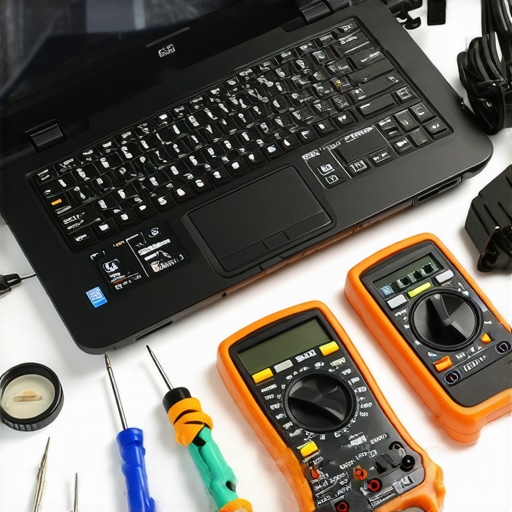
How do I keep my workstation running like new for years?
The secret isn’t a magic software cleaner; it is physical thermal management. Dust is a silent killer that causes your components to throttle and eventually cook themselves. I make it a habit to use compressed air on my fans every three months and repaste the CPU every two years. If you ignore this, you’ll eventually be troubleshooting common computer repair issues effectively just to keep the machine from shutting down mid-task. According to the Backblaze 2023 Drive Stats report, drive failure rates increase significantly after the four-year mark, regardless of the brand. This data is a reminder that hardware is a consumable, not a permanent fixture. Looking ahead, I predict that AI-integrated firmware will soon become the standard, offering predictive failure analysis that can move data off a failing SSD before the user even notices a lag. This level of automation is exactly how managed IT can elevate your business security in 2025 by removing the ‘human’ element of forgetting to check logs. My challenge to you is simple: download a SMART utility today and check your ‘Power On Hours’ and ‘Total Host Writes.’ If you are approaching the manufacturer’s TBW (Total Bytes Written) limit, start migrating your critical data today rather than waiting for the blue screen. Don’t let your hardware’s expiration date catch you by surprise.
What I Wish I Knew Before My First Major Server Crash
Over the years, I’ve realized that managed IT is as much about discipline as it is about software. My first real lightbulb moment was discovering that hope is not a strategy. If you aren’t actively trying to break your own recovery systems in a controlled environment, you don’t actually have a backup. I also learned the hard way that your ethernet cable might be the reason for slow speeds, even when your server hardware is brand new. Small, physical oversights often cause the biggest bottlenecks.
Another hard lesson? Never trust a mechanical drive that starts talking back to you. If you hear a high-pitched whining noise, stop what you are doing and clone the drive immediately. Most data recovery disasters start with a sound that someone decided to ignore for ‘just one more week.’ Finally, I’ve learned that beginners often make costly mistakes by rushing the diagnostic phase. Slow down, check the physical connections first, and the answer usually reveals itself without a full OS reinstall.
The Toolkit That Saves My Sanity Every Week
I don’t go into any repair job without a specific set of tools that have proven their worth across hundreds of machines. First, I always keep a bootable USB loaded with the power of data recovery tools ready to go. For hardware health monitoring, I rely on SMART data readers to get the easy way to check your hard drives health without guessing. It’s the difference between being a ‘parts swapper’ and a true technician.
Beyond software, I strongly recommend every small business owner invest in a dedicated physical firewall appliance. Software firewalls are fine, but a physical barrier is your first line of defense against modern threats. For those brave enough to attempt their own laptop screen repair, a simple plastic spudger and a magnetic mat to organize tiny screws are more important than the replacement panel itself. If you lose one screw inside a chassis, you’re looking at a potential short circuit that can kill the motherboard. #IMAGE_PLACEHOLDER_E#
Your Path to a Stress-Free Digital Environment
The transition from reactive firefighting to proactive management is the most rewarding shift a business owner can make. When you stop worrying about whether the server will boot and start focusing on how to use your data to grow your business, everything changes. Whether you are performing a step-by-step laptop screen replacement or auditing your 2025 security protocols, remember that you have the tools to stay in control. Proactive computer repair isn’t a chore; it’s an investment in your own peace of mind. Have you ever had a ‘successful’ backup fail when you actually needed it or struggled with a DIY fix that went sideways? Let me know your stories in the comments below!