

I stepped into the office last Tuesday at 7:30 AM, the only one there besides the cleaning crew, and I stopped dead in my tracks. Usually, the office is a tomb of silence at that hour, but instead, I was met with a persistent, angry vibration echoing from behind the server room door. It sounded like a swarm of mechanical bees had moved in overnight. If you have ever walked into your workspace and felt that sudden pit in your stomach because your hardware is making a sound it definitely should not be making, you know exactly what I am talking about. We often treat these machines like invisible workhorses, but when they start singing the song of their people at dawn, it is time to pay attention before you end up needing beginner-level computer repair advice just to get through the work week. [image_placeholder_1]
That Morning Racket Is Actually a Cry for Help
It is so easy to brush this off. You think, ‘Oh, it is just the cold start,’ or ‘It will settle down once the HVAC kicks in.’ I made that exact mistake years ago with a local database server, thinking a little extra noise was just part of its aging charm. Two weeks later, the bearings in a primary intake fan seized completely, the CPU cooked itself, and I spent my entire weekend learning the power of data recovery tools the hard way. The reality is that your server is loudest in the morning because the components are physically expanding as they warm up, causing a failing fan or a loose chassis screw to vibrate aggressively against the frame. Today, we are going to pin down exactly what that noise means and how to stop it before your hardware decides to quit on you for good.
Is a Little Buzzing Really Worth the Panic?
You might be wondering if I am overreacting. After all, machines with moving parts make noise. But here is the thing: mechanical failure is one of the top causes of unplanned downtime in small businesses. According to research from the Ponemon Institute, the average cost of a single minute of data center downtime can exceed $8,000, and while your small office closet might not be a Tier 1 facility, the loss of productivity is just as stinging. If that cooling fan dies entirely, your server’s internal protection will kick in—or worse, it won’t—and your business grinds to a halt. Have you ever noticed your server getting louder specifically when the office is quiet, or does it seem to settle down after an hour? I would love to hear if your ‘morning buzz’ is a new development or an old, annoying friend. We need to differentiate between a scary clicking sound and this specific high-frequency vibration so you can decide if you need a simple screwdriver or a full disaster recovery plan.
Find the Rattling Culprit with a Simple Touch
The first thing I do when a machine starts screaming is the finger test. Before you even think about the power of data recovery tools, you need to know if you are dealing with a mechanical rattle or a component on its deathbed. Gently place one finger on the top panel of the server, then the side, and then the front bezel. If the pitch of the vibration changes or stops when you apply pressure, you have a physical resonance issue. It is often a sign of a loose chassis screw or a panel that is not seated correctly. I remember once spending three hours diagnosing what I thought was a failing RAID array, only to realize a technician had left a spare PCIe bracket lying loose on the bottom of the case. It was vibrating against the metal floor like a tuning fork. You should also how to tell if your computer power supply is failing or just dusty, as a clogged PSU fan is a prime suspect for high-frequency morning noise. 
The Five-Minute Tighten Down
Once you have identified where the buzz is loudest, it is time to get the screwdriver out. This is computer repair for beginners at its most basic, but it saves more hardware than you would believe. Shut the system down properly—never work on a vibrating server while the platters are spinning—and tighten every single screw on the frame. Pay special attention to the hard drive cages. A loose drive is not just noisy; it is a ticking time bomb. Excessive vibration can lead to head crashes, forcing you to look into data recovery secrets to get your client files back.
Replace the Fan Before It Swaps Your Data for a Headache
If the noise persists after tightening everything, the bearing in one of your cooling fans has likely gone dry. When the oil in a fan bearing degrades, it becomes thick and sticky when cold, which is why the server sounds like a blender at 7:00 AM but quiets down by lunch. Replacing a fan is a cheap fix, but ignoring it is expensive. This is the move that keeps your server running when a cooling fan dies: have a spare fan on-site at all times. If you are noticing that your hardware is consistently struggling with heat or noise, it might be a symptom of a larger problem, like why your computer gets loud when you open more than five browser tabs due to poor airflow or thermal throttling.
Build a Strategy That Outlasts the Hardware
Fixing a rattle is a tactical win, but you need a strategic approach to keep the office running smoothly. Many small businesses ignore these small signs until they are forced to search for effective managed IT solutions for growing companies. Regular maintenance prevents the ‘morning buzz’ from turning into a Monday morning outage. If your server is more than five years old, that vibration might be the ghost of hardware past telling you it is time for an upgrade. I’ve seen companies lose days of work because they didn’t have the reason your managed IT provider needs a disaster recovery plan for you clearly defined before the fans stopped spinning for good. Investing in managed IT solutions means someone is watching those hardware logs for you, so you don’t have to be the one standing in a dark office at dawn wondering if your server is about to explode.Most people think the first logical step to data recovery is downloading a free utility they found on a forum. In my experience, that is the fastest way to turn a recoverable situation into a permanent nightmare. If you hear any physical noise—clicking, grinding, or that aggressive vibration I mentioned earlier—the mechanical heads are likely physically scraping the platters. Running software forces the drive to spin and read at high speeds, which is effectively like rubbing sandpaper over your business records. You must understand the danger of using free file recovery tools on a failing mechanical drive before you click ‘Scan.’ A study by industry leader Ontrack indicates that amateur recovery attempts reduce the probability of professional success by over 50% due to avoidable media degradation. 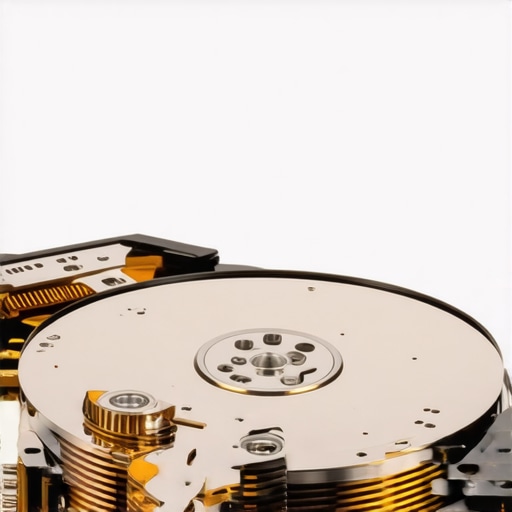
Stop Using Software to Rescue a Clicking Drive
Beyond the drive itself, there is a massive ‘oops’ factor involving laptop maintenance that most people ignore until it is too late. I often see clients who live with a small hairline fracture on their display for months. However, why a cracked laptop screen can eventually damage your motherboard is a nuance that can save you a thousand-dollar repair bill. A crack compromises the structural integrity of the display housing, which puts uneven tension on the delicate LVDS video cable. Eventually, that cable frays or shorts out, sending a surge directly into the logic board. It is never just a cosmetic issue; it is a ticking electrical hazard.
Does your current IT provider hide behind an overseas help desk?
This is a sophisticated trap many growing companies fall into when signing their first service contracts. You think you are getting a deal, but you need to watch for red flags in your managed IT service agreement that signal future costs. Identifying the sign your IT support company is outsourcing your help desk overseas is vital because it directly impacts your data sovereignty and security response times. True expertise isn’t just about ‘fixing’ things; it’s about managed IT strategies to keep your business secure in 2025 through proactive local audits and hardware lifecycle management. Have you ever fallen into the trap of trying to ‘software fix’ a clear hardware problem? Let me know in the comments.
I have spent years building a toolkit that goes beyond just a basic screwdriver and a prayer. When you are elbow-deep in a server rack or trying to delicately pry open a chassis, the quality of your gear determines whether you solve the problem or create a new one. I always keep a specialized non-marring pry tool in my bag for those tricky cases; it is the secret to following laptop screen repair DIY tips for clearer displays without snapping the plastic bezel clips. If you have ever felt that sickening ‘crack’ of a plastic tab breaking, you know exactly why I am so protective of my spudgers. Beyond the physical tools, I rely heavily on preventative diagnostics. I am talking about catching issues before they require the power of data recovery tools to bail you out of a disaster. For me, a reliable torque driver and a fresh tube of high-conductivity thermal paste are non-negotiable items for any tech-focused workspace.
Read the Warning Signs Before the Drive Dies
Software is your first line of defense in hardware maintenance. I run a daily script that checks the S.M.A.R.T. status of every drive on my network. You need to understand the risk of ignoring that SMART status bad warning on your PC because it is the digital equivalent of an engine light flashing on your dashboard. According to the comprehensive hard drive reliability reports published by Backblaze, specific metrics like ‘Reallocated Sector Count’ are often the most accurate predictors of a total mechanical failure. If those numbers start climbing, I don’t wait for a crash; I migrate the data immediately. This proactive approach is a cornerstone of managed IT strategies to keep your business secure in 2025. It is much cheaper to replace a $100 drive today than it is to pay for emergency services after the hardware component that causes the most blue screens of death finally gives up the ghost.

How Can I Keep My Hardware Running for Five Years or More?
Longevity is not about luck; it is about environment and oversight. I tell my clients that heat is the silent killer of every professional workstation. You can significantly extend your hardware life by mastering tips for troubleshooting laptop screen problems seamlessly before they escalate, such as recognizing when a backlight is drawing too much power. If you are scaling a business, look into effective managed IT solutions for growing companies to ensure someone is monitoring your thermals remotely. I also recommend a deep-cleaning schedule every six months. A simple can of compressed air and a microfiber cloth can prevent you from needing laptop screen replacement step-by-step repair guide instructions due to heat-related component failure. In the future, I expect we will see even more AI-driven predictive maintenance tools that can tell you a fan is going to fail three weeks before it actually starts buzzing.
Stop Guessing and Start Monitoring Today
If you want to take your maintenance to the next level, my advanced tip for you is to dive into your system’s event logs tonight. Look for ‘Disk’ or ‘Whea-Logger’ errors. These are the whispers of a failing system. If you see them, don’t panic, but do start looking for data recovery secrets every business should know today so you are prepared. Even if you aren’t an IT pro, learning troubleshooting common computer repair issues effectively is a skill that pays dividends. I’ve seen small offices save thousands just by having one person on-site who knows how to identify a dying backlight before your screen goes dark. Check your logs, tighten your screws, and keep your fans clean. Your future self will thank you when your server stays silent and your screen stays bright on a busy Monday morning.
Hard Lessons I Learned on the Server Room Floor
Over the years, I have realized that a silent office is usually a productive one, but silence can also be deceptive. One of the most painful moments of my career was ignoring a rhythmic ticking because I was ‘too busy’ to open the case. That ticking was the actuator arm of a drive failing, and it cost us three days of productivity. I have learned that proactive listening is a skill just as valuable as coding or network configuration. Another lightbulb moment was discovering that heat does not just slow things down; it permanently degrades the silicon. If you treat your hardware like a disposable appliance, it will treat your data with the same lack of respect. Lastly, remember that physical maintenance is the best insurance policy you never have to pay a premium for. Don’t wait for a crash to start researching data recovery secrets every business should know today.
#IMAGE_PLACEHOLDER_E#
My Go-To Kit for Hardware Emergencies
I do not just rely on my ears; I use a specific set of tools to keep things running. I highly recommend keeping a copy of the Backblaze Drive Stats reports bookmarked; their real-world data on which drives fail helps me choose the right replacements. For physical work, a high-quality precision driver set is essential for any computer repair for beginners project. I also swear by specialized diagnostic software to keep a constant eye on that critical SMART status. Finally, I always have a link ready for effective managed IT solutions for growing companies because even as a pro, I know that having a dedicated team monitoring your environment is the ultimate safety net.
Secure Your Digital Foundation Today
Taking care of your office hardware is not a chore; it is an investment in your peace of mind. By addressing that ‘morning buzz’ and staying ahead of component wear, you are ensuring your business remains resilient against the unexpected. Whether you are performing a simple fan replacement or implementing managed IT strategies to keep your business secure in 2025, every step you take builds a more stable future. Don’t wait for the silence of a dead server to realize the value of your gear. Start listening to what your machines are telling you today, and you will find that computer repair becomes a rare necessity rather than a constant crisis. Have you ever had a piece of hardware give you a warning sign that you totally ignored until it was too late? Let me know in the comments below!