

I’ll never forget the sound. It wasn’t a splash; it was a sizzle. One minute I was finishing a client’s proposal, and the next, my lukewarm Americano was surging through the keyboard of my MacBook Pro. I did what most people do—I panicked. I flipped it over, wiped it down, and then I made the ultimate rookie error. I shoved it into a five-pound bag of Jasmine rice and waited. If I could go back in time, I’d slap that bag of rice out of my own hands. By the time I realized that the move that prevents a small coffee spill from killing your entire laptop involves immediate power-down and a specific cleaning process, the corrosion had already started its slow march across my logic board. I spent three days praying to the rice gods, only to find a bricked machine that smelled like coffee and starch. Today, I’m going to show you how to bypass that sinking feeling and get your data back, even when the power button feels like a useless piece of plastic.
Stop Reaching for the Rice Bag Immediately
We’ve all heard the myth. “Just put it in rice, it’ll draw the moisture out!” It sounds like a miracle cure, but in my experience, it’s closer to a funeral rite. Rice doesn’t pull moisture from inside sealed components; it just gets starch and dust stuck in your ports while the water continues to eat your circuits from the inside out. When I finally gave up on the rice trick, I realized I had to learn the real data recovery secrets if I ever wanted to see my family photos again. The technical reality is that liquid damage creates conductive bridges between pins that should never touch. According to the repair experts at iFixit, corrosion begins the second the liquid makes contact with a powered circuit, meaning every minute you wait is a gamble with your SSD. If you’ve already had a spill, have you noticed any weird green crust forming around your ports yet?
Is it Truly Possible to Save Your Data After a Heavy Soak?
You might be sitting there looking at a dark screen, feeling that pit in your stomach, thinking your work is gone forever. Skepticism is healthy here, especially with newer Macs where the hard drive is soldered directly to the motherboard. But here is the thing: the data is rarely “gone” just because the laptop won’t turn on. The information lives on the NAND chips, and unless those chips were physically cracked, there is almost always a path to recovery. I’ve seen boards that looked like they spent a decade at the bottom of the ocean still give up their files once the right power rails were bypassed. My early mistake was assuming that a dead screen meant a dead drive. It doesn’t. You can often rescue files from a laptop with a damaged motherboard by using specific hardware bridges or external readers.
The Truth About Professional Recovery vs. DIY
Before we dive into the nitty-gritty steps, we have to be realistic about when to stop. If you have critical business data that isn’t backed up, sometimes why drive savers remains the only choice for physically damaged drives becomes the conversation you need to have with your wallet. But for the brave souls who want to try the neighborly advice first, there is a middle ground between doing nothing and spending three grand at a lab. We are going to look at how to safely clean the board with 99% isopropyl alcohol and how to use another Mac to potentially wake yours up just long enough to drag and drop those folders. Stick with me, because we’re about to turn that expensive paperweight back into a data source.
Kill the Power Source Before It Kills Your Files
The biggest mistake I see isn’t the spill itself; it’s leaving the battery connected. Even if the laptop is “off,” power is still trickling through the board, waiting for a drop of liquid to bridge a high-voltage line to a data pin. I remember working on a Dell XPS where the owner had dried it perfectly, but never popped the bottom cover to inspect the internals. By the time it reached my desk, a tiny amount of moisture under a power management chip had caused a “slow burn,” turning the logic board into a charred, irreparable mess. To avoid this, you must physically disconnect the battery immediately. This is where computer repair for beginners-avoid costly mistakes starts: don’t just hold the power button—crack the case and pull the plug. Once the power is gone, the chemical reaction of electrolysis and corrosion slows down significantly, buying you the time needed to actually save your data.
Scrub Away the Corrosion with High-Proof Alcohol
Water doesn’t just dry and disappear; it leaves behind minerals and salts that act like tiny conductors. If you see green or white crusty spots on the motherboard, that’s your data dying in real-time. I use 99% isopropyl alcohol and a soft-bristled toothbrush to gently scrub the affected areas. It feels wrong to “wash” a circuit board, but it’s the only way to neutralize the contaminants. This is a critical part of troubleshooting common computer repair issues effectively. If the liquid was sugary—like soda or that Americano I mentioned earlier—the alcohol will help break down the sticky residue that simple air-drying leaves behind. This process is often how managed IT solutions streamlining operations for small businesses handle emergency hardware recovery when a workstation takes a hit.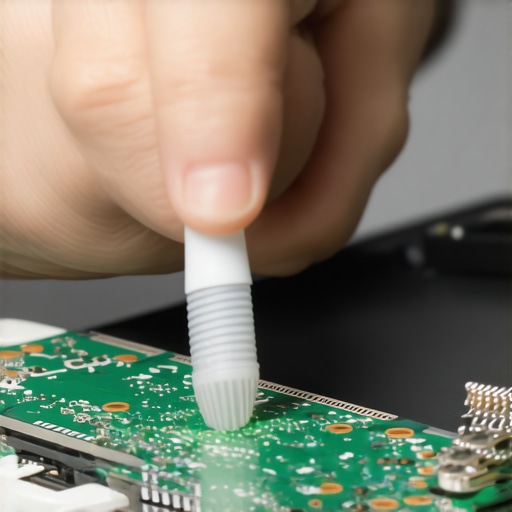
Use Target Disk Mode to Bridge the Gap
If your Mac still shows some signs of life—maybe the fans spin or it chimes—but won’t boot to the desktop, you might be able to use Target Disk Mode. By connecting your damaged machine to a healthy Mac via Thunderbolt, the damaged one acts like a simple external hard drive. This is one of the most effective the power of data recovery tools-what you need to know. However, if the board is too far gone to power on, you’ll need a hardware bridge. For older models, you can simply pull the SSD and put it in an enclosure. For newer ones with soldered storage, you might need a specialized tool like the “Lifeboat” connector found on some 2016-2017 MacBook Pro logic boards. Knowing how to rescue files from a laptop with a damaged motherboard often means looking for these hidden ports that bypass the standard power sequence.
Don’t Let a Dead Screen Fool You
Sometimes the reason you can’t get your data is simply a shorted keyboard or a dead screen masquerading as a dead motherboard. I once spent two hours trying to “recover” a drive only to realize the laptop was perfectly fine, but the the first thing to check when your laptop screen goes white was actually a corroded display cable. By plugging into an external monitor and using an external mouse, the “dead” laptop came right back to life. Don’t assume the worst until you’ve bypassed the peripherals and tried a direct connection to the internal storage components. For many, this is the moment they realize they need a more robust strategy, which is why managed IT is a game changer for growing companies that can’t afford a single spill to stop their operations dead.Let’s dig deeper into the psychology of a tech emergency. Most people assume that if the software can’t see the drive, the drive is dead. But in my years of doing this, I’ve found that the hardware often fails in ‘layers.’ One of the biggest traps you can fall into is the DIY software loop. When a drive starts clicking or failing after a spill, running ‘free’ recovery software is like asking a marathon runner with a broken leg to keep going. These tools hammer the drive with intense read requests, often causing the read/write heads to physically scrape the platters. This is exactly the danger of using free file recovery tools on a failing mechanical drive; you might get 10% of your files back before the drive permanently seizes up. Then there is the myth that ‘the cloud has my back.’ If you are running a business, relying solely on a consumer-grade sync service is a recipe for disaster. I’ve seen companies lose weeks of work because a sync error overwrote a ‘clean’ file with a ‘corrupted’ version during a hardware crash. This is the reason your managed IT provider needs a disaster recovery plan for you that includes versioning and off-site, immutable backups. It isn’t just about having the data; it’s about the speed of recovery. Have you ever fallen into this trap? Let me know in the comments.
Could a cracked screen actually kill your entire system?
It sounds like a stretch, right? How does a crack in the glass affect the processor? Here is the nuance: modern displays carry high-voltage lines for the backlight. When a screen is physically compromised, those tiny copper traces can shift or bridge. I’ve seen cases where a simple hairline crack led to a short circuit that sent 19 volts straight into the CPU’s data rail. This is why a cracked laptop screen can eventually damage your motherboard. It’s not just a cosmetic issue; it’s a potential electrical hazard for the most expensive parts of your machine. 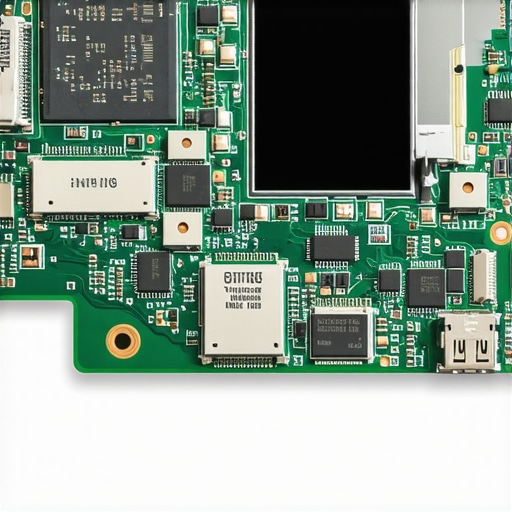 Professional data recovery firms like Kroll Ontrack emphasize that ‘logical’ errors are frequently symptoms of ‘physical’ degradation. If you notice the risk of ignoring that smart status bad warning on your pc, you are seeing the drive’s internal firmware trying to warn you that the physical media is literal molecules away from failure. In a professional environment, this is exactly why your managed IT service should be doing regular security audits. They should catch these hardware warnings months before you’re stuck staring at a black screen and a puddle of spilled coffee. Don’t wait for the sizzle; check your hardware health today.
Swap the Rice for an Ultrasonic Cleaner
If you are serious about moving beyond the hobbyist level of repair, you need to invest in the right gear. After a spill, the most critical tool in my shop is a high-frequency ultrasonic cleaner filled with specialized solvent. While the alcohol-and-toothbrush method works for surface-level grime, it cannot reach the minerals trapped underneath the Ball Grid Array (BGA) chips where the real damage hides. Niche experts like Jessa Jones from iPad Rehab have long championed this ‘deep clean’ philosophy: if you don’t remove the corrosion from under the chips, the device is a ticking time bomb. This is the heart of troubleshooting common computer repair issues effectively. I personally use the Branson 3800 series because its sweep frequency ensures every nook of the board gets hit without damaging delicate components. 
How do I maintain my laptop’s health over time?
Prevention isn’t just about avoiding coffee; it is about consistent hardware hygiene. At least once a year, you should open the bottom casing and use compressed air to blast out the cooling fins. I’ve found that how to clean a laptop fan without pushing dust deeper inside is the single most effective way to prevent thermal throttling and motherboard warping. Furthermore, pay attention to your SSD’s health. I recommend using a tool like DriveDx to monitor SMART attributes. If you see ‘reallocated sectors’ climbing, you are looking at the risk of ignoring that smart status bad warning on your pc. In the world of data recovery secrets-expert-techniques-to-save-your-files-fast, the best recovery is the one that happens while the drive is still spinning.
Why Managed IT Is the Only Way to Scale
As your business grows from one laptop to twenty, you can’t be the person scrubbing motherboards with a toothbrush anymore. You need systems that predict failure before it happens. This is why managed IT is a game changer for growing companies. A solid provider uses Remote Monitoring and Management (RMM) tools to catch a failing cooling fan or a bulging battery before it causes a fire or a data catastrophe. We are moving toward a future where AI-driven predictive maintenance will tell us exactly which capacitor is likely to fail three months before it actually pops. If you aren’t using effective managed IT solutions for growing companies, you are essentially playing Russian Roulette with your uptime. Don’t just fix problems; build an infrastructure that prevents them. I challenge you to download a hardware monitor today and check your current CPU temperatures while under load—if you’re hitting 90°C, it’s time for a repaste.
What Liquid Damage Taught Me About Tech Resilience
After years of scrubbing logic boards and chasing lost partitions, I’ve realized that the ‘sizzle’ of a spill isn’t necessarily the end of the world—it is just the start of a very high-stakes race. If you are struggling to decide whether to invest in a fix, I recommend reading up on how to choose between repairing an old workstation and buying a new one to see if the effort matches the value. My biggest lightbulb moment was realizing that data recovery is a physical process, not a software miracle. You cannot ‘download’ a fix for a corroded circuit. Furthermore, I learned that the risk of running your core business operations on end-of-life software or hardware is that when things break, there are no replacement parts left to find. Always have a backup plan that doesn’t rely on luck.
Where I Go When Things Get Complicated
I don’t expect you to have an ultrasonic cleaner in your kitchen, so here is the toolkit I personally rely on when my own gear hits the fan. For teardowns and repair guides that are actually accurate, I never deviate from the crowdsourced wisdom at iFixit. For monitoring the ‘pulse’ of my storage, I use DriveDx to stay ahead of the curve. If you are running a small team, you should also realize why your small business shouldn’t rely on a single consumer-grade router or basic external drive for your only backup. Finally, if the chips are truly down and the drive is clicking, DriveSavers is the only lab I trust with a client’s life work. #IMAGE_PLACEHOLDER_E#
Building a Disaster-Proof Future
The goal of this guide wasn’t just to help you save a few files today; it was to change how you interact with your technology forever. We live in a world where our entire lives are digitized, yet we treat our hardware like it’s invincible. By moving toward effective managed IT solutions for growing companies, you can stop being the person who panics over a coffee cup and start being the person who simply restores from a cloud image in twenty minutes. You have the tools, the knowledge, and the path forward. It’s time to take control of your data recovery secrets and ensure your digital legacy stays intact. Have you ever tried a DIY repair that actually worked, or did the rice fail you as badly as it failed me? Let me know in the comments below!