

I was three hours deep into a complex project, the kind where you finally find your rhythm, when the screen suddenly flashed that haunting, sickly shade of blue. My heart sank. No save button could rescue me now. It is a visceral kind of frustration, isn’t it? That dreaded Blue Screen of Death (BSOD) usually feels like a death sentence for your hardware, but more often than not, it is just one tiny, rebellious stick of memory causing the chaos. I remember my first big repair fail—I actually replaced an entire motherboard because I was convinced the board was toast, only to realize later it was a single 8GB stick of RAM that had gone rogue. I wasted three hundred dollars and a whole weekend because I didn’t know how to isolate the problem. We are not going to let that happen to you. Today, I am going to show you how to hunt down that one faulty module so you can get back to work without nuking your bank account. If you are just starting out, you might want to look at computer repair for beginners to avoid the same expensive traps I fell into.
Stop Guessing and Start Testing Your Memory
Troubleshooting hardware can feel like searching for a needle in a haystack, but troubleshooting common computer repair issues effectively is all about the process of elimination. When your system crashes with codes like ‘MEMORY_MANAGEMENT’ or ‘DATA_BUS_ERROR,’ your PC is essentially screaming at you that it can’t rely on its short-term memory. Interestingly, hardware failures involving memory modules are among the top causes of Windows kernel-mode crashes, often triggered by minor voltage fluctuations or simple wear and tear.
Is poking around inside my PC actually worth the risk?
Many of my neighbors ask me if they are going to fry their entire system just by touching the RAM. It is a totally valid fear! But as long as you follow the right steps on how to safely upgrade your RAM, the risk is incredibly low. You are essentially just swapping out parts that are designed to be moved. Have you ever been mid-game or mid-presentation only to have your computer decide it’s had enough? It’s time we fix that for good. Before we dive into the heavy-duty software tools, we need to talk about the physical ‘one-by-one’ method, which remains the most reliable way to catch a liar in your memory slots. Unlike a memory leak that is slowing down your workstation through software, a physical hardware failure requires a hands-on approach.
Strip the System Down to the Bare Essentials
Before you touch a single component inside your case, you need to ground yourself. Static electricity is the silent killer of silicon. I once worked on a high-end editing rig where the owner had cleaned the interior with a standard vacuum cleaner. The resulting static discharge didn’t just kill the RAM; it fried the memory controller on the CPU itself. To avoid this, use an anti-static wrist strap or at least keep your hand on the metal chassis while the PC is plugged into a grounded outlet (but turned off). When you are ready, start by removing all but one stick of memory. If you have four slots, this is where the detective work begins. You are looking for the ‘One-Stick Miracle.’ If the computer boots and runs perfectly with stick A, but crashes instantly with stick B, you’ve found your ghost. This method is often the core solution for how to fix a desktop that beeps but wont show a picture because a bad module can prevent the Power-On Self-Test (POST) process entirely.
Why You Must Listen for the Click
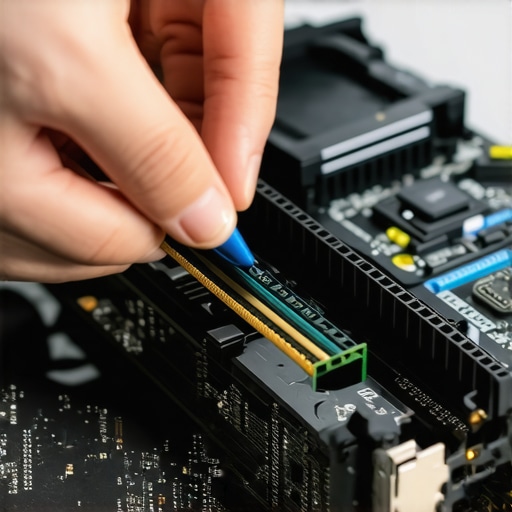 Think of RAM like a bridge. Every data packet crossing it needs a solid floor. A faulty module is like a bridge with a missing plank; most of the time you are fine, until you step exactly where that plank is missing. This is exactly why you might see a computer that freezes every time you open Chrome. Chrome is a notorious memory hog, and it is likely hitting that ‘missing plank’ in your hardware more often than lighter applications. When re-inserting your modules during testing, you must apply firm, even pressure until the side tabs click into place. I have seen countless ‘broken’ PCs that were fixed simply by reseating the memory. If the tabs aren’t locked, the connection is intermittent, which can even cause physical arcing. If your case is making weird noises while you tinker, check why your computer case is buzzing and how to find the vibration to ensure it is not just a loose mounting screw or a fan cable hitting the RAM heat spreader.
Isolate the Culprit Using the Process of Elimination
If the system crashes regardless of which stick is installed, you are likely looking at a bad motherboard slot rather than bad RAM. To test this, move your known ‘good’ stick to a different slot and repeat your stress tests. If the crashing stops, you’ve isolated a dead channel on the board. This is a common realization when troubleshooting common computer repair issues effectively. You have to be methodical. I remember a client who insisted their RAM was fine because the PC ‘ran okay most of the time.’ I ran a specialized diagnostic for six hours, and it found three errors in the final thirty minutes. Those three tiny errors were silently corrupting their database backups, making data recovery secrets expert techniques to save your files fast their only hope after a month of hidden data rot. Identifying these errors early prevents the nightmare of trying to salvage files from a drive that has been written to with ‘garbled’ memory.Everyone tells you to run a software diagnostic tool and walk away, but in my experience, software can be remarkably gullible. I’ve seen RAM modules pass a ten-hour stress test only to crash the second the user opened a heavy CAD file. Why? Because most tools test for logical errors, not thermal expansion issues. When the stick gets hot, the circuits expand, and that’s when the ‘ghost in the machine’ appears. A 2009 study by Google researchers found that DRAM error rates are orders of magnitude higher than previously reported, often triggered by environmental factors that standard bench tests simply don’t replicate. If you are seeing a laptop screen that shows static like an old tv, don’t automatically assume the panel is dead. The ‘oops’ factor here is assuming the most expensive part is broken. Often, it’s just a poorly seated ribbon cable or a power delivery issue on the motherboard. Have you ever spent money on a part only to find out it wasn’t the problem? Let me know in the comments.
Software Won’t Always Catch a Liar
Trusting a passing score on a memory test as gospel is a rookie mistake. Professional technicians know that transient errors—those that only happen under specific loads—are the real killers. If you are managing your own hardware, you might be tempted to ignore a single crash every few weeks, but that is a dangerous game. This is exactly how bit-rot happens. Your RAM might ‘pass’ a test but still be flipping a single bit while you save a document, leading to silent corruption. This makes data recovery secrets expert techniques to save your files fast your last line of defense when your files suddenly refuse to open. If you are running a company, the ‘oops’ factor is even larger; relying on DIY fixes instead of effective managed IT solutions for growing companies can lead to catastrophic data loss that no backup can fix because the backup itself was corrupted at the source.
Can a failing power supply mimic a memory error?
Absolutely. If the voltage ripple to your RAM slots is too high, the memory will lose its ‘state,’ causing a crash that looks identical to a hardware failure. This is why troubleshooting common computer repair issues effectively requires looking at the system as an ecosystem, not just a collection of parts. It is the same logic behind the risk of ignoring a clicking external drive; if you wait until it fails completely, you’ve missed the window for a cheap fix.  When you’re working with high-resolution panels, remember that laptop screen repair DIY tips for clearer displays often starts with checking the driver stability before touching a screwdriver. Stop the ‘parts cannon’ approach and start analyzing the symptoms through the lens of power and heat.
Build a Pro-Grade Toolkit That Never Lies
One thing I’ve learned from years of data recovery is that the best tool isn’t always the most expensive; it’s the one that gives you the most granular data. When I’m dealing with a system that refuses to behave, I reach for a bootable environment like Hiren’s or a dedicated Linux distro to bypass the OS entirely. This is where the power of data recovery tools what you need to know becomes evident. If the hardware fails in a clean environment, you know it’s a physical issue, not a Windows update gone wrong. For my business clients, we move beyond individual tools and into the realm of how managed IT can elevate your business security in 2025 by implementing real-time telemetry.
How can I keep my hardware healthy for the long haul?
Maintenance isn’t a one-time event; it’s a rhythm. Every six months, I recommend a deep dive into your system’s thermals and voltages. It’s not just about cleaning dust; it’s about verifying that your power delivery is stable. You need to know how to spot a failing power supply before it fries your motherboard because a PSU that is slowly drifting out of spec will eventually take your RAM or your SSD with it. I personally use HWInfo64 to monitor ‘Whea Errors’ in the background. If you see those numbers climbing, your hardware is struggling to maintain its integrity. This proactive stance is the cornerstone of managed IT solutions streamlining operations for small businesses. 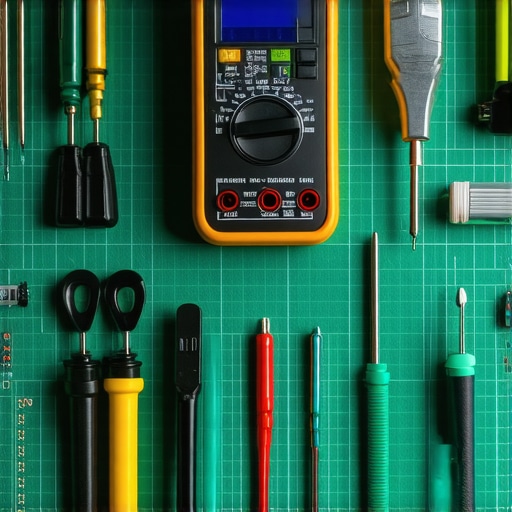
Stay Ahead of the Curve with Managed Monitoring
The shift we are seeing in the industry, and where I predict we’re heading by 2030, is toward predictive AI failure analysis. We are moving away from ‘it broke’ toward ‘it’s going to break in 14 days.’ According to technical insights from Puget Systems, stress-testing components during the initial build phase can reduce long-term failure rates by up to 20% by catching ‘infant mortality’ issues in silicon. If you’re running a growing company, waiting for a crash isn’t an option. You need data recovery secrets every business should know today to ensure that even when a component inevitably hits its end-of-life, your operations don’t skip a beat. Stop treating your computer like a toaster and start treating it like a high-performance engine that requires tuning. My challenge to you today: download a hardware monitor like HWInfo64, check your 12V rail stability under load, and see if your PSU is actually delivering what it promised. If you’re unsure about the results, don’t ignore the warning signs. Keep digging until you know your data is safe.
The Hard Truth About Memory That Only High-Volume Techs Know
The biggest mistake I see isn’t failing to find the problem; it’s stopping the search too soon. Most people run a quick scan, see a green bar, and assume their hardware is healthy. But memory is temperamental. It changes with heat, vibrations, and even the age of your power supply. If I’ve learned anything from computer repair for beginners, it’s that a ‘passed’ test doesn’t always mean a ‘fixed’ PC. I’ve had sticks of RAM that only threw errors when the room temperature hit 75 degrees. You have to be willing to doubt the software and trust your own methodical testing.
Another hard truth: brand names don’t guarantee immunity. I’ve seen premium, expensive modules fail right out of the box while generic sticks lasted a decade. This is why troubleshooting common computer repair issues effectively requires a mindset of skepticism. Don’t be afraid to pull parts and swap slots; your hardware is more resilient than you think. If you’re managing a team, this is where managed IT solutions streamlining operations for small businesses becomes a lifesaver, as professional monitoring catches these ‘silent’ failures before they turn into a full-blown office shutdown.
My Favorite Tools for Fighting Hardware Ghosts
When you’re ready to stop guessing, you need a toolkit that provides real-time data. I never start a repair without HWInfo64 because it shows me the ‘WHEA’ errors that Windows usually hides. For a deep, boot-level scrub, MemTest86 is still the gold standard for finding those specific ‘missing planks’ in your memory bridge. If things have already gone south and your files won’t open, I rely on data recovery secrets expert techniques to save your files fast to ensure the client doesn’t lose their life’s work. I trust these tools because they don’t sugarcoat the results; they give me the raw, ugly truth about the state of the silicon.
Take Control of Your Silicon
You don’t need a degree in electrical engineering to master computer repair. You just need patience and a process. The Blue Screen of Death isn’t an ending; it’s a conversation your computer is trying to have with you. By following the one-stick-at-a-time method and keeping an eye on your system’s health, you’re not just fixing a machine—you’re building the confidence to handle any digital curveball thrown your way. Have you ever discovered a hardware fault that completely surprised you? Let me know in the comments below.