

I sat there, staring at a blinking red light on the server rack while my phone blew up with messages from angry staff. We had an “unlimited” IT support contract. It sounded like a dream—one flat monthly fee and all our problems would vanish. But when I called my provider, the voice on the other end calmly explained that “unlimited” didn’t cover emergency weekend onsite visits. I felt like I’d been sold a “waterproof” tent that only worked when it wasn’t raining. It was a $3,000 mistake that I still kick myself for making.
Why ‘Unlimited’ Usually Has a Hidden Ceiling
I want to save you from that sinking feeling in your gut. Many business owners see the word “unlimited” and assume it covers everything from a broken laptop screen to a full-scale network collapse. In reality, these contracts are often “all-you-can-eat” only within very specific, narrow hours or conditions. It’s a classic bait-and-switch that relies on you not reading the fine print. I’ve seen companies think they were getting effective managed IT solutions, only to find out their provider didn’t even include basic security audits in the flat fee.
Is an Unlimited Plan Actually Too Good to Be True?
You’re right to be skeptical. If a provider offers to fix every single problem for a low flat rate, how do they make money? They do it by limiting the types of problems they solve or by making it so hard to get a technician that you give up. I once spent four days waiting for a response because our “unlimited” tier was deprioritized behind their “premium” clients. This is why quarterly audits from your IT provider are non-negotiable; they keep the service honest. Have you ever felt like your IT support was “ghosting” you right when things broke? [image_placeholder]
Stop Bleeding Money on Slow Response Times
It sounds counterintuitive, but “unlimited” can be the most expensive way to run your business. According to Gartner, the average cost of IT downtime can reach up to $5,600 per minute. If your “unlimited” contract results in slow response times, you aren’t saving money; you’re bleeding it. I learned this the hard way when I ignored our disaster recovery plan and assumed the support team would just “handle it.” They didn’t. They handle the easy stuff. For the hard stuff, like when you need data recovery secrets for a business server, the “unlimited” clock often stops and the hourly billing starts. It’s similar to how some people ignore the fine print in Dell ProSupport Plus, only to realize their hardware isn’t covered for the specific accident that actually happened. I’m going to show you how to spot these traps before you sign on the dotted line.
Stop Falling for the Flat-Fee Fantasy
If you want to avoid the trap I fell into, you need to stop looking at the price tag and start looking at the Service Level Agreement (SLA). When a provider promises ‘unlimited’ support, they are usually betting that you won’t need them. To beat the house, you must demand a guaranteed response time in writing. I once worked with a small law firm that assumed their flat-rate plan covered everything. When their main workstation died, they were told the ‘unlimited’ queue had a 48-hour wait. They ended up paying an emergency fee anyway just to get back to work. You should specifically ask if onsite support is included for hardware failures or if you’ll be stuck learning computer repair for beginners while your billable hours vanish.
Check Your Response Time Guarantee Every Time
A real partner will tell you exactly how many minutes it takes for them to acknowledge a critical ticket. If they can’t commit to a four-hour window for major outages, run away. This is especially vital when you realize that why your managed IT provider should be doing quarterly audits is to prevent these emergencies from happening in the first place. These audits should cover everything from your backup integrity to whether or not your team is using generic chargers on expensive business laptops, which is a leading cause of motherboard shorts.
Get a Real Firewall and Stop Praying to the IT Gods
Most small businesses think the router provided by their ISP is enough. It isn’t. I’ve seen ‘unlimited’ support contracts rendered useless because the provider spent hundreds of hours cleaning up malware that a simple hardware appliance would have blocked. You need to understand why your company needs a hardware firewall instead of a basic router. Residential gear can’t handle the traffic or the sophisticated threats targeting your client data. 
The Nightmare of the Clicking Hard Drive
I’ll never forget the sound of a failing Western Digital drive in my own office five years ago. It sounded like a tiny hammer hitting a nail. Because I hadn’t verified our ‘unlimited’ backup was actually running, we had to resort to data recovery secrets that most people only learn when it’s too late. If you hear a click, stop everything. Do not try to reboot. Knowing how to pull data from a drive with a corrupted file system header is a skill you hope to never use, but it’s the difference between a minor hiccup and a total business collapse.
The Brutal Truth About Physical Hardware Neglect
Your ‘unlimited’ software support won’t help when your hardware is physically dying. I’ve seen offices where the server room was actually a broom closet with no ventilation. If you don’t know how to spot a failing power supply before it fries your motherboard, you are sitting on a ticking time bomb. Look for erratic restarts or a faint ozone smell. Similarly, if your staff is working on portables, make sure they know how to tell if your laptop battery is swelling under the trackpad. Ignoring these physical signs leads to ‘billable’ hardware repairs that your ‘unlimited’ contract will conveniently exclude.Most people believe that if their laptop screen stays dark, the entire machine is a paperweight. This is a classic misconception that leads to businesses wasting thousands on new hardware when a $50 part or a simple cable reseating could have solved it. In my experience, I’ve seen countless owners panic when they see a blank display, yet they don’t know how to tell if your laptop screen backlight is actually failing versus a total GPU death. If you can see a faint image when holding a flashlight to the glass, your data is fine and your computer is alive; it just needs a new backlight or inverter. This is the kind of nuance your ‘unlimited’ provider might skip because it’s easier for them to suggest a replacement than to perform a delicate repair.
The Deadly Screen Repair Mistake Most Beginners Make
Here is the ‘oops’ factor that kills more laptops than coffee spills: failing to disconnect the battery before opening the case. Even if the laptop is turned off, the motherboard still carries a ‘trickle’ charge. I’ve seen people follow a laptop screen replacement step-by-step repair guide perfectly, only to short out the motherboard because they didn’t pull the battery connector first. It’s a split-second mistake that turns a $100 screen fix into a $600 motherboard replacement. Always verify the first thing to check when your laptop screen goes white before you start unscrewing things, but never touch the internals while power is present.
Why Does Your New Screen Look So Blurry?
Many advanced users get frustrated when a replacement screen doesn’t match the original’s crispness. This is usually because they bought a ‘compatible’ part rather than an OEM-spec panel. If why your laptop screen resolution looks blurry on a high-end display is a mystery to you, check the EDID (Extended Display Identification Data) chip on the new panel. Cheap third-party screens often lack the correct color profiles, leading to a permanent yellow tint or grainy textures.
Software Won’t Save a Clicking Hard Drive
I need to be blunt: if you hear your drive clicking, stop using ‘recovery’ software immediately. Everyone says you can just download a tool and fix it, but if the failure is mechanical, running software is like trying to fix a flat tire by driving faster. According to a study by Kroll Ontrack, nearly 30% of data loss is caused by human error, but that number spikes when users try to DIY a recovery on a failing drive. You need data recovery secrets expert techniques to handle physical damage. 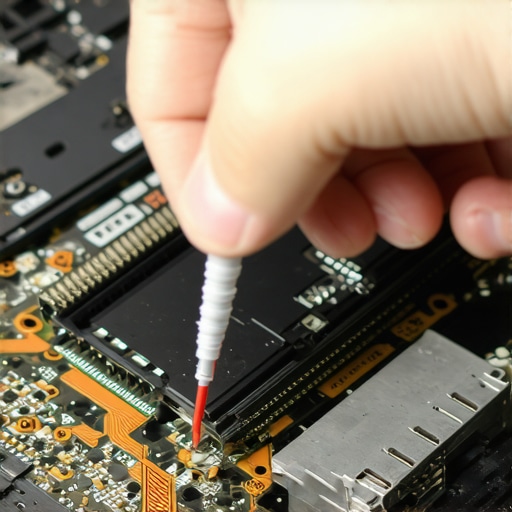 Using basic tools on a drive with a physical head crash will only scrape the platters and turn your files into dust. If you find yourself in this situation, how to pull data from a drive with a corrupted file system header is only relevant if the drive is spinning healthily. Have you ever fallen into this trap and lost files by trying to fix them yourself? Let me know in the comments.I stopped guessing years ago. If you’re serious about your hardware, you need a toolkit that matches your ambition. I personally swear by a FLIR thermal camera attachment for my phone. It’s the fastest way to find a shorted capacitor on a motherboard without poking around with a multimeter for hours. When a client says their laptop ‘feels hot,’ I can see exactly where the heat soak is happening. Most of the time, it’s just a clogged vent, and knowing how to clean a laptop fan without pushing dust deeper inside can save a machine from an early grave. I also recommend a dedicated SATA-to-USB bridge with its own power supply. When you’re dealing with a drive that is failing but still readable, you want a hardware-level connection that doesn’t rely on the host computer’s internal controller, which might time out. This is a staple for any technician who values their sanity.
How can you keep your equipment running for a decade?
It comes down to thermal management and power quality. I’ve seen $4,000 workstations killed by a $10 power strip. Use a true double-conversion UPS (Uninterruptible Power Supply) to ensure your gear gets ‘clean’ electricity. Beyond that, physical inspections are your best friend. Every quarter, I check our fleet for physical warping; you need to know how to tell if your laptop battery is swelling under the trackpad before it punctures and causes a fire. If the trackpad feels stiff or the casing looks slightly curved, pull that battery immediately.
Don’t Trust Your Software to Do the Hard Work
While I love automated tools, the power of data recovery tools only goes so far. I rely on the annual Hard Drive Stats from Backblaze to decide which drives to buy for our servers. Their specific 2023 report, which analyzed over 270,000 drives, revealed that while SSDs are generally more reliable, certain legacy 8TB mechanical models have failure rates nearly three times higher than their 12TB counterparts.  Following their data has saved our firm from at least three major batch failures in the last five years.
The Shift Toward Predictive Maintenance
We are moving into an era where IT isn’t about ‘fixing’ things anymore—it’s about ‘preventing’ the possibility of a break. In the next few years, managed IT strategies to keep your business secure in 2025 will rely heavily on AI-driven telemetry that predicts a SSD failure weeks before the first bad sector appears. Scaling your business means you can’t afford to have your lead designer offline for three days because of a flickering panel. By 2025, expect to see ‘Digital Twins’ of your hardware—software simulations that track wear and tear on components like fans and hinges. This allows you to schedule a replacement during a planned holiday rather than in the middle of a project deadline. If you’re still doing laptop screen repair at home, my advanced tip for today is to buy a dedicated anti-static mat. It sounds overkill until you fry a $300 logic board with a single spark from your sweater. Go grab one before your next repair—it’s the cheapest insurance you’ll ever buy.
The Most Expensive IT Lessons I Ever Paid For
Reflecting on a decade in the trenches, the biggest lightbulb moment wasn’t about a specific software patch, but about the value of time. If I could go back, I’d tell my younger self that preventative maintenance is always cheaper than a 2 AM emergency call. I’ve learned that “unlimited” usually means “limited by our schedule,” and that a $100 anti-static mat is worth more than its weight in gold when you’re doing laptop screen repair at home. Another hard truth? Never trust a drive just because it’s new. I’ve seen brand-new enterprise drives fail in forty-eight hours, which is why managed IT strategies to keep your business secure in 2025 focus so heavily on redundancy rather than just “good” hardware.
Gear and Data Sources That Save My Sanity
I don’t make a move without checking two things: my thermal camera and the latest reliability reports. If you want to dive deeper into the technical side, I highly recommend following the Backblaze Hard Drive Stats; they are the gold standard for knowing which hardware to trust with your livelihood. For tools, a high-quality iFixit kit and a dedicated SATA bridge are non-negotiable. If you are just starting out, check out my guide on computer repair for beginners to ensure you have the right mindset before you crack open a case. I also rely on the power of data recovery tools only as a last resort, always prioritizing a multi-cloud backup strategy first.
[image_placeholder_final]
Your Path to a Bulletproof Tech Strategy
Technology should serve your business, not hold it hostage. Whether you are fixing a flickering display or renegotiating a contract, remember that knowledge is your best defense against downtime. You now have the blueprints to spot “unlimited” traps and the confidence to handle physical repairs without panic. The future of your hardware depends on the small, proactive steps you take today. By implementing managed IT strategies to keep your business secure in 2025, you aren’t just fixing problems—you’re preventing them. Have you ever had an “unlimited” contract fail you during a critical deadline? Let me know in the comments below.