

I’ll never forget the acrid, metallic smell of 2:00 PM on a sweltering Tuesday in July. It wasn’t the scent of lunch; it was the smell of my main server rack trying its absolute hardest to melt through the floor. My office was humming with peak-hour activity—emails flying, orders processing, and the coffee machine working overtime—but our database was behaving like it was stuck in molasses. I realized, far too late, that I’d tucked our most critical hardware into a cramped broom closet with zero ventilation. I actually tried to “fix” it by pointing a cheap plastic desk fan at the intake vents and hoping for the best. Spoiler alert: it didn’t work, and I nearly lost our entire client history in one afternoon.
Stop the Heat from Killing Your Productivity
We’ve all been there—or at least, anyone who has ever tried to scale a business without a dedicated server room has. Thermal throttling isn’t just a fancy technical term; it’s your server’s way of screaming for help. When the internal temperature hits a certain threshold, the CPU intentionally slows down to prevent permanent hardware damage. For you, that means lag, software crashes, and frustrated employees. If you’ve been wondering why your office PCs are taking ten minutes to log in, the culprit might be a server that’s literally gasping for air. I made the classic mistake of thinking “it’s just a computer, it’ll be fine.” It wasn’t fine. I nearly fried an expensive motherboard because I ignored the basic laws of thermodynamics. Today, I’m going to show you how to stabilize those temperatures during your busiest hours, even if your “server room” is currently a repurposed pantry. We’re going to talk airflow, ambient temps, and those sneaky BIOS settings that can save your hardware. Have you ever walked into your server area and felt a wall of heat hit your face?
Does My Small Setup Really Need Professional Cooling?
You might be thinking that a five-figure HVAC upgrade is the only way out. It’s a common fear—the idea that if you don’t have a raised-floor data center, you’re doomed to failure. But here’s the reality: most throttling issues come down to poor placement and neglected maintenance rather than a lack of industrial power. According to a study by the Uptime Institute, nearly 30% of data center outages are caused by environmental factors like heat. For a small business, that number is likely much higher because we don’t have sensors everywhere. Before you start looking into effective managed IT solutions to outsource the problem, let’s see if we can’t fix the physical environment first. It’s often cheaper than you think.
Airflow is Your Best Friend When Things Get Busy
If your server is shoved against a wall, you’re essentially suffocating it. I spent years thinking that as long as the fan was spinning, things were okay. It turns out, recycling the same hot air over and over is just as bad as having no fan at all. You need a “cold aisle” and a “hot aisle,” even on a microscopic scale. Proper cable management isn’t just about looking neat for the boss; it’s about making sure air can actually reach the components that need it most. I once let a “nest” of ethernet cables block the front intake of our primary file server, and the temperature spike was enough to trigger a recursive reboot cycle that lasted three hours. When those peak hours hit, every cubic inch of airflow counts. If your server is gasping for air, no amount of computer repair for beginners knowledge will save you from the hardware degradation that follows. We need to look at how the room breathes, not just how the machine spins.
Get Your Hardware Off the Floor and Out of the Closet
Moving your server seems like a chore, but it is the single most effective way to drop internal temperatures by five to ten degrees instantly. Think of your server as a marathon runner; if you make them run in a sauna, they are going to collapse. I remember when I finally moved our main unit out of that ‘broom closet’ and onto a dedicated wire rack. I used a laser thermometer and saw the ambient temperature around the intake drop by 12 degrees in twenty minutes. If you cannot move the room, move the rack itself. Ensure there is at least six inches of clearance behind the exhaust fans. If you are still seeing performance dips, you might want to check the first sign your business server motherboard is about to fail because heat damage is cumulative and often silent.
Stop Using Your Server Case as a Dust Magnet
Dust is essentially a thermal blanket for your components. It settles on the heatsink fins and prevents the fan from actually touching the metal with cool air. Last autumn, I opened a client’s server and found enough pet hair and carpet fiber to knit a sweater. We had to perform a deep clean—much like the process for how to clean a laptop fan without pushing dust deeper inside—using compressed air and an anti-static vacuum. The result? The screaming fan noise stopped, and the ‘lag’ the employees were complaining about vanished. If you hear a constant mechanical drone, it is time to look at the reason your computer case is vibrating and making a hum.
Manage Your Cables Like Your Business Depends on It
I used to be a ‘shove it in and zip-tie it’ kind of guy. That worked until I realized that a thick curtain of power cables and Cat6 wires was blocking nearly 40% of the rear exhaust. Air needs a clear, unobstructed path to travel through the chassis. 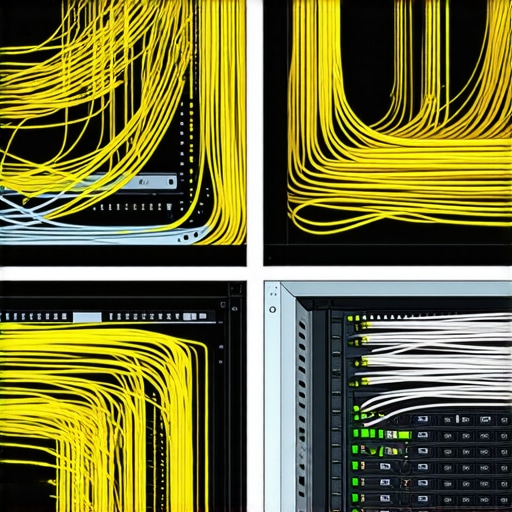 Use Velcro straps instead of plastic zip ties so you can easily adjust them without risk of cutting a wire. When you clear the ‘rat’s nest,’ you are not just being tidy; you are ensuring that the Power Supply Unit (PSU) isn’t choking. If the power supply gets too hot, it can fail spectacularly, so knowing how to spot a failing power supply before it fries your motherboard is your last line of defense against a total system blackout.
Check Your BIOS for Aggressive Fan Curves
Most servers ship with ‘silent’ or ‘balanced’ fan profiles. During a heatwave or a 2:00 PM rush, ‘silent’ is your enemy. Enter your BIOS settings and set your fans to a ‘Performance’ or ‘Full Speed’ curve. Yes, it will be louder, but it is the sound of your business staying online. I have seen businesses spend thousands on effective managed IT solutions only to realize the physical fix was a simple toggle in the system settings. It is also a good time to verify that your fans are actually spinning; if you have ever wondered why your computer feels hot but the fan isnt spinning, it could be a dead header on the board or a loose connection. Don’t let a $15 fan be the reason you lose a $5,000 server. Sometimes environmental factors like nearby appliances cause issues too, similar to how why your office wi-fi drops when the microwave is running, but heat is a constant battle that requires better hardware discipline than residential-grade gear allows.Heat is just the precursor to the ultimate nightmare: the silent failure of your data storage. I’ve seen so many business owners breathe a sigh of relief once their server cools down, only to realize the thermal stress has already corrupted their SQL database or shortened the lifespan of their SSDs. The biggest mistake I see? Relying on cloud syncing services as a substitute for a genuine recovery strategy. Most people think that because their files are in the cloud, they are safe. But sync is just a mirror. If a virus encrypts your local files, that mirror will happily encrypt the cloud version too. This is exactly why your business needs a disaster recovery plan before you need it. A true backup is immutable and versioned; it does not just copy your current mistakes into the ether.
The Dangerous Myth of the Free Recovery Tool
Let’s talk about the ‘Oops’ factor that keeps me up at night. I once had a client who heard a faint clicking coming from their NAS. Instead of shutting it down, they ran a ‘deep scan’ with a free recovery tool they found online. That software forced the read/write heads to drag across the platters for six hours, physically grinding the data into dust. In the world of professional recovery, we call this a ‘head crash.’ If you notice the risk of ignoring a clicking external drive, stop immediately. No amount of data recovery secrets expert techniques to save your files fast can fix a platter that has been turned into a circular scratch-pad. According to data from recovery specialists at Kroll Ontrack, physical drive failure and human error account for the vast majority of permanent data loss, yet most DIY attempts focus solely on software-level fixes that actually accelerate physical degradation.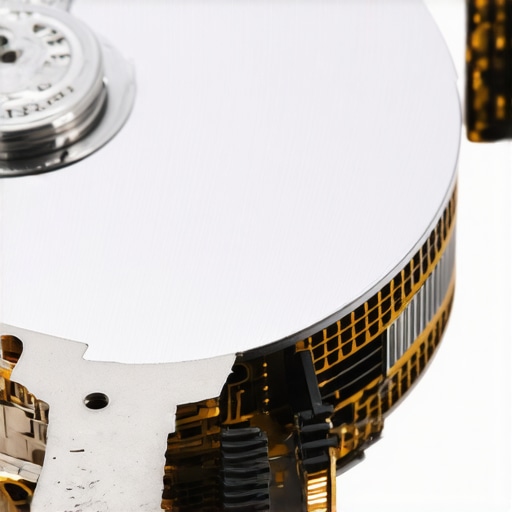
Is Your Managed Service Provider Actually Auditing Your Backups?
Many small businesses think that once they sign a contract for effective managed IT solutions, the ‘IT guys’ have everything handled. But here is the nuanced truth: many managed services are set-and-forget. If nobody is performing a ‘test restore’ every quarter, your backup is just a theoretical concept. You need to know why your managed IT provider should be doing quarterly audits because a backup job that reports ‘success’ can still be backing up empty folders or corrupted headers. I’ve stepped into offices where the managed IT had been failing for six months, but the dashboard showed green because the agent was only checking if the service was running, not if the data was valid. Have you ever fallen into this trap where you thought you were covered only to find the safety net was full of holes? Let me know in the comments. If you are dealing with hardware issues that feel more like ghosts than glitches, it might be time for troubleshooting common computer repair issues effectively. Sometimes the fix is a configuration change, but often, it requires managed IT strategies to keep your business secure in 2025 that anticipate these failures before the heat hits 2:00 PM again. Don’t wait for the smell of burning electronics to start learning how to recover a deleted folder from a network drive; the best time to audit your system was yesterday.I’ve realized that the difference between a business that survives a catastrophic crash and one that folds is usually found in the small, boring habits of maintenance. When I was starting out, I thought ‘repair’ was something you did when things broke. Now, I see it as a continuous process of prevention. If you’re tired of firefighting, you need to start looking at proactive monitoring. I personally swear by tools that give me a ‘health score’ for my hardware. For instance, I use CrystalDiskInfo on every workstation because it reads the S.M.A.R.T. data directly from the drive. If a drive shows even a single reallocated sector, I replace it immediately. You should too. Don’t wait for the blue screen; wait for the data to tell you it’s tired. This is exactly the power of data recovery tools what you need to know before a disaster strikes.
Stop Guessing and Start Monitoring
The key to long-term results isn’t buying the most expensive gear; it’s about consistent environmental and software audits. I tell my clients that if they aren’t looking at their checklist for moving your business to the cloud without data loss, they are likely sitting on a ticking time bomb of local hardware failure. According to the Backblaze 2023 Drive Stats report, the average failure rate for certain drive models can jump significantly after just four years of service. If you aren’t rotating your hardware or checking these stats, you’re playing Russian roulette with your database. You need a strategy that includes why managed IT is a game changer for growing companies—specifically, having a pro who watches those failure rates for you. 
How do I keep my systems running for the next five years?
Beyond the server rack, don’t ignore the daily peripherals that your team uses. I’ve seen entire offices grind to a halt because a laptop screen failed and the user didn’t know laptop screen repair diy tips for clearer displays or when to just call it quits and replace the panel. Maintaining health over time requires a ‘Hardware Lifecycle Plan’ where you budget for replacements before the warranty expires. Looking forward, I predict we are moving toward an era of ‘Predictive IT.’ Soon, your operating system won’t just tell you there’s an error; it will use AI models to predict that your fan will seize in three days based on subtle changes in vibration frequency. We are already seeing early versions of this in enterprise-grade monitoring.
Move Toward Predictive Maintenance Before it is Too Late
If you want to stay ahead, stop looking for the truth about unlimited backup plans for small businesses and start looking for a partner who offers effective managed IT solutions that prioritize uptime over recovery. My advanced tip for you this week: Download a hardware monitor today and check your CPU temps during your peak hour—if you’re hitting over 85°C, you’ve got a thermal problem that needs fixing before Friday. Don’t let a dusty heatsink be the reason you lose a week of productivity.
Hard Truths from the Trenches of IT
Looking back at my first server meltdown, I realized that technical knowledge matters less than consistent discipline. One lightbulb moment was discovering that a ‘green light’ on a backup dashboard doesn’t mean your files are safe; it only means the software didn’t crash. You must verify your data manually to avoid a catastrophe. Another realization was that heat damage is cumulative. Just because your server didn’t die today during a 90°F heatwave doesn’t mean its life wasn’t shortened by six months. Finally, I’ve learned that proactive maintenance is the only way to sleep through the night. Embracing managed IT solutions streamlining operations for small businesses allows you to focus on growth while the experts handle the environmental stressors. For more specialized tips, check out these data recovery secrets every business should know today to keep your assets protected.
My Personal Toolkit for Maximum Uptime
I don’t just guess when it comes to hardware health. I rely on a few specific resources that have never steered me wrong. First, CrystalDiskInfo is my go-to for monitoring hard drive health; it provides a clear warning before a drive fails. Second, I highly recommend keeping an infrared thermometer in your desk to check for hot spots in your rack that your internal sensors might miss. Third, I suggest reading the ultimate guide to data recovery after accidental deletion to understand the stakes of your daily operations. #IMAGE_PLACEHOLDER_E# These tools aren’t expensive, but the visibility they provide is priceless for any growing company.
Build the Business Infrastructure You Deserve
You’ve worked too hard to let a dusty fan or a neglected backup ruin your momentum. The steps we’ve discussed—improving airflow, managing cables, and auditing your backups—are the foundation of a resilient business. When you treat your hardware with respect, it returns the favor with years of reliable service. Don’t be afraid to take the first step today by simply checking your temperatures. Your future self will thank you for the peace of mind that comes with a stabilized server environment. Have you ever had a hardware failure that changed the way you look at IT maintenance? Let me know in the comments below!