

I still remember the sinking feeling in my gut when I walked into the office on a Tuesday morning and saw every screen displaying the same terrifying message: “Your files are encrypted.” I’d spent years thinking my little $80 router from the big-box store was plenty of protection. I mean, it had a password, right? I was wrong. Dead wrong. It turns out that relying on basic hardware is one of the biggest computer repair for beginners’ mistakes you can make when running a business. That day cost me three days of downtime, a hefty recovery fee, and a lot of gray hair. [IMAGE_PLACEHOLDER]
The Day My ISP Router Let Me Down
The truth is, most of us treat our office network like our home Wi-Fi. We plug in whatever the internet provider gives us and assume we’re safe. But your business isn’t a living room; it’s a target. I learned the hard way that residential-grade firewalls just don’t have the “brains” to catch sophisticated threats. When I finally sat down with a security pro, he showed me how easy it was for a bad actor to bypass my basic setup. My mistake was thinking that because I was a “small” company, nobody was looking for me. That arrogance almost killed my business. Today, I’m going to show you why a dedicated firewall appliance is the single most important piece of hardware you’ll ever buy for your office. We are going to move past the “set it and forget it” mentality and actually lock the front door.
Is a Dedicated Firewall Just an Overpriced Router?
I get it. You’re looking at the price tag of a hardware appliance and thinking, “My current router works fine, why spend the extra thousand bucks?” I asked the exact same thing until I realized that a standard router is just a traffic cop, while a dedicated firewall is a full-blown SWAT team. According to the Verizon Data Breach Investigations Report, nearly 43% of all cyberattacks target small businesses because our defenses are usually paper-thin. A dedicated appliance does something called “Deep Packet Inspection.” It actually opens up the digital envelopes entering your network to see if there’s a threat inside. Your home router? It just looks at the address on the outside and waves it through. My biggest blunder early on was thinking software antivirus was enough. It isn’t. Once a threat is on your local network, it’s often too late. You need managed IT strategies that stop the threat at the perimeter before it ever touches an employee’s laptop. Have you ever noticed a strange device on your network and wondered how it got there? It’s a chilling thought. If you’ve ever had that “wait, what is that?” moment while looking at your connected devices, learning how to spot a rogue device is a great skill, but a dedicated firewall is the wall that keeps them out in the first place. This isn’t just about “tech specs”; it’s about making sure a ransomware attack can’t encrypt your server and put you out of business. Have you ever checked your router’s log and felt overwhelmed by what you saw? Tell me your experience, and let’s get your office secured.
Stop Buying Your Security at the Grocery Store
Moving beyond a residential router means looking for a device that offers Unified Threat Management (UTM). Think of this as the difference between a simple deadbolt and a full-time security detail. I used to think I could handle this myself until I realized that residential-grade firewalls lack the processing power to actually scan data in real-time. A true business appliance doesn’t just pass traffic; it inspects every packet for malicious signatures. This is where you have to be direct: if your device doesn’t support sandbox inspection or SSL decryption, you are essentially blind to half the threats coming through your fiber line. Don’t let the technical jargon scare you off; you need hardware that can keep up with your bandwidth without creating a bottleneck. If you’ve ever wondered why your office VPN is slow, it’s usually because your hardware is choking while trying to encrypt data.
Segment Your Network Like a Sinking Ship
Imagine a submarine where every room is open to the next. One leak and the whole thing goes down. That is exactly how most small office networks are set up. You need to implement Virtual Local Area Networks (VLANs) immediately. This sounds complex, but it’s just digital internal walls. Your guest Wi-Fi should never, under any circumstances, be on the same segment as your server or your accounting computers. I learned this the hard way when a visitor’s malware-infested phone almost took down my entire payroll system. By isolating traffic, even if someone manages to bypass the front door, they are stuck in the hallway. This is a core part of managed IT strategies that keep a single infected laptop from becoming a company-wide disaster. 
How I Nearly Nuked My Server with a Bad Update
Last year, I tried to be the ‘tech guy’ and pushed a firmware update to our primary gateway without a backup plan. The update failed, the firewall bricked, and my team sat staring at blank screens for five hours. It was messy, embarrassing, and completely avoidable. This is why you must have a configuration backup and a failover strategy. Before you touch a single setting, ensure you know the move that protects your files when a Windows update fails or when your network hardware decides to give up. Now, I always keep a ‘warm’ spare—an identical firewall pre-loaded with the latest config—ready to swap in. It’s an extra cost, but it’s cheaper than paying five people to drink coffee for a whole afternoon while I scramble to fix a device.
Real Hardware Needs Constant Maintenance
Setting up a firewall isn’t a one-and-done task. Hackers are constantly updating their methods, which means your hardware needs to be updating its threat definitions daily. This is why I advocate for a professional touch; why your managed IT provider should be doing quarterly audits is simply about staying one step ahead. They can spot if someone has been trying to brute-force your login or if a rogue device has managed to find a gap. If you aren’t looking at your logs at least once a month, you aren’t secured—you’re just lucky. Remember, if things do go south, having data recovery secrets every business should know in your back pocket is great, but preventing the breach with a properly maintained perimeter is always the smarter play.
A lot of people think that once they’ve signed a contract with a technology firm, their worries are over. This is the biggest misconception in the industry. In my experience, Managed IT isn’t a safety net; it’s a proactive strategy. If your provider is just sitting back and waiting for you to call when a printer breaks, you don’t have Managed IT—you have an expensive janitor. The real value lies in managed IT strategies to keep your business secure in 2025, where the focus shifts from fixing broken parts to optimizing your entire workflow. According to the 2023 Cost of a Data Breach Report by IBM and the Ponemon Institute, companies with high levels of security automation saved nearly $1.76 million compared to those without. If your current setup doesn’t involve automated threat hunting, you’re already behind the curve.
The Managed IT Trap That Leaves You Vulnerable
Everyone says the cloud is the ultimate solution for security, but that is a dangerous half-truth. The “Oops” factor here is assuming the cloud provider is responsible for your data’s integrity. They aren’t. They are responsible for the infrastructure; you are responsible for the data. I’ve seen businesses lose everything because they didn’t realize why managed IT is a game changer for growing companies involves setting up third-party backups for cloud environments. If you aren’t doing quarterly audits with your managed IT provider, you’re likely paying for “security” that hasn’t been updated since the day it was installed.
Stop Wasting Money on Screen Replacements You Don’t Need
When a laptop display goes dark, the instinct is to order a new panel immediately. But here is a nuance most shops won’t tell you: it’s often not the screen. I recently had a client who was about to trash a high-end workstation because the display was dim. Before you spend a dime, you need to know how to tell if your laptop screen backlight is actually failing versus a blown fuse on the motherboard. Replacing a $200 screen when the issue is a $5 video cable or a motherboard capacitor is a classic mistake. If you see a faint image when you shine a flashlight on the glass, your screen is fine—your power delivery is the problem. This is where computer repair for beginners mistakes can get incredibly expensive very quickly.
Can You Still Pull Data From a Drive That the Computer Won’t See?
The most advanced challenge in our field is dealing with “invisible” hardware. When your PC doesn’t even recognize a drive is plugged in, most people give up. However, there are data recovery secrets every business should know today that go beyond standard software. If you’re dealing with the risk of ignoring a clicking external drive, you must stop immediately. That sound is a physical arm scraping the magnetic platters. No software on earth can fix that; it requires a clean-room environment. On the other hand, if the drive is silent but won’t mount, we can often use specialized hardware to bypass the operating system’s file manager and pull data from a drive with a corrupted file system header. 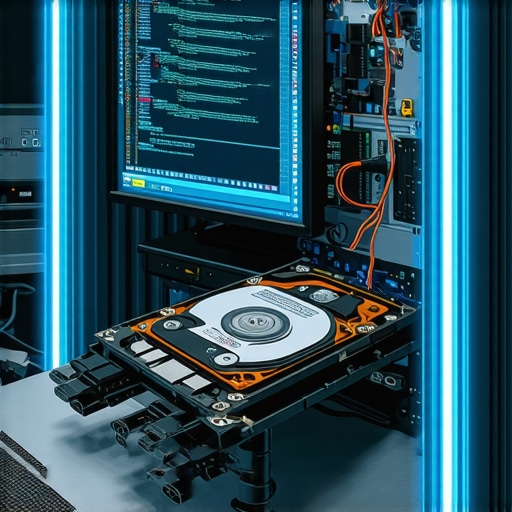
The Critical Recovery Step You Are Probably Skipping
One of the most nuanced mistakes I see is the “reboot and pray” method after a crash. If your system hangs while you’re working on a vital file, do not just hold the power button. This can finalize a corruption process that hasn’t finished yet. Knowing how to recover a word document after your PC crashed often depends on what you do in the first thirty seconds after the screen goes black. Have you ever fallen into this trap of thinking a simple reboot would solve a deeper hardware issue? Let me know in the comments. We need to move past the surface-level fixes and start treating our office tech with the professional precision it deserves.
I’ve learned that the ‘procision’ in professional IT doesn’t come from having the newest gear, but from how you treat the gear you already own. I used to be the guy who just bought a new laptop every two years because they ‘got slow.’ Then I realized I was just a victim of poor maintenance habits. If you want your hardware to last, you have to stop treating it like a disposable appliance. I personally swear by specialized diagnostic tools like CrystalDiskInfo for monitoring SSD health because Windows won’t always warn you before a drive hits its write limit. According to technical documentation from Seagate on S.M.A.R.T. monitoring, catching a pre-failure attribute can save you thousands in recovery fees. It’s why I’m so adamant about managed IT strategies to keep your business secure in 2025; it’s about watching those metrics so you aren’t surprised by a dead server on a Monday morning.
Clean Your Fans Before Your Motherboard Quits
You’d be shocked at how many ‘broken’ laptops are actually just suffocating. I’ve opened machines that looked like they were used in a dryer lint factory. Heat is the number one killer of silicon, and knowing how to clean a laptop fan without pushing dust deeper inside is a skill that can double the lifespan of your motherboard. When that fan is screaming, it’s not just annoying; it’s a cry for help. If you ignore it, you’re looking at a throttled CPU and eventually a blown power rail. I also make it a rule to avoid the ‘bargain’ bin for power; the truth about using generic chargers on expensive business laptops is that they often lack the ripple suppression needed to keep your battery from swelling. 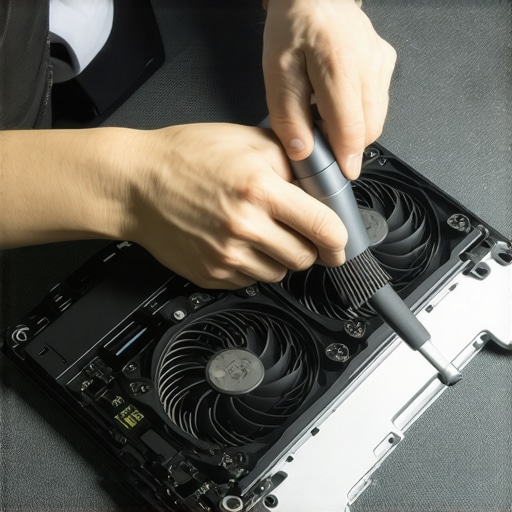
How do I keep my workstation running like new for years?
Consistency is the boring secret to tech longevity. Every quarter, I run a physical and digital ‘deep clean.’ This isn’t just about blowing out dust; it’s about auditing what’s running in the background. If you’ve noticed your trackpad getting hard to click, don’t just push harder. You need to check if your laptop battery is swelling under the trackpad before it punctures and causes a fire. For the digital side, why your managed IT provider should be doing quarterly audits becomes clear when they find 50GB of temp files or rogue startup items that are eating your RAM.
The Future of Self-Healing Hardware
I predict we are only a few years away from ‘Predictive AI’ being built into every BIOS, where your computer will literally order its own replacement parts before a failure occurs. Until then, you are the pilot. We are seeing more ‘right to repair’ shifts, but that also means more responsibility on the user to handle their own troubleshooting of common computer repair issues effectively. Don’t wait for a crash to start caring about your system’s vitals. Go ahead and download a battery health checker right now—check your cycle count and see if you’re actually getting the power you paid for. If you find your health is below 80%, it’s time to plan a replacement before it leaves you stranded during a presentation.
What My Most Expensive Mistakes Taught Me About Office Tech
Reflecting on those early days of panic, the biggest “lightbulb moment” wasn’t about the hardware itself; it was realizing that technology is either an asset or a liability based on how you respect it. I once spent a fortune because I ignored a clicking sound, a classic beginner mistake in computer repair that I will never repeat. If your gear is talking to you through heat, noise, or lag—listen. The second lesson? Never assume your ISP router is a fortress; it is a screen door. Real security requires a perimeter that actually filters threats rather than just passing them through.
Tools That Saved My Sanity More Than Once
I have built my toolkit through trial and error, and a few things are non-negotiable. First, for anyone worried about their storage health, I always recommend CrystalDiskInfo for a quick, readable report on SSD longevity. For the hardware side, I personally trust dedicated appliances like those from Fortinet or SonicWall because they offer the granular control needed for managed IT strategies to keep your business secure in 2025. If you are handling sensitive data, look into Veeam for off-site backups. These are the layers that let me sleep at night knowing my client data is not one power surge away from vanishing into the void.
Your Journey Toward a Bulletproof Workspace
Taking control of your office technology can feel overwhelming, but you do not have to do it all in one afternoon. Start by cleaning a fan or checking a battery health report to see if your laptop battery is swelling under the trackpad. These small wins build the confidence to tackle bigger projects like network segmentation or hiring a partner for managed IT. You have the power to turn your workstation from a source of stress into a high-performance tool that actually supports your growth. Don’t wait for the next crash to take the first step.
Have you ever had a tech “near-miss” where a quick check saved you from a total disaster? Let me know in the comments below!