

I’ll never forget the cold sweat I broke into when my accounting laptop started opening hundreds of empty browser tabs while I was trying to run payroll. It wasn’t just a glitch. It was a targeted attack that walked right past the ‘free’ antivirus I’d installed because I thought I was too small to be a target. I spent the next three days in a panic, scouring forums and realizing I didn’t know the first thing about real protection. I had fallen for the classic trap of thinking ‘home use’ tools were enough. Today, I’m going to make sure you don’t repeat that nightmare. We are going to find you a security solution that acts like a silent guardian, so you can actually focus on your customers instead of fearing every email attachment. Have you ever had that sinking feeling when a weird pop-up just won’t go away?
Stop Playing Russian Roulette with Your Business Data
Relying on the wrong software is a gamble you’ll eventually lose. I learned the hard way that why your business shouldn’t rely on consumer-grade antivirus isn’t just a sales pitch—it’s a survival strategy. Consumer tools are built to protect one person browsing the web; business tools are built to protect a network, prevent data leaks, and stop an infection from jumping from your front desk to your back-office server. When I was starting out, I figured a single password for everything would make things easier, but as I’ve discussed before, why your business should never use a single password for every employee is just as critical as the software you install. It’s all part of a larger shield you’re building.
Does a tiny shop really need more than just Windows Defender?
You might be skeptical. Windows Defender has gotten pretty good lately, right? While it’s fine for your grandma’s laptop, it lacks the centralized management a growing company needs. If you have five employees, you shouldn’t have to walk to five different desks to see if everyone’s software is updated. According to the Cybersecurity & Infrastructure Security Agency (CISA), small businesses are often the ‘low-hanging fruit’ for hackers because they lack dedicated IT staff. This is where managed IT solutions for small businesses can bridge the gap, even if you’re not ready for a full-time hire yet. You need something that alerts YOU when a threat is blocked on any machine in the office. I once ignored a minor warning on a secondary workstation, only to have it turn into a week-long recovery project because I didn’t have a bird’s-eye view of my network. Avoiding costly repair mistakes starts with admitting that ‘set it and forget it’ only works if you have the right ‘it’ in place.
Secure Your Perimeter Without Going Broke
The first real step toward business-grade security isn’t just buying a license; it’s about visibility. Think of your network like a bank. Consumer antivirus is like a deadbolt on the front door—it’s a start, but if someone crawls through a window, the deadbolt doesn’t help. You need a security solution that offers EDR (Endpoint Detection and Response). This is your 24/7 security camera system. It doesn’t just block a virus; it tells you where it came from and what it tried to touch. When you’re looking at how managed IT can elevate your business security in 2025, this central oversight is the gold standard. I once spent a weekend manually scrubbing six different machines because one employee downloaded a ‘PDF converter’ that was actually a Trojan. If I’d had a managed console, I could have killed that process across the entire network with one click.
Separate Your Traffic Before a Guest Compromises Everything
I remember a client—let’s call him Dave—who ran a boutique law firm. He was convinced that his router’s basic password was enough. One afternoon, a delivery driver asked for the Wi-Fi. Within twenty minutes, a worm was scanning Dave’s local server for vulnerabilities because the driver’s phone was already compromised. It wasn’t malicious intent from the driver; he was just a carrier. That is exactly why your office network needs a guest portal for visiting clients. By creating a ‘guest’ lane on your digital highway, you ensure that someone browsing Instagram in your lobby can’t accidentally (or intentionally) peek into your payroll folders. 
Why Your Local Backup is the Ultimate Safety Net
We talk a lot about the cloud, but the cloud is just someone else’s computer. If your internet goes down or your cloud provider has a sync error, you’re stuck. That’s why your business needs a local backup even if you use the cloud. I follow the 3-2-1 rule: three copies of your data, on two different media types, with one copy offsite. It sounds like overkill until your main workstation starts making that dreaded grinding sound. Speaking of hardware warnings, if your gear is acting up, knowing how to verify if your laptop battery is actually failing or just needs a reset can save you from a panic-buy.
Kill the Master Key Mentality
The biggest mistake I see small teams make is sharing a single administrator login. It’s the digital equivalent of giving every employee a master key to the entire building, including the safe. You need individual accounts with the least amount of privilege necessary to do the job. I’ve written extensively about why your business should never use a single password for every employee, and it remains the fastest way to stop a breach from becoming a total catastrophe. If an intern’s account gets hacked, you want the damage confined to their folder, not the entire company’s financial history.Most advice tells you to download a ‘recovery tool’ the moment a file disappears. Here is the hard truth: if your drive is making any noise—a click, a whir, or a grind—running recovery software is the fastest way to ensure you never see those files again.
Stop Killing Your Hard Drive with Free Software
Everyone says to try software first, but in my experience, that’s where the real nightmare begins. When a mechanical drive is failing, it is usually a physical issue, not a logical one. The software forces the drive to spin and read sectors repeatedly, which can cause the read-head to physically gouge the platters. I’ve seen clients lose years of critical data because they fell for the danger of using free file recovery tools on a failing mechanical drive. If you hear a click, stop immediately and power it down. Professional labs use data recovery secrets and expert techniques like drive cloning and clean-room swaps for a reason. According to the recovery specialists at Ontrack, the success rate of professional recovery drops significantly after a user has attempted multiple software-based fixes on a physically compromised device. 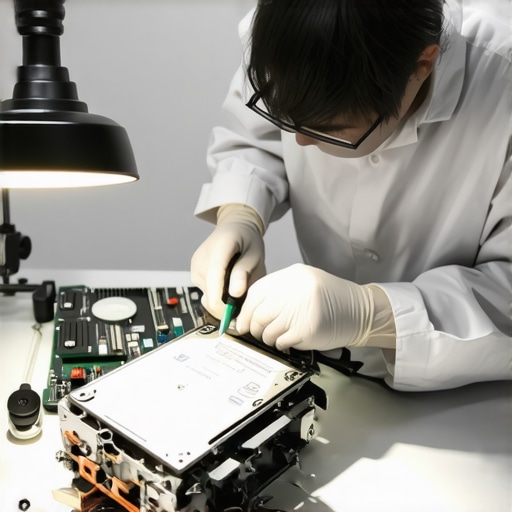
Why does your IT guy keep talking about SMART data?
You might think we’re just being pedantic when we bring up technical logs, but SMART (Self-Monitoring, Analysis, and Reporting Technology) is your essential early warning system. It tracks things like ‘reallocated sector counts’—basically the drive’s way of saying it’s running out of healthy space to store your information. Knowing how to check if your hard drive is about to fail using S.M.A.R.T. data can give you the 48-hour head start you need to move your files before the hardware goes dark forever. This is the difference between a controlled migration and a chaotic, expensive emergency recovery.
A Cracked Screen Is More Than Just a Cosmetic Flaw
Another common myth is that a small crack in your laptop screen is just an eyesore you can live with until next quarter. I’ve seen dozens of people wait months to fix a hairline fracture, only to have their entire machine die because that crack allowed pressure to affect the internal display cables or let in moisture. There is a real risk that why a cracked laptop screen can eventually damage your motherboard is more than just a theory—it is a frequent cause of unexpected short circuits. When you look for effective managed IT solutions for growing companies, you aren’t just paying for someone to fix things when they break; you’re paying for an expert to spot these physical risks before they snowball into a total office shutdown. Have you ever fallen into the trap of thinking a small glitch or a minor crack wasn’t a big deal? Let me know in the comments below.
Clean Hardware Saves More Money Than You Think
I’ve seen too many people focus purely on software while their actual hardware is suffocating under a thick layer of dust. I personally keep a can of compressed air and a non-conductive ESD brush at my desk for a reason. It sounds basic, but keeping your internals clean is the best way to find the fix for a noisy laptop fan that sounds like a jet engine. If you can hear your computer from the next room, it isn’t working hard—it is slowly dying. Heat is the absolute silent killer of silicon. When dust cakes onto the heat sinks, your components have to throttle their speed just to stay alive. Beyond just cleaning, you need to be aware of how you are feeding your machines. I never plug a server or a critical workstation directly into a wall socket. You need a UPS (Uninterruptible Power Supply) to filter those micro-surges. This is why your office network needs a battery backup for the main switch; it is not just about the extra ten minutes of run-time, it is about the voltage regulation that prevents long-term circuit fatigue. I have had clients whose power supplies failed every six months until we realized their office had ‘dirty power’—knowing how to tell if your computer power supply is failing or just dusty can save you from a fire hazard later.
Protect Your Gear from Dirty Power
According to the IEEE 1100-2005 standard, often referred to as the ‘Emerald Book,’ proper grounding and power conditioning are essential for the long-term reliability of sensitive electronic loads. If you are scaling up, you cannot ignore this. As your team grows, you shift from fixing laptops to managing a digital ecosystem. This is why managed IT is a game-changer for growing companies. It allows you to delegate the physical and digital health of your office to someone who actually monitors those voltage logs and thermal thresholds. When you have a remote workforce, this becomes even more complex. You need to know how to keep your remote team secure without slowing down their workflow, which usually involves automated patch management and hardware monitoring tools that alert you before a disaster happens.
How do I maintain my office hardware over the long haul?
Consistency is your best friend. Every quarter, I recommend a ‘digital physical.’ This includes checking the physical ports for damage, ensuring cables aren’t being pinched by desk legs, and reviewing your security protocols. The goal is to move from a reactive ‘break-fix’ mindset to one of total prevention. This is the core of the managed IT strategies to keep your business secure in 2025. By the time 2027 rolls around, I predict we will see the rise of ‘self-healing’ networks where AI-driven monitoring agents don’t just alert a technician; they will automatically reroute traffic or throttle a failing component to prevent a crash while ordering the replacement part in the background. We are already seeing the early stages of this with enterprise-grade cloud systems, and it is only a matter of time before it reaches the small business desktop. My best advice? Don’t wait for the click or the smoke. Grab a flashlight right now and check your laptop’s intake vents. If you see grey fluff, it’s time for a quick blast of air. That five-second check could save you a $500 repair bill next month.
Hard-Earned Lessons from the Server Room Floor
After years in the trenches, I’ve realized that the best IT strategy isn’t about having the newest gear, but having the most resilient habits. First, a ‘backup’ isn’t real until you have successfully restored a file from it—always test your recovery before you actually need it. Second, ignoring a physical defect is like ignoring a leak in your roof; following a laptop screen replacement step-by-step repair guide is a minor task compared to trying to salvage data from a motherboard fried by a short circuit. Finally, transparency with your team saves more money than any firewall; if they feel safe reporting a weird email, you’ve already won half the battle.
#IMAGE_PLACE_E#
My Personal Tech Defense Kit
If you want to move beyond the ‘cross your fingers’ method of business management, I highly recommend starting with CrystalDiskInfo for monitoring your drives. It’s the easiest way to see if you’re at risk before the clicking starts. For power stability, I swear by APC or CyberPower UPS units; they have saved my hardware from brownouts more times than I can count. Also, keep an eye on your system logs—if you notice your performance dipping, you might be seeing the sign your cpu is thermal throttling and slowing down your work. Staying informed through the CISA Small Business Cyber Hub is also a must-read for anyone serious about data recovery secrets every business should know today.
Building a Business That Outlasts the Hardware
Technology is ultimately just a tool to help you serve your customers and grow your dreams. It shouldn’t be a source of constant anxiety or a black hole for your budget. By taking these proactive steps—from air-dusting your vents to auditing why your it support costs are higher than they should be—you are reclaiming your time. You are shifting from a ‘fixer’ to a ‘founder.’ Remember, a little bit of maintenance today prevents a massive computer repair headache tomorrow. You’ve got the knowledge; now it’s time to secure your future. Have you ever had a minor hardware issue turn into a major business disaster because you waited too long to address it? Let me know in the comments—I’d love to hear your story.