

I spent forty minutes staring at a blinking red light while my biggest client waited on the other end of a dead Zoom link. That’s the exact moment I realized my “great deal” on a consumer-grade router was actually costing me thousands in lost revenue. We’ve all been there, trying to save a few bucks on hardware because “internet is just internet,” right? Wrong. I learned the hard way that using a router designed for Netflix and Minecraft to run a business is like trying to haul construction timber in a sedan. It might work for a mile, but eventually, the suspension is going to snap. Today, I’m going to show you exactly why that single point of failure is sabotaging your growth and how to build a network that actually stays upright when the pressure is on. Have you ever had your entire office go dark right before a major deadline?
Stop Treating Your Office Like a Living Room
When I first started my consultancy, I made the classic mistake of thinking that “Gigabit” on the box meant the same thing regardless of the price tag. I bought a top-tier home router, thinking I was being smart. What I didn’t account for was the sheer number of concurrent connections. Between our laptops, VOIP phones, the smart fridge in the breakroom, and the separate network for guest Wi-Fi I was trying to run, the processor inside that little plastic box simply choked. Consumer gear is built for “bursty” traffic—checking email or streaming a movie. It isn’t designed for the sustained, heavy lifting of a professional environment. This is often why your office Wi-Fi is slow even with a gigabit connection. According to a report by Gartner, the average cost of IT downtime can be staggering, and while you might not be losing $5,600 per minute like a Fortune 500 company, the loss of a single contract because your network flaked out is a price no small business should pay.
Can a High-End Gaming Router Handle the Load?
It’s tempting to think that a $400 router with eight antennas and RGB lights is the solution. I thought so too. But even the flashiest consumer gear lacks the sophisticated traffic management needed to implement the move that stops your business network from crashing during peak hours. You need features like VLANs, robust firewalls, and the ability to failover to a second internet connection—things a standard home setup just can’t do reliably. Relying on a single consumer device means you have no redundancy. If that one box dies, your business dies with it. This is precisely why your managed IT provider needs a disaster recovery plan for you that starts at the very edge of your network. Let’s dig into the specific technical gaps that make consumer routers a liability rather than an asset.To move past the ‘buffering’ trap, you have to stop thinking of your network as a single box and start viewing it as a coordinated system. The first move is replacing that consumer all-in-one unit with a dedicated gateway and a managed switch. This is the cornerstone of managed IT solutions streamlining operations for small businesses. Think of your old router like a studio apartment where everyone sleeps, cooks, and works in the same room. A business-grade setup is more like a professional office suite where sensitive work happens behind closed, soundproof doors.
Build a Digital Wall Around Your Sensitive Files
I once walked into a dental clinic where the guest Wi-Fi was on the same subnet as their patient records. It was a massive security liability waiting to happen. By setting up VLANs (Virtual Local Area Networks), you effectively slice your one physical network into several private, isolated channels. This is the move that prevents unauthorized devices from joining your network and sniffing around your server or NAS. If a visitor’s phone has hidden malware, it stays trapped in the ‘Guest’ room and can’t jump over to your accounting software.
Put Your Video Calls at the Front of the Line
Traffic shaping, often called Quality of Service (QoS), is what separates a professional network from a chaotic one. I remember a frantic call from an accounting firm during tax season. Their VOIP phones sounded like they were underwater because a summer intern was uploading massive raw video files to a personal cloud drive. We implemented a rule in their new firewall: VOIP and Zoom traffic get ‘Express Lane’ priority, while large file uploads are relegated to the ‘Slow Lane.’ Suddenly, the freezing stopped. This is exactly the reason your computer is freezing during high-definition video calls—it’s rarely the PC itself; it’s the network getting choked by low-priority data.
Get a Second Internet Connection as a Safety Net
Redundancy is the secret sauce of 99.9% uptime. Most professional-grade routers allow for ‘Dual WAN’ capability. This means you can plug in your main fiber line and a secondary, cheaper cable or 5G backup. I set this up for a boutique law firm last year. Three weeks later, a construction crew down the street accidentally severed their main fiber line. Because we had a failover system in place, their network switched to the backup in under five seconds. They didn’t even drop their active client calls. Without this, you’re essentially gambling your daily revenue on the chance that a backhoe won’t hit a cable. This level of planning is why your business needs a disaster recovery plan before the storm hits.
Stop Power Fluctuations From Killing Your Hardware
Even the most expensive router will fail if the power flickers. I’ve seen more ‘dead’ networking hardware that was actually just corrupted during a brownout than I care to count. A dedicated Uninterruptible Power Supply (UPS) for your networking rack is non-negotiable. It’s the move that keeps your office data safe during a power outage and prevents hardware from frying. If you’re seeing weird intermittent reboots, the same logic found in how to tell if your computer power supply is failing applies here—unstable power causes ‘brain glitches’ in your router. Finally, you need visibility. Consumer routers are black boxes, but professional systems show you real-time data. When things feel sluggish, knowing how to find out which background program is eating your network bandwidth becomes a five-second task instead of a two-hour investigation. I once found a single compromised workstation sending out thousands of spam emails just by looking at the traffic spikes in a management dashboard—something a home router would never have caught.Let’s dig deeper into the nuances that most business owners overlook until it is too late. One of the biggest contrarian views I hold is that relying solely on ‘The Cloud’ is a dangerous half-measure. While it is great for collaboration, why your business needs a local backup even if you use the cloud comes down to your Recovery Time Objective. If you have 500GB of critical files, downloading that over a standard office connection during an emergency could take days, not hours. The CISA (Cybersecurity and Infrastructure Security Agency) emphasizes the 3-2-1 backup rule—three copies, two different media types, one offsite—precisely because single-point failures are a statistical certainty, not a possibility.
The Dangerous Illusion of Cloud-Only Safety
Many professionals treat their portable hardware as disposable, but why a cracked laptop screen can eventually damage your motherboard is a nuance that catches even savvy owners off guard. It is not just a visual annoyance; the structural integrity of the laptop lid often protects the delicate internal ribbon cables. When that frame is compromised, a simple adjustment of the screen angle can cause a pin-to-pin short that fries your entire system. This is a classic ‘trap’ for those trying to squeeze one more month out of a broken device. Furthermore, knowing how to choose between a glossy or matte laptop screen replacement isn’t just about aesthetics; it is about reducing eye strain and maintaining productivity in varying office lighting environments.
Can You Truly Recover Data From a Physically Dead Drive?
The answer is usually yes, but only if you don’t mess with it first. The ‘oops’ factor here is massive: people hear a mechanical clicking sound and keep trying to reboot, hoping it was a fluke. If you hear a mechanical noise, the danger of using free file recovery tools on a failing mechanical drive cannot be overstated. You are essentially letting a software algorithm force a physical robot arm to scrape the magnetic surface where your files live. This is one of the essential data recovery secrets every business should know today: physical problems require physical solutions in a cleanroom. 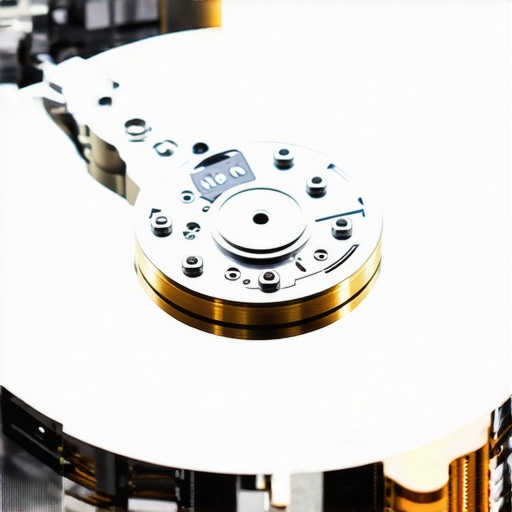
Stop Grinding Your Data Into Dust
Managed IT is another area where the ‘cheap’ option often costs the most in the long run. If your provider is only reactive, why your IT support costs are higher than they should be becomes painfully obvious when you factor in the ’emergency response’ fees they charge when things inevitably break. A sophisticated setup involves proactive monitoring, like how to check if your hard drive is about to fail using s.m.a.r.t. data before the clicking even starts. Also, be wary of the sign your IT support company is outsourcing your help desk overseas, which often leads to a lack of accountability. Finally, a true partner should guide you on how to properly decommission old office pcs without leaking sensitive data. Have you ever fallen into the trap of thinking ‘it won’t happen to me’ only to lose a day of work to a preventable hardware failure? Let me know in the comments.I have spent too many nights with a precision screwdriver in one hand and a lukewarm coffee in the other to believe in luck anymore. The difference between a business that scales and one that stays small is often found in the maintenance logs. If you are still waiting for something to smoke before you fix it, you are essentially paying a ‘chaos tax.’ To move into a more professional tier, you need a toolkit that does more than just scan for viruses. I personally swear by HWiNFO64 for real-time hardware telemetry. It is not just about checking if your computer is on; it is about watching the voltage rails and thermal margins to spot a failure months before it happens. This is the level of detail required for effective managed IT solutions for growing companies. If you see your temps creeping up, do not ignore the sign your cpu is thermal throttling and slowing down your work. Often, a $10 tube of high-quality thermal paste and a can of compressed air are all that stand between you and a $500 motherboard replacement.
How do I keep my hardware from hitting a wall?
Maintaining a professional environment means moving beyond computer repair for beginners avoid costly mistakes and into scheduled cycles. Every six months, I perform a physical ‘health check’ on every machine in my fleet. This includes checking for the fix for a noisy laptop fan that sounds like a jet engine, which is usually just dust buildup or a failing bearing. For screens, I look for early-stage delamination or pressure marks. If you spot a flicker, following tips for troubleshooting laptop screen problems seamlessly can prevent you from needing a full panel replacement later. According to the 2023 Backblaze Drive Stats report, hard drive failure rates vary wildly by model and age, proving that ‘brand loyalty’ is less important than active monitoring of your specific units.  Looking ahead, I predict a massive shift toward AI-integrated hardware telemetry where your laptop will literally book its own repair appointment before you even notice a slowdown. We are moving away from ‘break-fix’ and toward a world of ‘predict-prevent.’ My challenge for you today: Download a hardware monitor and check your drive’s health. If you see anything other than ‘Good,’ it is time to act. Do not wait for the clicking to start.
The Real Cost of the Good Enough Hardware Mentality
After years of patching together broken systems, I have come to realize that the ‘good enough’ label is the most expensive thing you can put on your business. My first big lightbulb moment was discovering that ‘Gigabit’ isn’t a performance guarantee; it is just a speed limit. The processor inside your hardware matters far more than the raw numbers on the box. If the ‘brain’ of your router or PC is overwhelmed, your speed becomes irrelevant. Another hard lesson? Redundancy is always cheaper than recovery. Paying for a secondary internet connection or a spare hardware gateway might feel like a luxury today, but it is effectively an insurance policy against a $10,000 day of lost productivity. Finally, I learned that hardware always talks to you before it dies. Those micro-stutters during a Zoom call or a slightly louder fan are not just quirks—they are early warnings. If you are currently wondering why your server keeps rebooting on its own at night, it is already trying to tell you something is wrong.
Tools That Keep My Sanity Intact
I don’t leave my uptime to chance, and neither should you. My essential toolkit starts with HWiNFO64; it provides the kind of granular hardware telemetry that lets you spot a failing voltage rail months before it pops. I also rely heavily on the annual Backblaze Drive Stats reports to decide which drive models are worth the investment for local storage. When physical issues arise, I find that simple laptop screen repair how to fix common issues at home guides can empower a small team to handle minor fixes without waiting for a technician. For the bigger picture, I recommend staying current with managed IT strategies to keep your business secure in 2025 to ensure your software layers are as robust as your hardware.#IMAGE_PLACEHOLDER_E#
Take the Reins Before the Smoke Appears
Moving from a reactive to a proactive mindset is the ultimate level-up for any professional. The goal is to reach a state where technology is an invisible engine rather than a constant source of friction. By paying attention to the risk of ignoring that smart status bad warning on your pc, you are choosing to lead your business rather than just surviving it. Proper managed IT is not about having the flashiest gear; it is about having a system that stays upright when the pressure is on. You have the tools, the knowledge, and the roadmap—now it is time to secure your digital future. Have you ever ignored a ‘minor’ glitch only to have it turn into a major hardware failure a week later? Let me know in the comments below.